I'm using Quicken Classic Deluxe on Windows 11 Home, Version R65.29, Build 27.1.65.29
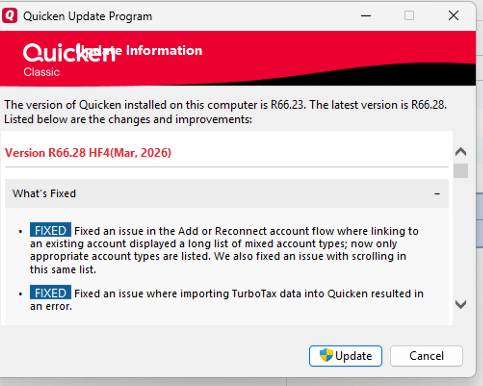
Note that this is a release dated 12/22/25. Originally I was running the most current release R66.23 dated 3/2/26 but it caused the problem I describe below. The customer support agent had me install the older release, essentially turning back my system, and the problem was resolved. Note that this is a temporary solution since newer releases cause the problem.
The problem: I have been using Quicken for 20+ years, and have several accounts from Fidelity that I have connected to accounts in Quicken. Recently I added a few more accounts at Fidelity, but was unable to connect them to Quicken. While inside Quicken, I went to Tools/Add Account and then went through the process of logging into Fidelity, accepting their Terms & Conditions, and choosing the accounts I wanted to connect. Quicken then showed me a listing of all of my Fidelity accounts, and on the new accounts, it gave the option of "Add Account to Quicken", "Link to Existing account", or "Do Nothing". I wanted to "Link to Existing Account" since I already had some of the accounts set up in Quicken; in fact, some of the accounts that needed to be reconnected had years of data in them, so I didn't want to have Quicken add a new account and put in placeholders.
However, when I chose "Link to Existing Account", I was presented with a list of accounts that was not comprehensive. The list actually looked like hidden accounts. In the past, choosing "Link to Existing Account" gave scroll buttons at both the top and bottom of the list, so I could scroll through and find the correct account to link. This was missing from Quicken.
As mentioned above, the (temporary) solution was to close Quicken, install a prior patch (in my case, the patch R65.29 dated 12/22/25), restart Quicken, and reconnect the accounts. That seems to have worked, although there are still some inconsistencies with some of my Fidelity accounts. Specifically, when I now run One Step Update, some of the Fidelity accounts need to be reauthorized.
The website for finding the prior system patches for Quicken is:
https://www.quicken.com/support/reinstalling-and-patching-your-quicken-subscription-version-after-your-membership-has/
I'm hoping that Tech Support will be able to fix this error in current/future patches so I can use the most current patch.