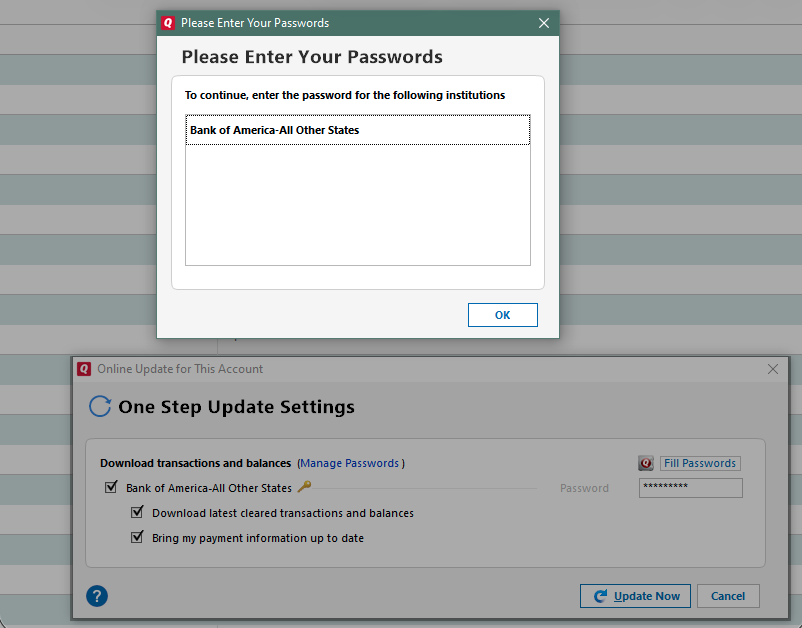
For the past several days, Quicken is asking for a password to access Live Oak Bank at the OSU screen but won't allow me to enter it or save it. When I try to reset the account, the password is not accepted in that case as well.
Hi @Lisamar,
I’m sorry to hear you’ve been experiencing this issue over the past several days with your Live Oak Bank accounts. We’ve seen this type of error before when using Direct Connect as a connection method.
To better understand what’s happening, I have a couple of questions:
We’ll be here and look forward to your reply.
Yes, I'm seeing the error as shown in the image you posted.
Thanks for confirming the error you’re seeing.
This usually happens when a password contains an unsupported character.
Before following any troubleshooting steps, I recommend creating a backup file. Then:
Deactivate your accounts and update the passwords at your financial institution. The special characters that can cause the error are not limited to the ampersand (&), left carat (<), right carat (>), backslash (\), and forward slash (/). After updating the passwords, try reactivating the accounts.
I also suggest using a password between 6 and 12 characters.
I hope this helps. Let me know how it goes!
Just checking in to see if you still need assistance. We haven't heard back from you in a while. Please let us know if you still need help. Thank you!
Hello again @Lisamar, I am checking in once more before this thread gets closed. If you need assistance, let us know.
Hi @Lisamar, Due to inactivity this thread is being closed. If you still need help, please create a new post