One Step Update is now reporting error CC-601 when trying to connect to Logix Federal Credit Union. I've tried twice today a few hours apart and still get the error. It worked yesterday at about 8:47am Pacific time.
Hi @cyberphile,
Thank you for sharing what you’re experiencing. This issue may be caused by something on the bank’s end that is preventing Quicken from connecting. I checked your account on our side and did not see any reported errors.
To help us investigate further, I would appreciate it if you could submit your log files.
To send your logs:
Once submitted, please let us know. I look forward to your response!
New message from OSU:
Just spoke to Logix Customer Support. They checked internally and claim there is no problem on their side.
I see that there are other FI's that are reporting the CC-601 error too.
The following is in the CustomerCentralError.txt log:
************** OSU at 14:42:07 18-03-2026********************
Institution 1****************** INSTITUTION_ID : 0 INSTITUTION_NAME : Logix FCU TP_CUSTOMER_ID : 050b3702-d1fa-48d5-ace5-8d55bbf57e56 -----------ACCOUNT 1------------------------ TP_ACCOUNT_ID : 84531b10-045b-11f1-b7ea-3a27c89a857b AGGR_STATUS_CODE : FDP-101 -----------ACCOUNT 2------------------------ TP_ACCOUNT_ID : 84531b11-045b-11f1-b7ea-3a27c89a857b AGGR_STATUS_CODE : FDP-101
NONE of my accounts are updating! All showing AGGR_STATUS_CODE : FDP-103
Hi,
@cyberphile Thank you for sharing your error message and the information provided by Logix. Since the issue has been ongoing for more than 24 hours, I recommend contacting Quicken Support so it can be further investigated and escalated if necessary.
@mardis2003 I’m sorry to hear that none of your accounts are working. I’d appreciate it if you could provide a bit more information so we can better assist you.
I checked your accounts on our end, and some appear to be working correctly. Could you please clarify the following:
Thank you!
@Quicken Laura
Hi, someone else has already contacted Quicken Support regarding this:
@cyberphile,
Thank you for bringing that up. I reviewed the related ticket and can confirm that it was escalated for an individual case, with our team working directly with that user.
For that reason, I recommend reaching out to Quicken Support so they can review your situation and escalate it as needed.
Feel free to let me know if you have any questions. I’m happy to help!
Yeah, I have called Quicken support 3 times - they keep telling me that there is no reported error with Logix - this community forum would suggest otherwise. This has been ongoing for over a month. One Quicken support person did finally concede that the problem was not with anything that I am doing & that they would contact me when there was a fix. Still waiting to hear back. losing hope
Hi @karenclifton2451,
Apologies for the delayed response, and thank you for your patience. I understand how frustrating it can be.
To help us investigate further, please submit your log files so we can forward them to the appropriate team. You can do this by following these steps:
(CBT-1080)
@karenclifton2451
I had a similar problem at the beginning of April with Logix FCU also. Surprisingly, someone from the Quicken Escalation Team indicated a possible cause of my problem: over 150 Quicken datasets (a small number still active and the rest deleted). I can see none of these "deleted datasets" (if they were deleted, why is there still a record someplace?). That team sent me the instructions below that seemed to fix my issue. If you haven't already, you can try them.
We’re following up regarding the FDP-103 error you encountered when connecting toLogix FCU. To help finalize the solution, please sign out of your Quicken file and sign back in using the steps below.
For Windows
In Quicken, go to Help > Refresh Sign In.
Sign back in using your existing Quicken ID.
For Mac
In Quicken, go to Quicken > Sign Out.
If you plan to add or re-activate one or more accounts with Logix FCU, please use the steps below to ensure the correct credentials are being entered:
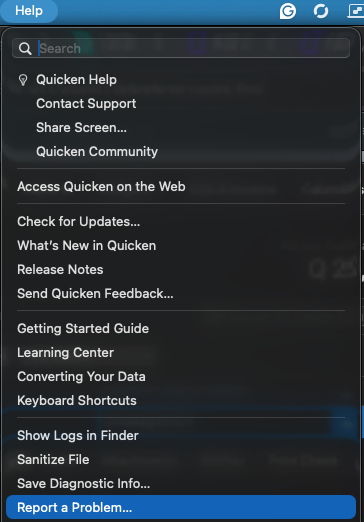
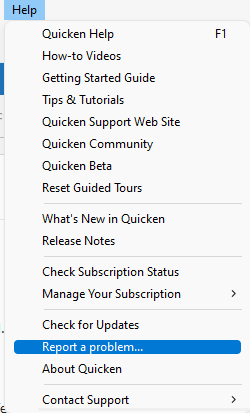
If the credentials continue to fail in Quicken—even though they successfully sign in on theLogix FCU website—please use the Help menu in Quicken to accessReport a Problem and submit a report with your logs attached.
When submitting the report:
All required logs will already be pre-selected.
If you need any assistance with this process, please contact our Support Team at650-250-1900 or visit www.quicken.com/support.
Please reply to this email to let us know if the issue is resolved. If the problem is still occurring, include anew set of logs in your response so we can continue assisting you.
Thank you,
Quicken Support
TYSM @cyberphile - did they do something to get rid of the phantom datasets? Or was refreshing my sign-in supposed to accomplish that? Glad it worked for you. Thanks for sharing. It didn't work for me… :-(
@Quicken Laura I submitted the problem report. I refreshed my sign-in. I called logix who told me i need to change my password (again!) which i did as well. no luck.
Is there something trashed in my quicken account itself? (i am trying from an empty data file - i even tried from a new laptop with an empty brand new data file) - my multiple logix accounts have been failing gradually - now I am at the point where none of them connect…
I don't know if he did anything with regard to those phantom (deleted) datasets in the cloud or not. As I said, I had no idea they even existed.
Thanks for sending the logs and report.
I checked internally for additional details and can confirm that an individual ticket was created for the CC 503 error during your interaction with Quicken Support.