Errant Account Balances

Michael Hauser
Michael Hauser Quicken Windows Subscription Member ✭✭✭

Has anybody, over the last three(3) weeks or so, had an issue with errant account balances appearing all of a sudden? I have about six or seven previously reconciled or closed accounts where the balances were odd amounts that I could not match to a previous transaction. Ultimately, I had to enter an adjusting entry, some years back, to bring the account back to the correct current balance, which in some cases should have been zero. I ran a file Validation, had many errors, but none that corrected the balances. Has anyone else run into this?

[Edited Readability]

Answers

  • Quicken Laura
    Quicken Laura Quicken Windows Subscription Moderator mod

    Hi @Michael Hauser,

    I’m sorry to hear that you’re experiencing this issue with your balances. I have a few questions that will help us narrow down the cause:

    1. When did the issue start?
    2. Have you noticed any Quicken adjustments being generated automatically without your input?
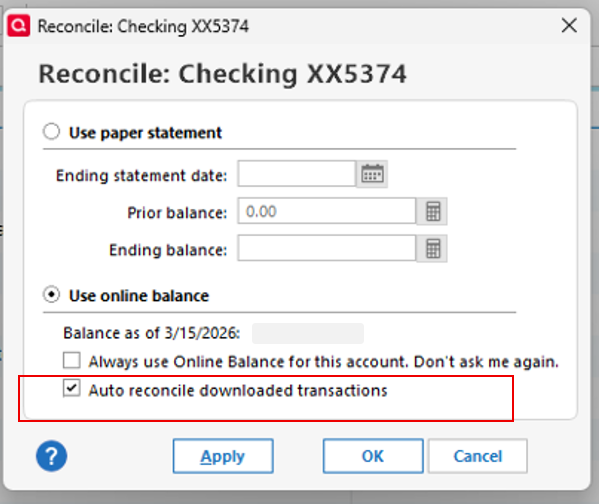
    3. Do you have automatic reconciliation enabled? Screenshot 2026-03-19 at 12.34.55 PM.png
    4. Where is your Quicken data file located? To check, open Quicken and go to File. At the bottom under Recent Files, the file with the check mark next to it is the one currently open. Please provide the full file path shown there.
    5. Is your file being backed up or synced by any third-party services such as Carbonite, OneDrive, or Backblaze?
    6. Have you tried restoring a backup from a date before the issue started?

    Your answers will be very helpful in identifying the source of the problem. Thank you!

    Quicken Laura

    Make sure to sign up for the email digest to see a round up of your top posts.

  • Quicken Laura
    Quicken Laura Quicken Windows Subscription Moderator mod

    Hi @Michael Hauser,

    I just wanted to follow up since I haven’t heard back from you. I’m checking in to see if you still need assistance.

    Quicken Laura

    Make sure to sign up for the email digest to see a round up of your top posts.

  • Michael Hauser
    Michael Hauser Quicken Windows Subscription Member ✭✭✭

    I adjusted my balances so that they were correct at current time but the historical balances may not be accurate since I was not able to identify where they went askew. Aside from a possible data corruption issue, I have no idea what happened and wondered if there was a more global issue that was identified. I did run a file validation process.

    I appreciate you reaching back out but at this point, unless there is a known fix, there is nothing I am in need of at this point. But thank you. Or if there is an instruction on what I might have done wrong, I would appreciate know what that might have been.

  • Quicken Laura
    Quicken Laura Quicken Windows Subscription Moderator mod

    Hi @Michael Hauser,

    Thank you for taking the time to share the steps you’ve taken to correct the affected balances.

    There is no known issue specific to this scenario, so it is most likely due to file behavior. I recommend saving a backup now that all your accounts are showing the correct balances. If this issue recurs, we can certainly continue investigating further.

    Please feel free to reach out if you have any additional questions.

    Quicken Laura

    Make sure to sign up for the email digest to see a round up of your top posts.

  • Michael Hauser
    Michael Hauser Quicken Windows Subscription Member ✭✭✭

    As a follow-up to this prior issue, I am now finding a common issue on why my balances on mostly asset and liability accounts are/were recently noticed as inaccurate. After running a file validation, many spilt entries which included a credit or debit to an asset or liability account were "corrected" because it indicated that the matching transfer "account no longer exists". The split line entry is still present but no category is listed. Some of these transactions go back to 1997, when I started using Quicken. I don't recall what account would have been the matching transfer and I really do not ever recall eliminating any accounts. (My practice has been for any closed accounts is to simply have a zero balance and move them into Hidden Status knowing specifically that I would need or want the historical information).

    The effect of this is an asset or liability account balance is now not currently accurate and for the last month, I have been setting up adjusting entries to get them back into balance. This addresses the current issue, but the historical data is no longer accurate. If I attempt to go back and re-enter the split transaction, it is understood that this is going to affect the go-forward historical balances, and then again, cause a current imbalance. I am not motivated, at this point, to go back and correct these many entries as the historical data is of low importance at this moment, but it may be required in the future.

    But the more important question is why did this suddenly happen. Did I inadvertently delete an account? Was the file corrupted somehow? Software issue? I am open for input. Thank you.

  • Quicken Laura
    Quicken Laura Quicken Windows Subscription Moderator mod
    edited April 5

    Hi @Michael Hauser,

    Thank you for sharing more details. What you are describing may indicate data file damage. Normally, if an account associated with a transfer is removed, Quicken will preserve the reference in some form (for example, by showing a [Deleted Account]category). It is not typical for the category in split transactions to be removed entirely across multiple entries.

    Since this behavior appeared after running Validate, it’s possible that the process corrected previously undetected inconsistencies in the file.

    If you have a backup from before the issue began, I recommend restoring that backup, then running Validate again and confirming whether the issue persists.

    If restoring a backup is not an option, you may need to manually reconstruct the affected transfer transactions, though I understand this can be time-consuming.

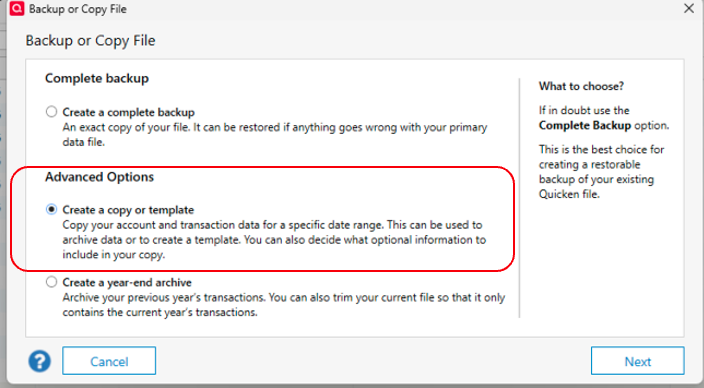
    If the issue continues moving forward, I recommend creating a copy of your file by following these steps:

    1. Go to File > Copy or Backup File
    2. In the Backup or Copy File window, select Create a copy or template under Advanced Options
    3. Click Next create copy or template.png
    4. Choose a name and location for the copied file
      • Use Browse if needed
      • Do not include the .QDF extension (Quicken will add it automatically)
      • Avoid special characters: * ? < > | " : \ /**
    5. Click Save Copy
    6. When prompted, select New copy to open it

    Please let me know if you have any additional questions. I’ll be happy to assist further!

    Quicken Laura

    Make sure to sign up for the email digest to see a round up of your top posts.

  • mshiggins
    mshiggins Quicken Windows 2017 SuperUser ✭✭✭✭✭

    @Michael Hauser there have been several issues where syncing to the Quicken cloud and/or enabling pending transactions have corrupted past transactions. If you have encountered theses issues, there is no one size fits all solution.

    Do you have earlier back ups of your data?

    Quicken user since Q1999. Currently using QW2017.
    Questions? Check out the Quicken Windows FAQ list

  • Michael Hauser
    Michael Hauser Quicken Windows Subscription Member ✭✭✭

    Thank you for the feedback. First, I do have regular backups but since I do not know when/if the data was corrupted, it would be hard to use a backup and know that was the correct backup to use, and then re-enter in all the forward transactions from the back-up time. I will need to decide if/how I am going to address this on my end.

    For what it is worth, let me just indicate this is distressing. I have been using Quicken since 1997 and the one thing I appreciate most about it was having the historical date in a simplified manner of being able to retrieve and utilize. The fact that my data could be corrupted, altered or deleted is unnerving. It impacts my confidence in using Quicken. I have over 680 transactions that were "corrected" in a file validation run yesterday (4/6/26), some of which go back to 1997. All of them involve a "split transaction". It would be nearly impossible and/or extremely time consuming to go back and research the transaction from a previous backup file and then re-enter the transaction in my active file. Each transaction affects the current balance of these accounts. Like I said in the earlier paragraph, I am going to have to decide to even bother. This certainly affects my trust in Quicken and I have come to expect better.

  • Quicken Laura
    Quicken Laura Quicken Windows Subscription Moderator mod

    @Michael Hauser,

    I understand how frustrating this must be, and I’m sorry the suggested solutions haven’t fully met your needs. Whatever next steps you decide to take, I’d be glad to assist if you have any additional questions.

    Please don’t hesitate to reach out for further help!

    Quicken Laura

    Make sure to sign up for the email digest to see a round up of your top posts.