How do I add a missing FDRXX transaction in Fidelity IRA account.

W.N.M
W.N.M Quicken Windows Subscription Member ✭✭
edited March 19 in Investing (Windows)

Windows 11, version 25H2, OS Build 26200.8037.

Quicken Classic Deluxe R66.23, build 27.1.66.23.

Apparently I deleted a transaction for a dividend payout from FIDELITY GOVERNMENT CASH RESERVES in my IRA account. When I try to manually enter the transaction I get two transactions, as shown below, and the result is no increase in my cash balance.

image.png

What can I do to fix this?

Best Answer

  • Quicken Laura
    Quicken Laura Quicken Windows Subscription Moderator mod
    Answer ✓

    Hi @W.N.M,

    Thank you for reaching out. I'd be happy to help.

    If there’s a share or cash discrepancy, Quicken may create placeholder entries to balance holdings. Please check whether there are any placeholder entries associated with the FDRXX security. If you find one, delete it and then try entering the transaction again.

    If you don’t see any placeholder entries at the bottom of the account register, you can enable hidden transactions by following these steps:

    1. Go to Edit
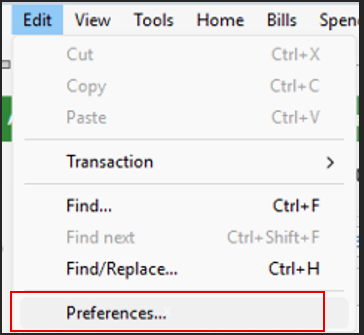
    2. Click Preferences Edit> Preferences.png
    3. Select Investments
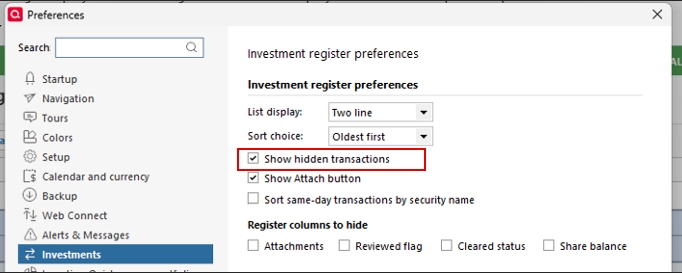
    4. Check the Show hidden transactions box Investments> Hidden transactions.png

    If that doesn’t resolve the issue, please check whether automatic reconciliation is enabled. If it is, try temporarily disabling it:

    1. Open the account in question
    2. Click the Gear icon (Actions) at the top right of the register and select Edit Account Details
    3. Go to the Online Services tab
    4. Uncheck Reconcile using online balance (bottom right corner)
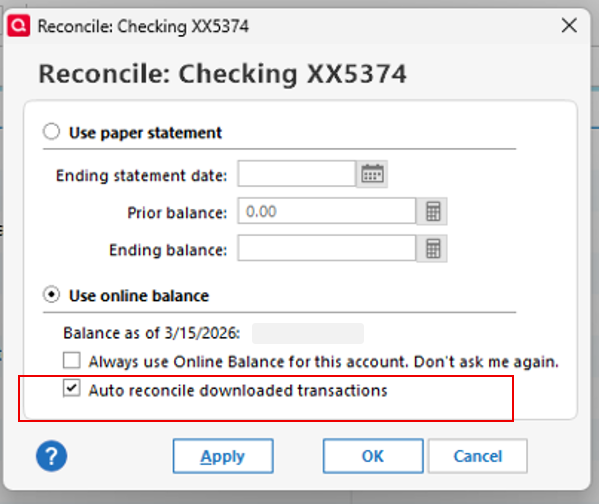
    5. Click OK auto reconcile.png

    Please let me know how it goes!

    Quicken Laura

    Make sure to sign up for the email digest to see a round up of your top posts.

Answers

  • Quicken Laura
    Quicken Laura Quicken Windows Subscription Moderator mod
    Answer ✓

    Hi @W.N.M,

    Thank you for reaching out. I'd be happy to help.

    If there’s a share or cash discrepancy, Quicken may create placeholder entries to balance holdings. Please check whether there are any placeholder entries associated with the FDRXX security. If you find one, delete it and then try entering the transaction again.

    If you don’t see any placeholder entries at the bottom of the account register, you can enable hidden transactions by following these steps:

    1. Go to Edit
    2. Click Preferences Edit> Preferences.png
    3. Select Investments
    4. Check the Show hidden transactions box Investments> Hidden transactions.png

    If that doesn’t resolve the issue, please check whether automatic reconciliation is enabled. If it is, try temporarily disabling it:

    1. Open the account in question
    2. Click the Gear icon (Actions) at the top right of the register and select Edit Account Details
    3. Go to the Online Services tab
    4. Uncheck Reconcile using online balance (bottom right corner)
    5. Click OK auto reconcile.png

    Please let me know how it goes!

    Quicken Laura

    Make sure to sign up for the email digest to see a round up of your top posts.

  • W.N.M
    W.N.M Quicken Windows Subscription Member ✭✭

    Hi @Quicken Laura,

    It worked. I deleted a placeholder for 60 shares and then entered the transaction without any problem.

    Thanks

    Bill

  • Quicken Laura
    Quicken Laura Quicken Windows Subscription Moderator mod

    Hi @W.N.M,

    That's great to hear. I'm glad it worked!

    Please feel free to reach out anytime if you have additional questions.

    Quicken Laura

    Make sure to sign up for the email digest to see a round up of your top posts.