I've tried multiple ways to delete bill reminders; however, they keep returning. I don't sync to the cloud (though a sync does sometimes occur when adding new accounts). Very frustrating!
I'm using Quicken Classic Deluxe RR66.28. This has been happening the past few months despite many…many attempts to edit/delete bill reminders
Hello @GH8884,
Thank you for sharing your experience and reporting the issue you are running into.
I have some follow-up questions for you:
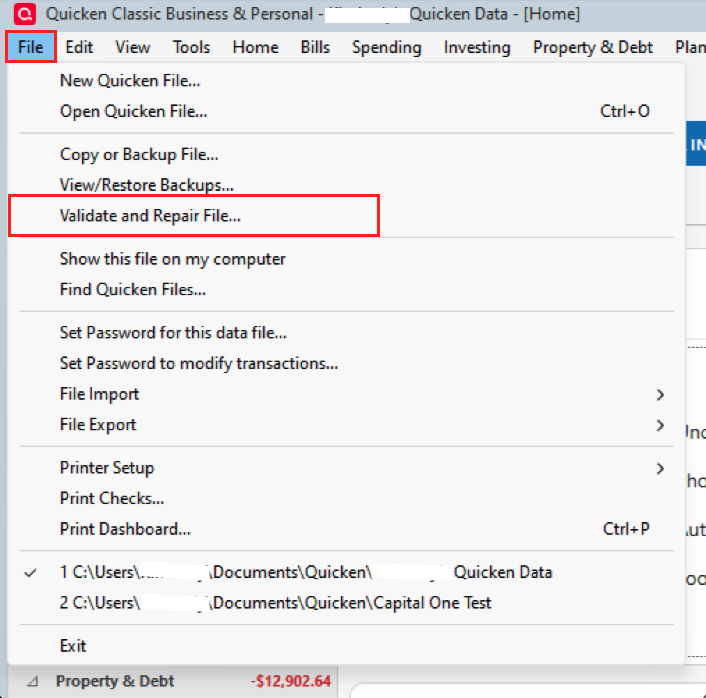
We can try validating your file to see if that clears it up for us.
To Validate:
Once the validation has completed, it will produce a report of anything it has found/corrected. Let us know if anything has changed or if the reminder continues to reappear.
Thank you.
@GH8884,
Just checking in, we haven't heard back from you in a while.
Do you still need assistance?
Thank you!
Hello again,
Checking in once more before this thread is closed.
Let us know if you still need assistance.
hi quicken alyssa,
restarting this thread - i am having the same issue and have validated my file with no fix to the issue. my file is local D; and i use Cloud Sync, nothing else. the only thing i can determine is that these reminders were created a very long time ago… 10 - 15 years ago. the new reminders seem to be behaving correctly.
Something is reintroducing the data to the data file. First, I would try logging off of Quicken's servers, delete the erroneous reminders, and log back in.
@michael 98,
Just checking in to see if you took @RalphC's advice, and whether or not it helped with this issue.
I also wanted to suggest that you move your file off the D drive. The default location for a Quicken Windows file is C>Users>username>Documents>Quicken, and this is where we recommend keeping it.
You should also exclude your active data file from syncing to any third-party cloud services. Storing it externally or allowing third-party services to access the file can cause data damage.
Let us know if this issue is ongoing or if you have resolved it.
i've given up, problem still happens. not earth shattering, more an annoyance. and to be fair, one of many….
Thank you for following up!
Sorry to hear this is still an issue. Due to the nature of this issue, I would recommend that you contact Quicken Support directly if/when you want to try troubleshooting this again. They can walk you through troubleshooting steps in real-time and escalate the situation as needed.
The Quicken Support phone number can be found through this link here. Phone support is available from 5:00 am PT to 5:00 pm PT, Monday through Friday. Chat support is available at the same times, 7 days a week.
Thanks again!