Oops. Multiple Quicken accounts for one bank account

Confused in Portland
Confused in Portland Quicken Mac 2017 Member

Quicken Starter 8.5.1

Somehow, but I'm sure it's my fault, I have multiple Quicken Accounts for the same Bank of America checking account. Some visible, some hidden. 1. How can I combine them into one and make it the only one visible?. 2. How do I designate that the remaining account as the only one updated via downloads from BA? Thank you.


Answers

  • Quicken Carlos
    Quicken Carlos Quicken Mac Subscription Moderator mod

    Hi @Confused in Portland,

    Thanks for contacting the Quicken Community!

    It sounds like the accounts became duplicates because the actions were added to Quicken instead of linking to an existing account.

    Before we begin troubleshooting, I recommend creating a backup of your Quicken file.

    Next, we need to identify all the duplicate accounts. Once you’ve identified them, I suggest to deactivate them:

    To deactivate an account:

    1. Select the account to open its register.
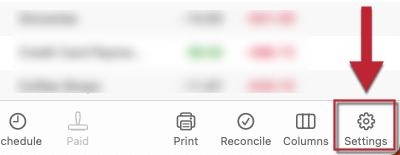
    2. Click the Settings gear icon in the lower right corner of the register. Gear Icon Mac.png
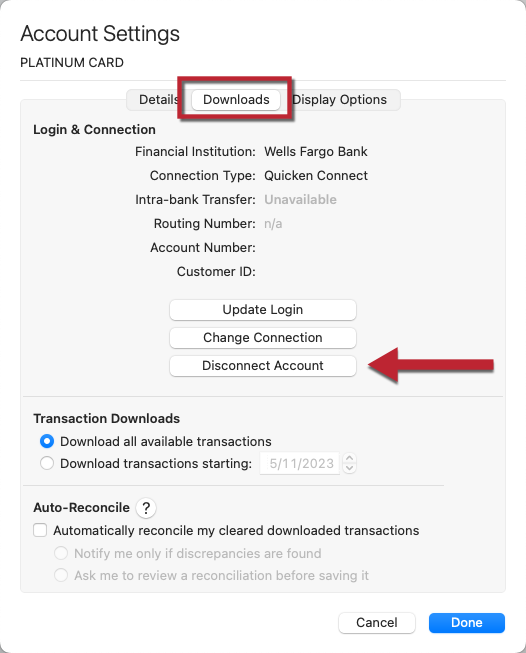
    3. Go to the Downloads tab.
    4. Click Disconnect Account. Donwloads.png
    5. Click Done.

    To reactivate account(s):

    1. Select the account to open its register.
    2. Click the Settings gear icon in the lower right corner of the register.
    3. Go to the Downloads tab.
    4. Click Connect Account...
    5. Select your financial institution or type its name to search.
    6. Click Continue and follow the prompts.
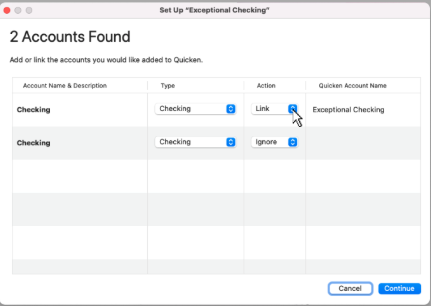
    7. Choose LINK when Quicken displays your available accounts, and carefully link to your existing Quicken account(s). Screenshot 2026-03-26 at 9.22.02 AM.png
    8. Click Continue.

    Let me know how it goes!

    Quicken Carlos

    Make sure to sign up for the email digest to see a round up of your top posts.

  • Jon
    Jon Quicken Mac Subscription SuperUser, Mac Beta Beta

    As for combining accounts, there's no automatic way to do that. If there are transactions in one copy of the account that you want to move to a different copy you can select the transactions in the register and drag & drop them onto the account in the sidebar that you want to move them to. Once you no longer need a particular Quicken account you can delete it.

  • polly5931
    polly5931 Quicken Mac Other Member ✭✭

    Carlos,

    I have a similar problem and found the drag and drop feature very helpful. Not finished yet with settling the download issues. This is very helpful with the screenshots, thanks!

    Polly

    Quicken classic subscription, recently migrated from Q2007.

  • Quicken Carlos
    Quicken Carlos Quicken Mac Subscription Moderator mod
    edited March 30

    Hi @polly5931,

    Thanks for your reply! I recommend taking the time to complete the steps above. If you run into any errors or problems, please let us know.

    We’re happy to help.

    Quicken Carlos

    Make sure to sign up for the email digest to see a round up of your top posts.