I cannot download QFX, excel or CSV from Manulife one in Quicken Classic R66.26

acton2k
acton2k Quicken Windows Other Member ✭✭

Good morning, I am using Manulife one Bank. There is no way to do One step Updates or web connect with this bank. I have to download the transactions manually. I used to download in .QFX format. At the end of February, they updated our credit cards and the Visa portal. Now I can no longer download in .QFX format. The options available are Excel or CSV. I downloaded both. With CSV, I am getting an error.
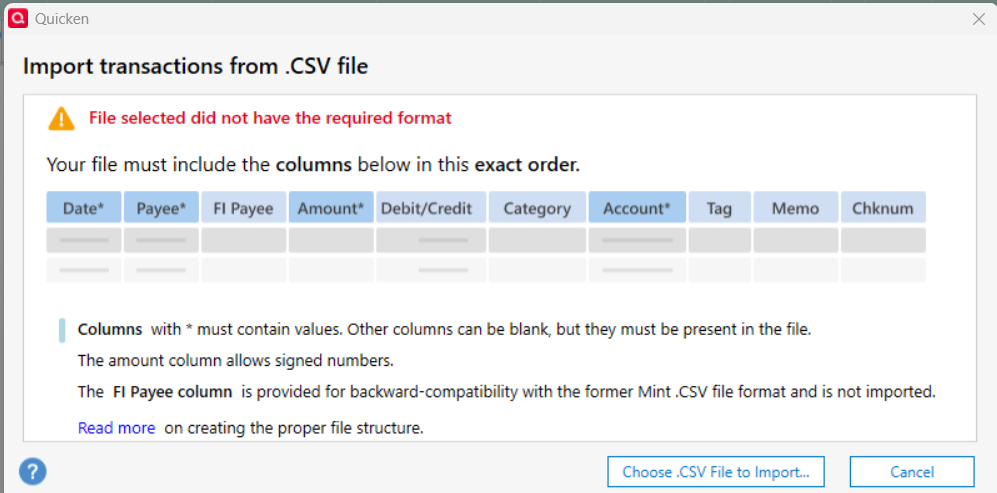
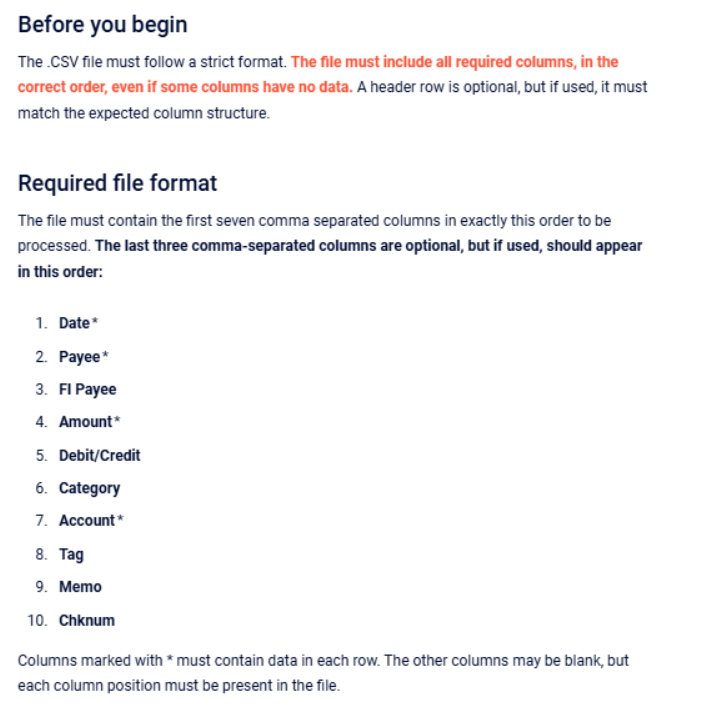
image.png image.png

Ok, I'll play the game…

I go in Register columns and here are the columns options I have. Some of the columns they are requesting are not in the list.
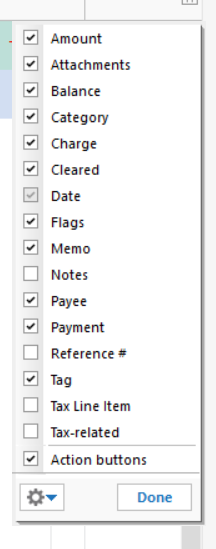
image.png

The FI Payee,Debit/Credit, Account and Cheknum are not available. How do I fix this? Is there a way around it?

I cannot download anything from this bank.

Thank you for your help

Comments

  • Quicken Carlos
    Quicken Carlos Quicken Mac Subscription Moderator mod
    edited March 30

    Hi @acton2k,

    Thank you for reaching out to the Quicken Community!

    The fields for FI Payee, Debit/Credit, Account, and Check Number are not configured within Quicken. They need to be included in the CSV file format.

    Below is an example of how the CSV file should look before importing it into Quicken:

    screenshot_2026-03-30_at_11.02.59___am.png

    Once the CSV file is in this format, it will be ready for import. Before proceeding, I recommend backing up your Quicken file to ensure your data is safe.

    Then we can try importing the data file again:

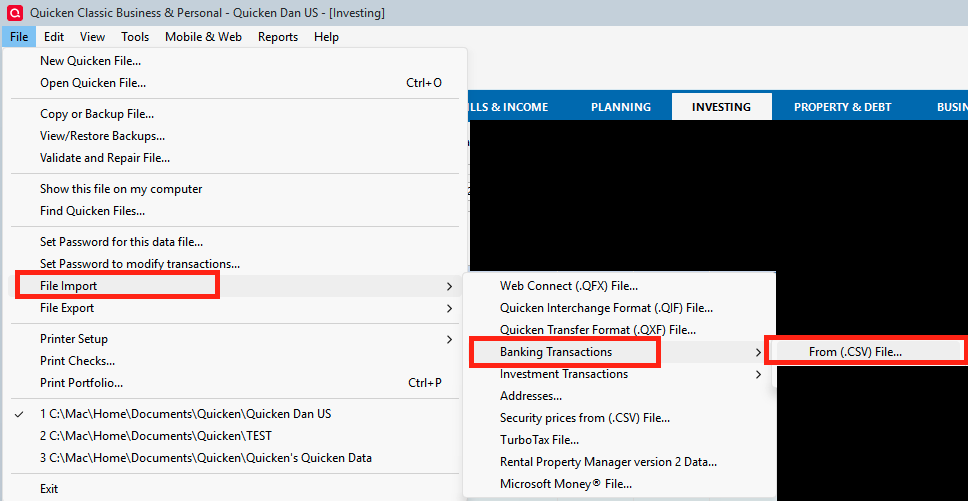
    • Go to File > File Import.
    • Click on Banking Transactions.
    • Select From (.CSV) File…
    Screenshot 2026-03-30 at 10.38.02 AM.png
    • Choose .CSV File to Import…
    • Search for the .CSV File and click Open.

    Let me know how it goes. I’ll be looking for your reply.

    Quicken Carlos

    Make sure to sign up for the email digest to see a round up of your top posts.

  • acton2k
    acton2k Quicken Windows Other Member ✭✭

    Thank you, I've added the columns in the file and imported it in Quicken. It worked in a certain way. The field "amount" did not dissociate a charge from a payment. I had to move the Charges/payments around. Here are the fields the Bank file has:

    image.png

    The amount of the transactions are not even existant… I will have to call the bank

    Thank you for your assistance😉👍️

  • Unknown
    edited March 30
    This content has been removed.
  • Quicken Carlos
    Quicken Carlos Quicken Mac Subscription Moderator mod

    Hi @acton2k,

    Thank you for your reply. I’m glad to hear that the steps above worked! This may also help other users experiencing the same issue.

    If you need any further assistance, please let us know. We’re happy to help.

    Quicken Carlos

    Make sure to sign up for the email digest to see a round up of your top posts.