Like to move shares from Old Security to New Security (good) quickly.

BRETTB
BRETTB Member ✭✭✭✭
edited March 31 in Investing (Windows)

I'm in process of rebuilding my quicken file with a clean rebuild because I believe of a corrupt security list.

In my current process, I have shares/transactions from an old security with name only (no symbol or no CUSIP) and wish to move them over to the good security (one downloaded from brokerage, with symbol and CUSIP).

Is there a quick way to do this because one at a time is very slow?

Thanks in advance.

Comments

  • Quicken Laura
    Quicken Laura Quicken Windows Subscription Moderator mod
    edited March 31

    Hi @BRETTB,

    Thank you for reaching out.

    There isn’t a direct way to merge securities while preserving full historical data. The most accurate method is to manually update transactions from the incorrect security name to the correct one. However, as an alternative, you can adjust the share balances to effectively consolidate them (make sure to save a backup first).

    To adjust the security balance:

    Set the incorrect security to 0 shares

    • Open the investment account where the security is held
    • Locate the incorrect or duplicate security
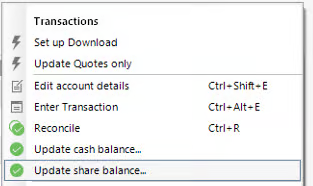
    • Click the gear icon in the upper-right corner of the register
    • Select Update Share Balance image.png
    • Choose the incorrect security
    • Enter:
      • Shares = 0
      • Date = today (or a clean cutoff date)

    Adjust the correct security

    • In the same account, click the gear icon again and select Update Share Balance
    • Choose the correct security
    • Enter:
      • The total number of shares you actually own
      • Use the same date as above

    Verify the totals

    • Go to the Holdings view
    • Confirm that:
      • Only the correct security shows shares
      • The share count matches your brokerage records

    Optional: Remove the incorrect security

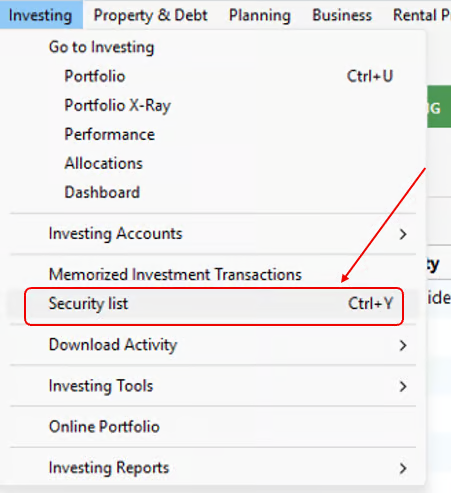
    • Go to Tools > Security List image.png
    • Delete the unused security if it is no longer needed

    Let me know if you have additional questions. I'm happy to help!

    Quicken Laura

    Make sure to sign up for the email digest to see a round up of your top posts.

  • q_lurker
    q_lurker Quicken Windows Subscription SuperUser ✭✭✭✭✭

    a) To delete the “incorrect” security ( @Quicken Carlos last step), all transactions that have used that security in any account need to first be deleted; not a trivial task.

    b) Your intent to clear the perceived security list corruption is not clear. Do you know of a specific corrupted security you are trying to bypass? Are you trying to recreate or rebuild all securities? Are you expecting to eliminate (delete) known corrupted securities? How many securities you dealing with?

  • BRETTB
    BRETTB Member ✭✭✭✭

    Validate and Super Validate did not fix issues (tried many times)

    I have done about every fix they gave me with my issue trying to fix "unidentified security". Through a process, because when I had a new clean quicken file, I did not get that error. I have lots of transactions and found that unbearable going forward (and I'm a long time user of 15 and maybe 20 years (thousands of entries).

    Anyways, with help of quicken support, decided to go through process of setting a new clean quicken file.
    Always backed up, but my issue started many months ago and been trying to figure out the issue since then but came to the collusion the security list is some how corrupt (I was editing the symbols way back because account manager was doing covered calls and I wanted to see the stocks next to the calls and quicken has issue doing this correctly (which they need to fix). I did not get issue on a clean quick file where I setup up the brokerage and downloaded.

    Brought over all data with QFX except for the brokerage accounts that I had brokerage accounts I had issues with. I setup those up up with new downloads from brokerage and added the work New to end of account name (only issue the new downloads from brokerage only go back like 2yrs). Then to get the old history I did a export with the QIF from old quicken file on each account (using the default check boxes- Transactions and Special Handling) that did not come over, setup a account in the new quicken files so I could import to - added the work OLD to end of account name. I deciding the "New" accounts I would use that data then I compared and the "Old" transactions and moved over all the data from old that was not in the "New" account.

    That is where I am right now. The QIF accounts brought in transactions from old quicken file with security name only (no symbol or CUSIP because there was something corrupt) without the true Brokerage securities (with Security Name, Symbol and CUSIP).

    So on some of these old transactions, I have multiple transactions on the same security and instead of changing each transaction one at a time to the new security (that has Security Name, Symbol and CUSIP) was looking for a bulk method. Basically want to reassign security transactions to new security transactions.

    Sorry for the Detail but know your a lot time user/expert.

    I know I can move securities in bulk from one brokerage to another but I want to move transactions from one security to a new one in bulk.

    Thanks Again in Advance if you have any insight.

  • q_lurker
    q_lurker Quicken Windows Subscription SuperUser ✭✭✭✭✭

    Thanks for the explanation.

    One path - backup a couple of steps. Edit the QIF file to get the security names changed there and re-import. That could be done by eliminating all other transactions in the QIF file since those are OK for you right now in the new file. You would just be deleting the 'bad security' transactions in the new file and reimporting those now with the 'good security' names. Or you might edit the QIF security names as needed and reimport the whole thing after deleting all the other stuff from the new file. Or some similar process you might see better than I can.

    Path two - continue with the one-at-a-time editing. I have gone that individual editing path a few times for various reasons. I found it easiest to:

    • Sort the transaction list by security. That collects all the transactions for one security into one grouping.
    • Edit the security name of the first one in the group, but before entering/saving that transaction, copy that 'good security' name to the clipboard (highlight and Ctrl-C). You can then hit Enter to save that transaction at which point that transaction will re-sort to group with the other good named transactions.
    • The Enter will drop you to the next 'bad security' transaction in that group.
    • Tab twice to advance from date fields to Security field. The security name will be highlighted. Ctrl-V will paste in the "good security' name. Enter to save and repeat.
    • Tab twice. Ctrl-V. Enter. Time after time as needed. (A single mouse click in the Security field can replace the Tab twice, if that is easier.)

    It actually tends to go pretty quickly once you get in rhythm. You might backup after each security name change just in case, at least while you are getting it down.

    Once completed, delete the 'bad security' from the security list.

  • BRETTB
    BRETTB Member ✭✭✭✭

    On your number one path. Before I brought over the QIF, I first setup the brokerage account and downloaded everything they had (looks like 2yrs worth of data on the 3 broker platforms I used). Thus all those downloaded perfectly. The QIF was for the old data from old file and when I import into the clean file, quicken does not ask any question about matching up securities.

    Your step two is exactly what I found to be easiest way. Just which there was some other method to make it a little faster.

    Thanks Again for the Help!

    PS Hope Quicken offers some easier ways to fix this. My suggestion is to allow some type of rebuild on the security list that would have taken care of the first issue "Unidentified Security". 2nd Allow to allow reassignment of transactions into new security.

  • q_lurker
    q_lurker Quicken Windows Subscription SuperUser ✭✭✭✭✭

    The QIF was for the old data from old file and when I import into the clean file, quicken does not ask any question about matching up securities.

    That is my understanding of the design. So I was suggesting if you need those old QIF-file securities to match up with specific securities in your new file, it might be better to figure out and make those bulk edits in-mass in the QIF file rather than within Quicken.

  • BRETTB
    BRETTB Member ✭✭✭✭

    Yes only problem I believe on my account is my security list was somehow corrupt on the old file.

    Note: I edited and messed around with securities because I had one of my brokerage account is managed and they use covered calls and in quicken it would not put the security next the call even if I linked the call to the base security. Thus thinking through that whole process things may have gotten corrupt.

    So I setup the brokerage account in name then did the first download to get the correct security with the symbol and CUSIP (because you can't edit the CUSIP in Quicken) about 24months worth only. Then rest of my old data was brought into quicken through the QIF process and only selected transactions and special handling per quicken support. So it added those but they have no security symbol or CUSIP, just the security name.

    Just explaining my process and you probably can see why I did it this way but incase someone else has the issue added the notes here.

    Thanks again.