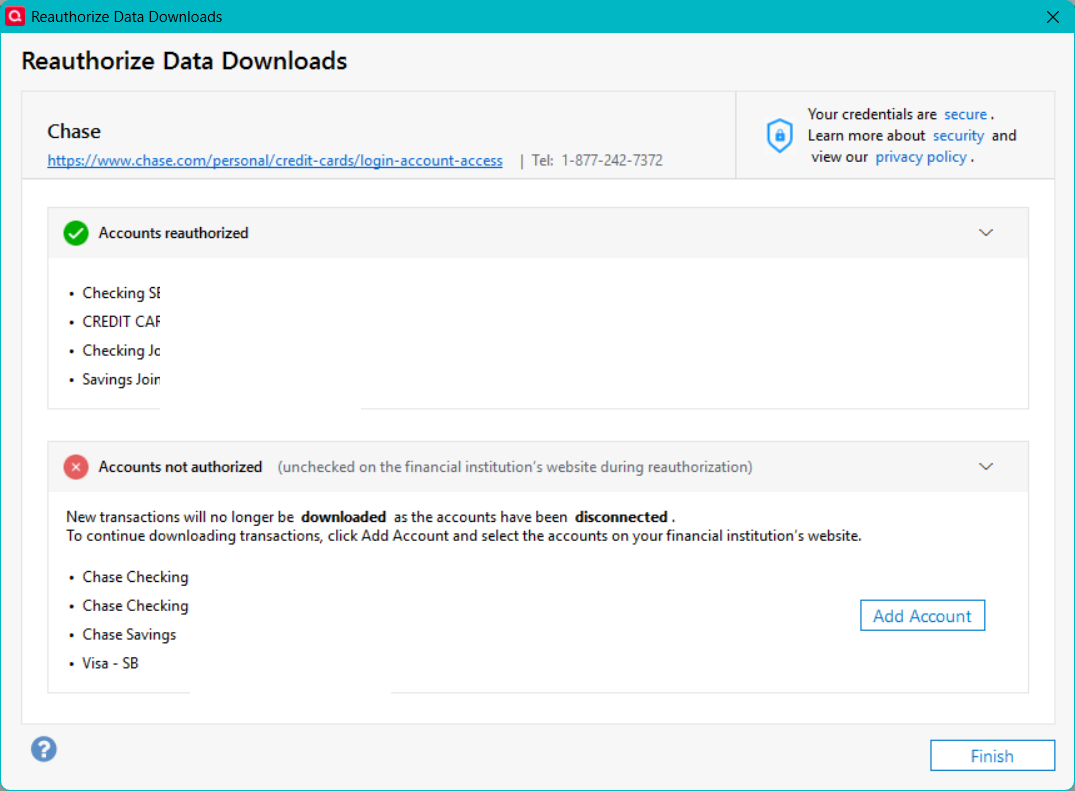
Reauthorization dialog I've not seen before

Gerry Blue
Gerry Blue Quicken Windows Subscription Member ✭✭✭✭

image (1) copy.png

I got this when I came back from reauthorizing my accounts on the Chase website. The accounts on the top part of the screen are the accounts as they are listed on the Chase website. The accounts on the bottom half are the accounts as they are listed in Quicken. The thing is, they are the same accounts. When I click "Finish" none of the Chase accounts are set up for download so I have to "add" the accounts again to set up download. When I do this, I don't get this screen again. So far.

Is this because the accounts are not named the same on Chase as they are in Quicken? If so, is this naming restriction new? It used to work just fine.

[Edited - Removed partial account numbers]

Answers

  • Quicken Carlos
    Quicken Carlos Quicken Mac Subscription Moderator mod
    edited March 31

    Hi @Gerry Blue,

    Thank you for reaching out to the Quicken Community!

    Before following any troubleshooting steps, I recommend creating a backup file.

    First, deactivate all accounts with the affected financial institution:

    • Open Quicken.
    • Select the Tools menu and select Account List....
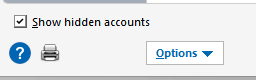
    • Click on Show Hidden Accounts.
    Screenshot 2026-03-31 at 3.22.45 PM.png
    • In the Account List, select the account you want to deactivate, and then click Edit.
    • In the Account Details window, click the Online Services tab.
    • Click Deactivate next to the service you want to disable. Deactivate.png
    • Click Yes to the message confirming if you want to disable this service.

    Next, reactivate the account(s):

    • Go to Tools > Add Account.
    • Select the bank for the deactivated account(s). If prompted, choose the connection method.
    • Enter your credentials and click Connect.
    • During the authorization process, make sure all accounts are selected to prevent this issue in the future.
    • When the list of located accounts appears, click LINK next to each account you want to reactivate.
    • Click Next, then Done on the final prompt.

    During the authorization process, make sure all accounts are selected to prevent this issue in the future.

    Please let us know how it goes! I’ll be looking forward to your reply.

    Quicken Carlos

    Make sure to sign up for the email digest to see a round up of your top posts.

  • Gerry Blue
    Gerry Blue Quicken Windows Subscription Member ✭✭✭✭

    Carlos, thank you for the reply. I did as you recommend and it seems to have worked. For now. For reasons that are not worth going into right now, I have to reauthorize both Chase and Fidelity fairly often. A couple of notes: On the Chase site, I do not check all of the accounts as a couple of them are a family member's accounts and I do not want them in my Quicken file. Also, I've seen the screen I posted above a number of times and it always results in my accounts being deactivated for download. I do not understand what that screen is supposed to accomplish. I'll let you know when it happens again as I'm fairly confident that it will happen again.

    Gerry

  • Quicken Carlos
    Quicken Carlos Quicken Mac Subscription Moderator mod

    Hi @Gerry Blue,

    Thanks for your reply and for providing more details about this window. I’m glad to hear it’s working now after following the steps above.

    I understand how frustrating this can be, so if the issue comes up again, please don’t hesitate to reach out to us.

    Quicken Carlos

    Make sure to sign up for the email digest to see a round up of your top posts.

  • Gerry Blue
    Gerry Blue Quicken Windows Subscription Member ✭✭✭✭

    Hi @Quicken Carlos,

    It happened again. Do you want the screenshot again? It looks very much like the one I posted above.

    Gerry

  • Quicken Carlos
    Quicken Carlos Quicken Mac Subscription Moderator mod

    Hi @Gerry Blue,

    Thank you for following up and for letting me know that you are still experiencing the same issue.

    I have a few questions to help us better understand why this is happening:

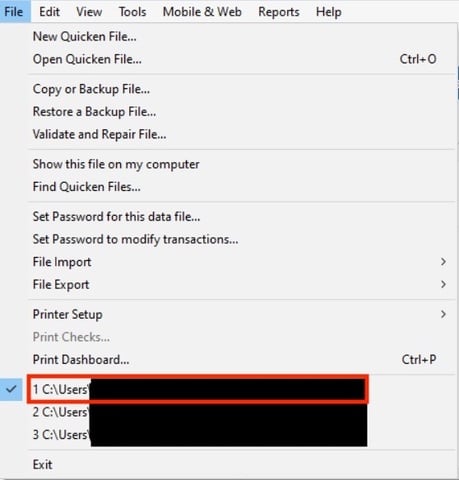
    • Where is your Quicken data file located? To check this, please open Quicken and go to File. At the bottom of the menu above the Exit option, you will see a check mark next to the currently open file. Please share the full file path shown there.
    File location.jpg
    • Is your file being backed up or synced by any third-party services such as Carbonite, OneDrive, or Backblaze?
    • Are you using a VPN, firewall, or antivirus software? If so, please let me know which one(s).
    • Are these joint accounts? If so, are they authorized using the primary account holder’s credentials?

    I look forward to your reply.

    Quicken Carlos

    Make sure to sign up for the email digest to see a round up of your top posts.

  • Gerry Blue
    Gerry Blue Quicken Windows Subscription Member ✭✭✭✭

    Hi @Quicken Carlos,

    The full path is C:\Users\gblue\Documents\Quicken\<filename>.QDF

    I've been allowing Microsoft File History to back up my data files.

    No VPN. I use Webroot SecureAnywhere.

    The accounts are a mix of joint and individual accounts. I believe the credentials being used to authorize are the primary account holder but I'm not positive. How can I be sure?

    The reason that I have to reauthorize frequently is there are two Quicken accounts on two different computers that are accessing the same bank accounts. When I successfully reauthorize those accounts, all is well on my end until the other computer tries to access those accounts and must reauthorize which forces me to reauthorize the next time I update. The bank apparently does not make provisions for more than one authorized computer at a time.

    Gerry

  • Quicken Carlos
    Quicken Carlos Quicken Mac Subscription Moderator mod

    Hi @Gerry Blue,

    Thank you for following up and for providing those details.

    To confirm which accounts are eligible for each set of credentials, I recommend contacting your financial institution directly.

    Once you have confirmed the primary set of credentials, if any accounts are linked to a secondary set, I recommend deactivating those accounts in Quicken. Then, revoke access from Chase (please refer to the instructions provided here). After revoking access, please try reactivating the accounts.

    If you are using multiple sets of credentials, I recommend authorizing the accounts in Quicken using only the primary set of credentials to help avoid connectivity issues.

    Please let me know how it goes.

    Quicken Carlos

    Make sure to sign up for the email digest to see a round up of your top posts.

  • Gerry Blue
    Gerry Blue Quicken Windows Subscription Member ✭✭✭✭

    Hi @Quicken Carlos,

    I feel like we might have distracted ourselves from my original question. This "new" dialog in the reauthorization process continues to dog me on both Chase and Fidelity. The latter only has one set of credentials so I'm fairly certain that credentials and primary owners are not a problem in this case. I want to get back to the dialog in question. It's basically the same in Fidelity as it is in Chase except the accounts are different. The top part of the dialog lists the accounts that supposedly have been authorized, and the bottom part lists the accounts that have not been authorized (unchecked during the reauthorization process.) It lists the very same accounts that are listed in the top section although the names don't necessarily match letter-for-letter. Could that be the problem? Do I need to make the names match? It's also worth noting that even though the accounts listed as having been unchecked on the website, were most definitely NOT unchecked.

    Again, Whenever I get this mystery dialog, the result is that ALL of the accounts listed are DEACTIVATED and I have to go through the authorization process again (this time using the add account approach.) The 2nd time through, I get the dialog I'm expecting where I can choose add, don't add, or link to existing account. I do the appropriate linking and I'm back in business until the next time the other computer tries to update and fights the same battle.

    I don't know what exactly the mystery dialog is designed to do but I don't think deactivating all the accounts that I've just authorized on the FIs website is what the designers had in mind. I'd love it if Quicken could convince the FIs to allow their accounts to be authorized on more than one computer but absent that, if you could save me from having to reauthorize TWICE every. single. time. I reauthorize, I'd be most grateful.

    Thank you!

    Gerry

  • Quicken Carlos
    Quicken Carlos Quicken Mac Subscription Moderator mod

    Hi @Gerry Blue,

    Thanks for your reply.

    Based on the error shown in the screenshot, it appears that during the authorization process, some accounts may have been left unchecked. This can sometimes cause certain accounts to become disconnected.

    However, since you’ve confirmed that all accounts were selected and you’ve already gone through the process of deactivating and reactivating the accounts multiple times, I recommend contacting Quicken Support for further assistance. They can guide you through additional troubleshooting steps in real time or escalate the case if necessary.

    Phone support is available Monday through Friday, from 5:00 AM PT to 5:00 PM PT.

    I hope this helps!

    Quicken Carlos

    Make sure to sign up for the email digest to see a round up of your top posts.