Citizens Bank - cannot setup online any longer
I opened a new Citizens Small Business checking account. I can login just fine via the web browser.
Go into Quicken (Quicken Classic Deluxe, version R66.28, Build 27.1.66.28) on Windows 11.
Click the "+" to add an account. Select Citizens (I have also tried: Citizens Bank-Not Your TypicalBank), it pops up the EWC+ notification that launches a web browser (same browser I can login just fine with). I get the Citizens Login page (SAME looking login page when I login manually), enter the credentials and then Citizens web site reports:
Authentication Error Authentication Error Occurred
I am wondering if Quicken is sending the correct URL parameters that's causing the authentication error?
I'm fairly certain (but could be wrong) that my old ( no longer have them) Personal accounts worked "online" with Citizens, but I could be wrong that they never worked either (like M&T Bank and KeyBank never seem to work with Quicken).
Comments
-
Hello @mjonis,
Thank you for reporting the issues you are experiencing with Citizens Bank.
We currently have an Open Alert for this financial institution, but it appears what you are seeing is different.
After reviewing your internal connections, I can see that you are encountering a CC-505 error. This error is caused by an issue on the bank's servers (typically a block placed by the bank) that prevents Quicken from downloading transactions.
Here are the steps from the linked article:
First, wait one business day
This error message is typically caused by a temporary issue on your bank's servers. You can try updating again in a few hours or the next business day.
Second, if waiting one day does not resolve the issue
Try refreshing your online account information:
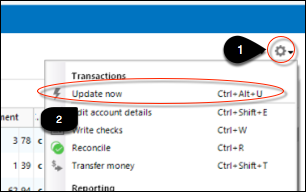
1. From your account register, select the Actions gear icon at the very top right of your register (Ctrl + Shift + N).
2. Select Update Now.
3. Follow the on-screen instructions to complete the update.
4. Repeat these steps for each financial institution experiencing this error.
If the issue persists
Try the steps above again the next business day. If the problem continues for over 48 hours, contact Quicken Support for assistance.
Hope this helps!
Quicken Alyssa
Make sure to sign up for the email digest to see a round up of your top posts.
1 -
Thanks Alyssa!
0 -
Quicken Alyssa
Make sure to sign up for the email digest to see a round up of your top posts.
0 -
Still the same issue. I'm wondering now if possibly Citizens doesn't let their business checking be accessed via Quicken? Have no idea why the error is returned, since I can login just fine (same browser) manually. If I have a few hours to kill next week, I might call in and attempt to open a ticket.
0 -
Hi @mjonis,
Thank you for following up on the Quicken Community!
For further investigation, I recommend contacting Quicken Support for additional assistance. They can guide you through additional troubleshooting steps in real time or escalate the case if necessary.Phone support is available Monday through Friday, from 5:00 AM PT to 5:00 PM PT.
I hope this helps!Quicken Carlos
Make sure to sign up for the email digest to see a round up of your top posts.
1