Connection error with Delta Community Credit Union
Since Apr. 3, 2026, unable to connect to DCCU via direct connect. Immediately returns error OL-297-A, unable to establish an internet connection. Other online institutions update normally. If I attempt to reset the account, it opens a blank window, the program freezes, and must be closed through the Windows Task Manager.
Comments
-
Hello @F16Lambo,
Thank you for sharing your experience and reporting the issues you are experiencing.
We do have a Support Article for the OL-297-A error. It explains that these errors usually appear when your computer cannot establish an internet connection with Quicken. Please note, these errors do not mean the computer has lost internet connection, simply that Quicken cannot establish an internet connection.
Here are the first steps from the article:
Update your internet security settings
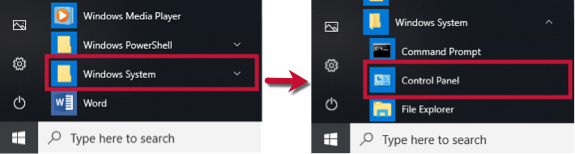
1. Click the Start button and select the Control Panel.
- Windows 10: The Control Panel is located in the Windows System folder in the Start menu.
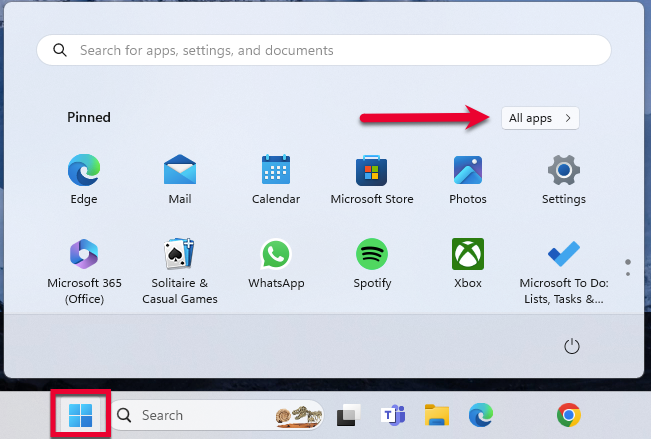
- Windows 11: Go to the Start menu and select All apps.
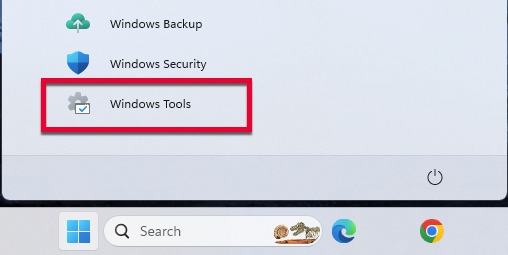
Then, go to Windows Tools and select Control Panel.
2. Select Network and Internet, then Internet Options.
3. Go to the Advanced tab.
4. Scroll down to the Security Section.
5. Verify TLS 1.2 is checked.
- If it is not, check it.
- If it is already checked, continue to the If the issue persists section below.
6. Click Apply, then OK.
7. Try your update in Quicken again.
Please review the article and complete the remaining steps.
If the issue is not resolved after following the steps outlined in the article, you will need to contact your financial institution to resolve this issue. Quicken does not have access to the financial institution's servers to correct the problem. This may require you to ask to speak with an online services specialist who handles transaction download issues at the financial institution. If your financial institution states it can't assist, an escalation with the financial institution may be necessary.
Let us know how it goes!
Quicken Alyssa
Make sure to sign up for the email digest to see a round up of your top posts.
0 -
I’m having a similar error with Delta Community Credit Union, but I am on Mac. When I try to add an account, I instantly get “Care Code 1200”.
Quicken support just says wait 24 hours or disconnect/reconnect accounts. I’ve waited, but no success. I can’t disconnect because it’s a fresh file.
Do you have similar troubleshooting steps that work for Mac?0 -
Thanks for the reply, performed steps in the referenced support article for the OL-297-A error, but no help. I have a query in to the DCCU help desk to see if there are server issues or changes in connections.
1 -
I'm having the same error. It is only Delta Community Credit Union that errors. Same with the Reset Account. End up with a blank window and frozen.
0 -
I have TLS 1.2 selected along w/ TLS 1.3 selected, but no dice on connecting to Delta Community Credit Union. What is the next possible solution?
0 -
I just got off the phone with DCCU and the problem is at their end. Their Quicken interface is down with no current estimated time of restoral. "They are working on it". 11:15 AM, April 9, 2026.
2 -
Hello All,
Thank you for adding to this discussion.
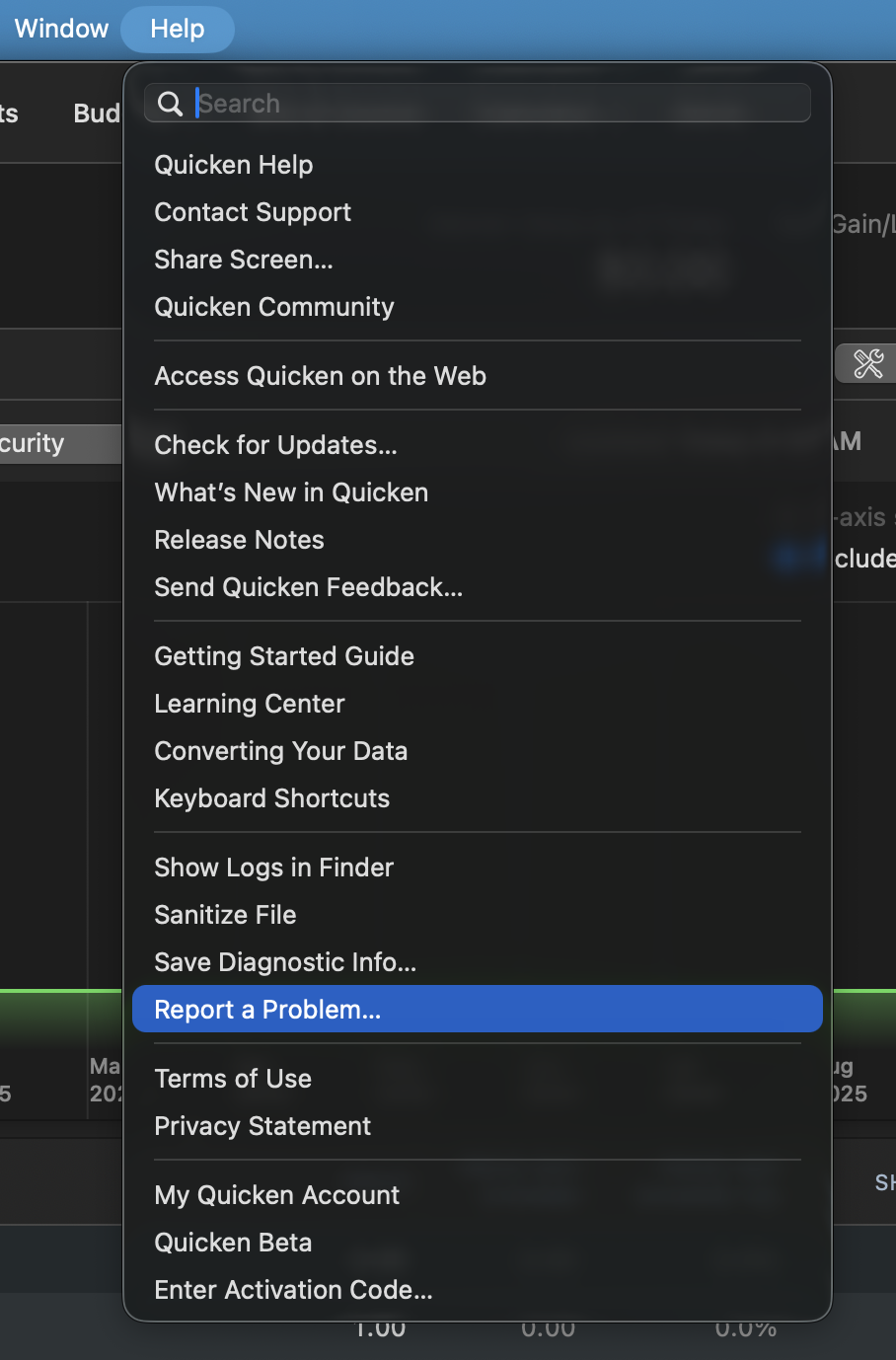
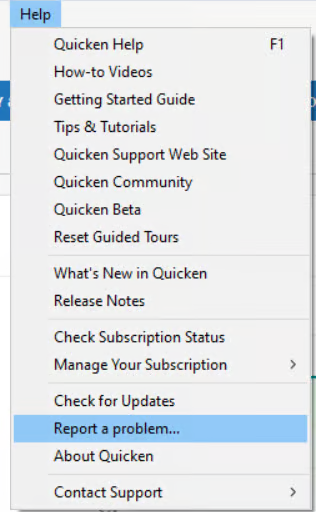
Can I please have you all go to Help > Report a Problem in your Quicken software, then select Send to Quicken?
Mac:
Windows:
This issue has been reported, and your log files will help the investigation. Once you have sent them over, let me know so I can add them to the ticket.
Thank you!
[CTP-16886]
Quicken Alyssa
Make sure to sign up for the email digest to see a round up of your top posts.
0 -
I have Reported the problem per your instructions.
1 -
Quicken Alyssa
Make sure to sign up for the email digest to see a round up of your top posts.
0 -
@Quicken Alyssa Still getting error as of this morning. Do you know if Quicken is working with Delta Community to resolve? Delta says they're working on it, but it didn't sound like they know if this is a Quicken thing or a Delta thing. Any info?
0 -
Thank you for posing this question.
This is a Direct Connect issue, which indicates that it is an issue on the bank's servers. However, an escalation ticket was opened, so yes, Quicken is looking into it on behalf of our mutual customers.
Hope this helps!
Quicken Alyssa
Make sure to sign up for the email digest to see a round up of your top posts.
1 -
Does anyone have an update?
0 -
Delta CU still not working just tried and says No internet connection?
0 -
AM Update. Still No Internet Connection
0 -
Hello @pistolpete & @Mikec767,
Thank you for updating this discussion.
I am sorry to hear you are still experiencing this error. We opened an escalation ticket for this issue a couple of days ago, but there are currently no new updates.
Sometimes online banking errors are resolved quickly, and other times they take longer to resolve. This is due to many contributing factors.
We appreciate your patience.
Quicken Alyssa
Make sure to sign up for the email digest to see a round up of your top posts.
1 -
Still Down, just checked.. Very Frustrating at this point..
0 -
Thank you for continuing to update us.
I wanted to provide a bit of context on why escalations can take time, just to ensure the expectations are not unrealistic.
When we escalate an issue, it isn’t just handled internally; there are often multiple parties involved, including the financial institution itself and our service providers. Each party may need to review, troubleshoot, and test changes before a resolution can be implemented. For these reasons, even after an issue is escalated, it can take weeks or months to fully resolve.
We know it’s inconvenient, and we truly appreciate your patience while all parties work toward a fix. Feel free to continue monitoring the situation on your end, and let us know if/when you establish a successful connection.
Thanks again!
Quicken Alyssa
Make sure to sign up for the email digest to see a round up of your top posts.
0