CITI

kipick
kipick Quicken Windows Subscription Member ✭✭

Why is CITI accounts not downloading?

Comments

  • Quicken Laura
    Quicken Laura Quicken Windows Subscription Moderator mod

    Hi @kipick,

    Thank you for reaching out. I checked your account, and it appears that your Citibank and Citi card accounts are not connecting properly and are returning a CP_ACCOUNT_NOT_FOUND error.

    To resolve this, I recommend deactivating and reactivating the affected accounts.

    First, you'll need to deactivate the affected accounts:

    1. Select Tools Account List
    2. If present, select the Show Hidden Accounts checkbox at the bottom of the Account List
    3. Select Edit on each account with this error and deactivate them on the Online Services tab
    4. When finished, close the Account List.

    Second, reactivate the accounts:

    1. Select Tools Add Account
    2. Complete the flow of re-adding the deactivated accounts to Quicken, using your bank login credentials and answering any security questions.
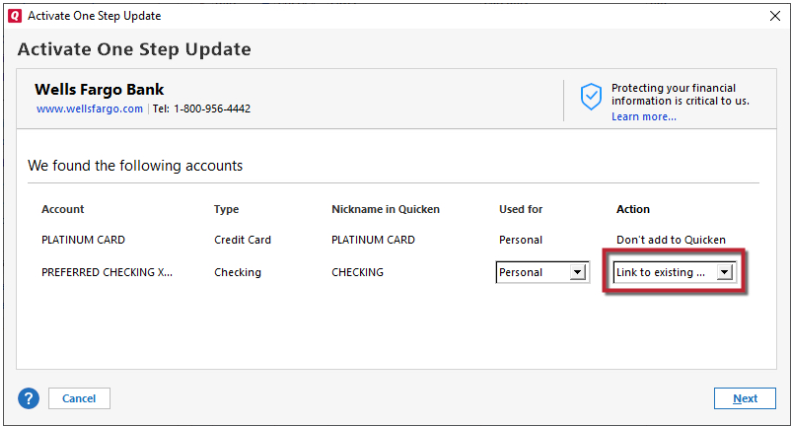
    3. When you reach the screen listing the accounts discovered at the financial institution, use the Action drop-downs to re-link your accounts:
      • For accounts you want to re-link, select Link to existing account and choose the corresponding account to re-link with. Link to Existing.png
      • Select Add to Quicken for new accounts you didn't previously track in Quicken.
      • For accounts you don't want to link or add, select Don't add to Quicken.

    Please let me know if the issue persists after trying these steps.

    Quicken Laura

    Make sure to sign up for the email digest to see a round up of your top posts.