TDECU Download Error OL-221-A

cdavis.r4d
cdavis.r4d Member ✭✭

Why do I keep getting download error OL-221-A message when I download from TDECU Bank?

I contacted the bank, and they said it's not their problem, and when I try Quicken, they're not their problem!

I have tried going from Quicken to TDECU, but I keep getting an error message, but to the fact that I need to add another code from a Text.

Is there any HELP?

CDavis

[Edited-Readability]

Answers

  • Quicken Alyssa
    Quicken Alyssa Quicken Windows Subscription Moderator mod

    Hello @cdavis.r4d,

    Thank you for sharing your experience and reporting the issues you are seeing from your end.

    We have a Support Article that addresses this error. You can follow the steps in the article to try to refresh the connection; this will ensure you receive the latest file from your financial institution. However, this may ultimately need to be resolved by your bank.

    To Reset the Account

    1. Open the register for the account.

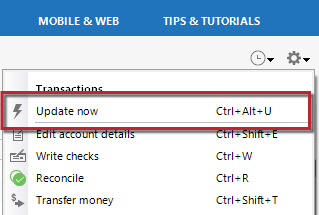
    2. Click Account Actions (button or gear icon) at the top right of the register.

    UpdateNowFIDropDown_support

    3. Select Update Now.

    Wait and try again later

    If completing the Update Now process doesn't clear up the issue, try updating your accounts the next business day. This error may be caused by a temporary outage or maintenance at the financial institution's server, which may be resolved the next day.

    If the issue persists

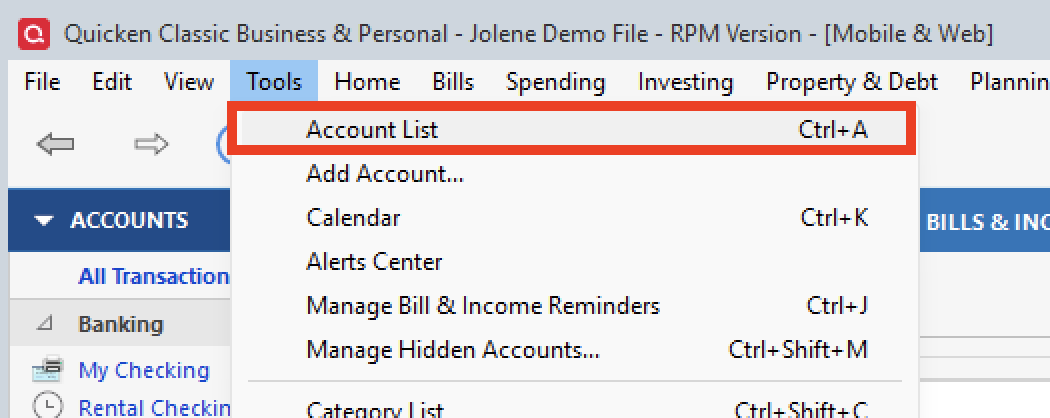
    If the issue is not resolved after waiting, you will need to identify the connection type for the affected account(s) to determine the next steps. To do this, go to Tools > Account List, find the affected account(s), and confirm the connection type in parentheses in the Transaction Download column.

    tools>acct list.png
    • Direct Connect - You will need to contact your financial institution to resolve this issue. Quicken does not have access to the financial institution's servers to correct the problem. This may require you to ask to speak with an online services specialist at the financial institution who handles transaction download issues. If your financial institution states it can't assist, an escalation with them may be necessary.
    • Express Web Connect - Please contact Quicken Support for assistance.
    • Web Connect (Importing a QFX file from your bank's website) - Receiving this error when downloading a QFX file directly from your bank's website indicates an issue with the file itself. You will need to contact your bank to resolve this issue.

    Hope this helps!

    Quicken Alyssa

    Make sure to sign up for the email digest to see a round up of your top posts.