selecting reconcile from holdings in investment account fails - navigation canceled

jswafa
jswafa Quicken Windows Subscription Member ✭✭✭✭

It used to be that selecting "last reconcile" from "holdings" in an investment account brought up the account reconcile window. Instead, now when I do that, Quicken tries to go to QW.exe (http://qw.exe/qw?menuid=7203) and fails, with a "navigation canceled" message in the internal browser window. This started happening some time ago, last fall, and I hoped it would go away after an update - but no luck.


Q user since DOS

Now QW Classic Premier on Win 11

Comments

  • Quicken Laura
    Quicken Laura Quicken Windows Subscription Moderator mod
    edited 7:24AM

    Hi @jswafa,

    I’m sorry to hear you’ve been experiencing this issue. To help us troubleshoot, I'd appreciate if you could provide a bit more information.

    1. Is this affecting one specific investment account, or all investment accounts?
    2. Have you tried validating your Quicken file?
    3. Have you tried restoring a backup from before the issue began?
    4. Does the reconcile button under the gear icon work?
    5. Have you installed the Quicken Mondo Patch? If not, please try installing it.
    6. Where is your file located? To check, please open Quicken and go to File. At the bottom of the menu, under recent files, the file with the check mark next to it is the one currently open. Please let me know the full file path shown there.
    7. Is your file being backed up/ synced by any third-party services like Carbonite, OneDrive, or Backblaze?

    I appreciate your help in providing this information and look forward to your response!

    Quicken Laura

    Make sure to sign up for the email digest to see a round up of your top posts.

  • jswafa
    jswafa Quicken Windows Subscription Member ✭✭✭✭

    Hi @Quicken Laura - thanks for getting back to me.

    This is affecting all my investing accounts. I haven't tried validating or the Mondo patch, and I don't know exactly when it began, so I haven't tried a restore. WAY too much hassle to re-enter all that data!! I hesitate to do any of those things because this is only an annoyance - the reconcile works properly from the gear icon. It's possible it happened when I moved from Windows 10 to a new Windows 11 computer.

    Here's my file location: "C:\Users\Woody\Documents\Quicken Data Files\QData.QDF"

    I don't back it up or sync it with any 3rd party software.

    Q user since DOS

    Now QW Classic Premier on Win 11

  • Quicken Laura
    Quicken Laura Quicken Windows Subscription Moderator mod
    edited 10:59AM

    @jswafa,

    Thank you for providing more information, that’s very helpful. To troubleshoot this issue, I recommend validating your file and installing the Mondo Patch, and clearing the cache, as the problem may be related to your specific file or an update that didn’t install correctly (don't forget to save a backup first).

    Steps to validate the file:

    1. Go to File
    2. Select Validate and Repair File
    3. Choose Validate File
    4. Click OK

    Steps to install the Mondo Patch:

    1. Download the US Manual Patch Update (244.51MB)
    2. Open the file when the download is complete.
    3. Follow the on-screen instructions to install the update.
    4. When finished, you can verify the release version of Quicken by selecting the Help menu in the software and choosing About Quicken.

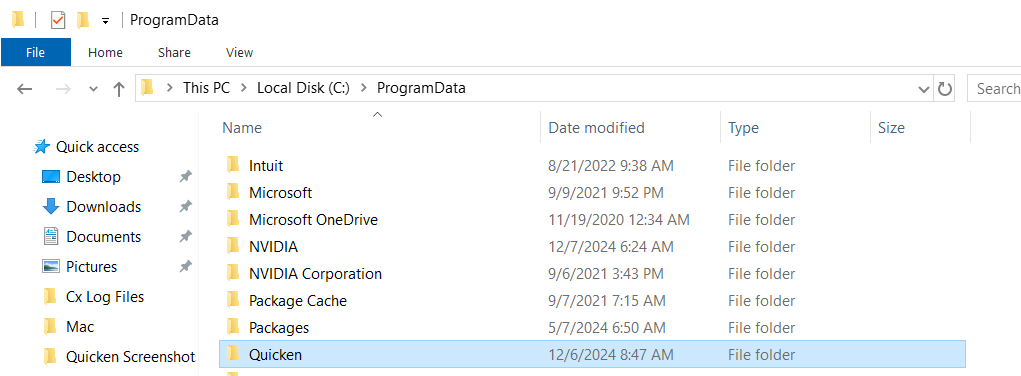
    Steps to delete the Cache Folder

    1. Close Quicken
    2. Navigate to: C:\ProgramData\Quicken\Cache image.png
    3. Delete the Cache folder
    4. Restart Quicken

    I look forward to hearing about your results!

    Quicken Laura

    Make sure to sign up for the email digest to see a round up of your top posts.

  • mshiggins
    mshiggins Quicken Windows 2017 SuperUser ✭✭✭✭✭

    Quicken user since Q1999. Currently using QW2017.
    Questions? Check out the Quicken Windows FAQ list

  • jswafa
    jswafa Quicken Windows Subscription Member ✭✭✭✭

    @mshiggins That was a great suggestion - thanks! I saw the discussion about forcing a cache reset, and that did the trick!

    Q user since DOS

    Now QW Classic Premier on Win 11