Quicken Classic 8.5.1 and 8.5.2 Transactions NOT downloading MacOS 26.5
After downloading Quicken 8.5.1, I noticed transactions were not downloading on either of my Macs. No errors of any kind occurred; the download indicator would spin, then turn green, but nothing happened.
I have reconnected ALL of my accounts, which come from different institutions. I have logged off Quicken, quit Sync, and reset the Cloud. None of this has resolved this issue.
I did update to 8.5.2, hoping this was the fix, but no.
Comments
-
Hi @Jearl,
Thank you for reaching out and outlining the steps you’ve taken so far; that’s very helpful. To help troubleshoot your missing transactions, please check the following:
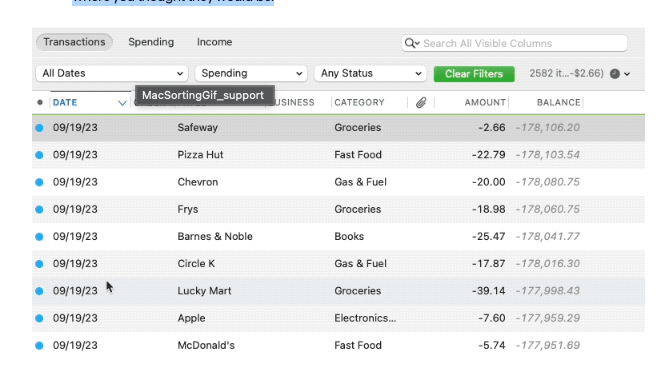
- Has the sort order been changed in your account register? Confirm that the Sort Order in your account register is by Date. If it is not, click on the top of the Date column in your account register. Your missing transactions could be in your register, just not where you thought they would be.
- Do you have any filters set? Click the Clear Filters button to the right of the account register’s filter dropdowns. This will confirm that there is no filtering in your account register.
- Are your missing transactions over 90 days old? Transaction download is typically limited to the last 90 to 200 days, depending on the financial institution. If you need transaction history that was not included in your initial download, you have the option to import transactions using Web Connect. For more information on Web Connect, click here.
- Are these transactions still marked as "pending" on your bank's website? Even though the pending transaction is authorized and displayed on your bank’s website, most banks will not allow transactional history to be downloaded unless the transactions are cleared.
- Are you using Web Connect? Some banks will only allow you to download transaction history to Quicken after the statement close date of that account. This means that you will not see any new transactions until the statement closes.
- Have you deleted transactions recently? You may have deleted the transaction in error. Downloaded transactions cannot be redownloaded and would have to be added manually.
- Was the transaction moved from one account register to another? Click on All Transactions above the account list. If you find the transaction(s) that you are looking for are in another account, click and drag the missing transaction(s) to the correct account in the account list.
- Are you using your data file across multiple devices via a cloud service (other than Quicken Cloud) or a network?
- Have you recently installed or updated any security software? If so, please let me know which one(s).
I look forward to your response!
Quicken Laura
Make sure to sign up for the email digest to see a round up of your top posts.
0 -
Thanks for your response.
1-sort has not been modified on either computer
2-No filters are set
3-Only missing transactions as of 4/4/26 confirming this with my bank account.
4-They are not marked as pending
5-Bank Accounts are Web Connect and Credit Cards are Quicken Connect
6-No deleted transactions
7-No transactions were moved
8-Devices are NOT sharing any Quicken data files
9-the only updates installed recently is Quicken 8.5.1 and 8.5.2. As well as MacOS 26.5 beta 2. The MacOS beta was installed before the issue and I've been running Apple beta software for years.
My issue is not so much as missing transactions, but NOT downloading any NEW transactions at all. This exact issue began on both my desktop and laptop at the same time, while running individual Quicken apps
Thanks
0 -
Thank you for answering those questions; that’s very helpful. I checked your accounts and can see that Delta Community Credit Union is returning an FDP-105 error. This typically indicates the bank’s website is temporarily unavailable for downloads, or access may be restricted due to high traffic.
At this time, there are no active alerts for this issue. I recommend waiting 24–48 hours and then attempting to update your accounts again, as outlined in the Quicken article for this error. If the issue persists after that, please contact Quicken Support for further assistance or possible escalation.
I also see that you contacted support earlier; thank you for doing that. It appears the chat may have ended due to inactivity. Since you already attempted to disconnect and reconnect your accounts, I’ve refreshed them on our end. Please follow the steps below to update only the affected accounts using Quicken Connect:
Refresh your session:
- Click Quicken(menu)
- Select Sign Out
- Quit Quicken
- Wait 5 seconds, then reopen Quicken
- Sign back in
Download missing transactions:
- Save a backup.
- Select the account with missing transactions from the left panel.
- Once the account register is open, hold the Option key on the keyboard.
- While holding Option, click Settings.
- While holding Option, click the Downloads tab.
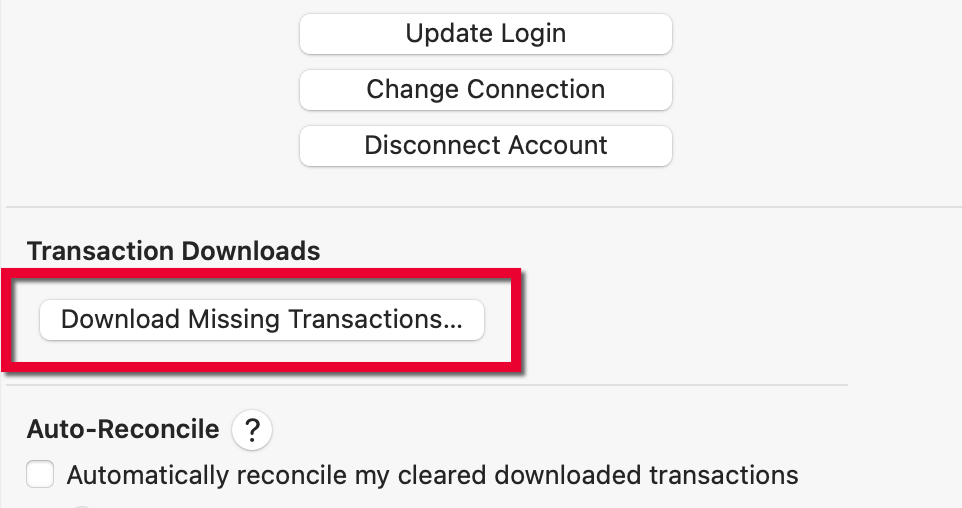
- Release the Option key, and click Download Missing Transactions…
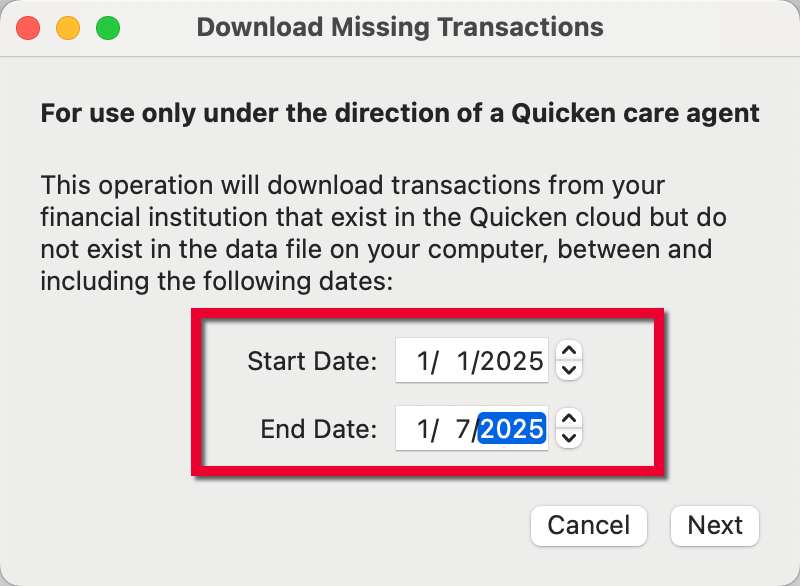
- In the Start Date field, enter the date of the oldest missing transaction.
- In the End Date field, enter the date of the newest missing transaction.
- Press Next.
- A confirmation window showing the quantity of downloaded transactions will appear when the process is complete.
- Press OK and review the register for any changes.
Please let me know how it goes!
Quicken Laura
Make sure to sign up for the email digest to see a round up of your top posts.
0