I am able to download my transactions to my computer but how can I get them into Quicken?
Hi @marysday,
Please let me know which format you are donwloading them in.
Thank you!
Hi Quicken Laura,
Sadly I am not very computer literate, so I'm not sure what format is. I have both Windows and Chrome on this computer. I use Windows to try to download my Barclay credit card transactions.
I hope this helps.
No problem. I can help you identify the file format.
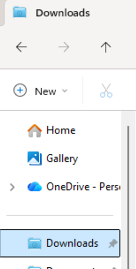
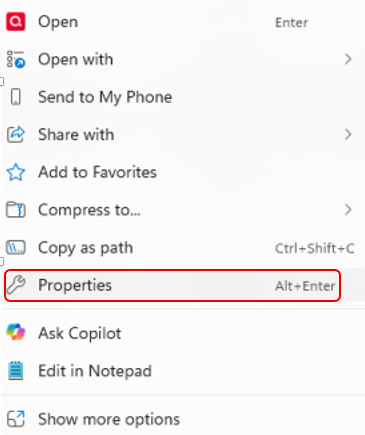
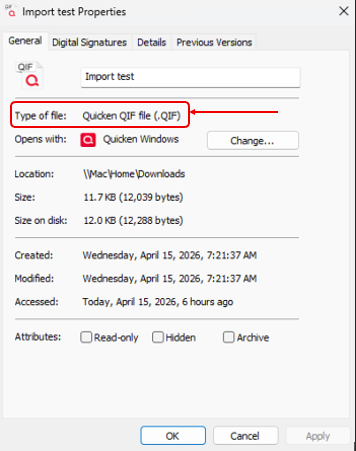
Once the file has been downloaded from your bank, you can locate it in your File Explorer (Downloads folder):
Please let me know what format you see, and I’ll be happy to guide you further.
Hi Laura,
It comes up as System Folder or CRDOWNLOAD File (.crdownload) when using Windows.
When I use Chrome it's Quicken OFX data (.qfx)
Does that make any sense?
Mary
Great, thank you; that’s exactly what I needed to know.
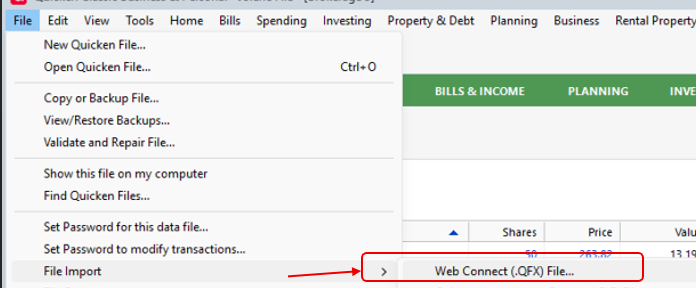
Below are the steps to import the file into Quicken:
Please feel free to reach out if you have additional questions!
Laura,
When click the Browse button The download files the "no items match your search" and the browser is empty.
@marysday,
Apologies, I just realized the previous steps were incorrect. I’ve updated them. Please try again and let me know if it works for you this time.
I have a different dropdown for file. I tried file import web connect and Quicken transfer Format (QFX) file,
Neither worked.
I'm giving up and entering all the transactions myself.
Hopefully by next month it will be corrected.
Thanks for all your help.
Apologies for the delayed response, and thank you for your patience. I’m sorry to hear that the previous steps didn’t resolve the issue.
Some users have since reported being able to update their accounts successfully, so it may be worth trying again. If the issue persists, please let me know, and I’ll be happy to assist further.