Fidelity cash values way off. How can I adjust?

RCinNJ
RCinNJ Quicken Mac Subscription Member ✭✭✭✭
edited April 16 in Investing (Mac)

For as long as I can remember Quicken has not properly tracked the cash value in multiple Fidelity accounts.

The accounts have two different types of cash accounts. One account has Cash "HELD IN FCASH" and other has CORE* "FDIC BANK DEPOSIT SWEEP NOT COVERED BY SIP". Whether I should have different types and which is better is a different question, but I realize how to fix may be different.

I'd like to just adjust the value of what QM is reporting as "Cash" so it matches what Fidelity reports. I can't figure out a way to affect this value.

The account with CORE does not show any security, but just shows a Cash value that is a large negative number but should be a small positive number. The net effect is QM shows too low a value for this account. CORE is not in my QM Securities list.

The account with FCASH has the Fidelity Treasury Money Market Fund FZFXX as a negative number and a large positive Cash value. The net effect is QM reports the correct account value but the cash position is way off. I don't think FCASH is FXFXX. FCASH is in my QM Securities list but is not being used. I can see in Transactions that the last download that listed FXFXX was on 4/28/23 so I assume that is when Fidelity switched from this MMF.

Is there one way to fix both? Are there ways to fix one or both of them?

Thank you!

Quicken for Mac 8.5.2. MacOS 26.3.

Answers

  • Quicken Carlos
    Quicken Carlos Quicken Mac Subscription Moderator mod
    edited April 16

    Hi @RCinNJ,

    Thanks for taking the time to reach out to the Quicken Community.

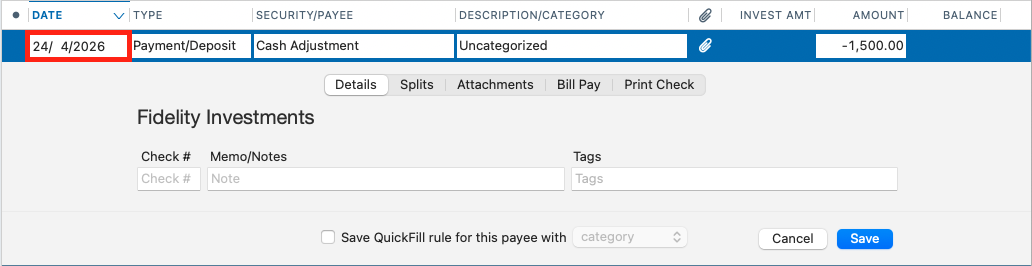
    Before making any changes to your accounts, I recommend creating a backup file. Once that’s done, I suggest following the steps below to adjust the cash balance:

    To adjust the cash balance:

    • Go to the Account Transactions view
    • Click New (lower left corner)
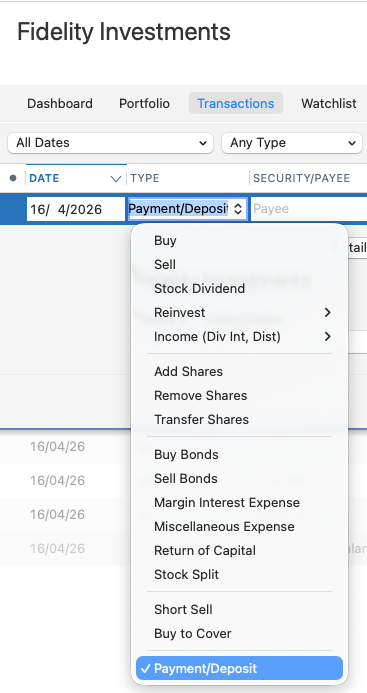
    • Enter a new Payment/Deposit transaction Screenshot 2026-04-16 at 9.01.27 AM.png
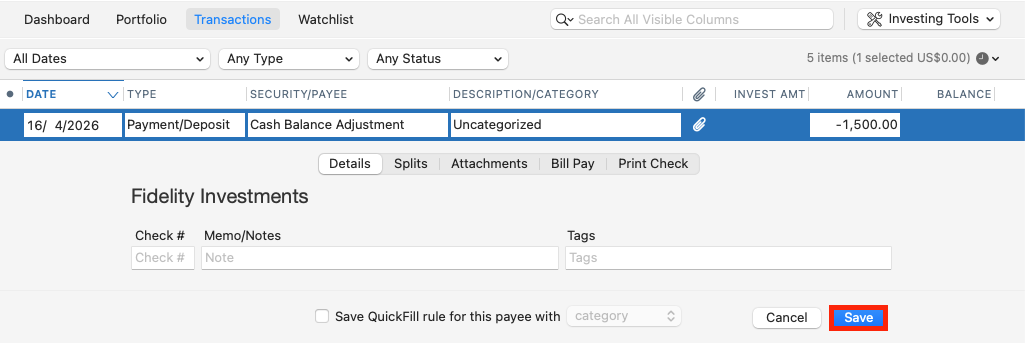
    • Enter the difference needed to match the cash amount reported by Fidelity
    • Click Save
      Screenshot 2026-04-16 at 9.16.15 AM 1.png

    To adjust FXFXX (or any money market fund listed in the security list):

    • Open the account in question
    • Click New (lower left corner)
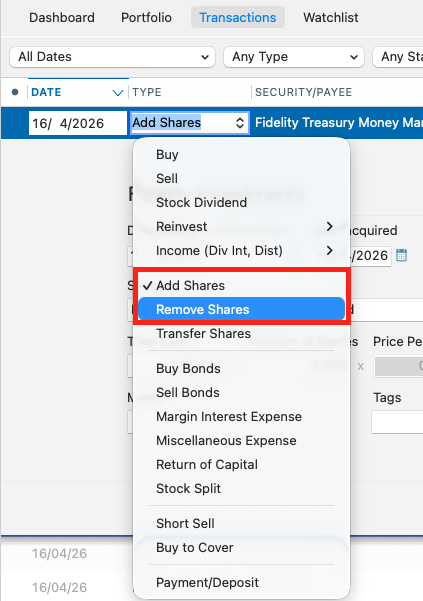
    • Select Add Shares or Remove Shares, depending on what is needed to match the correct balance
    Screenshot 2026-04-16 at 9.18.24 AM.png
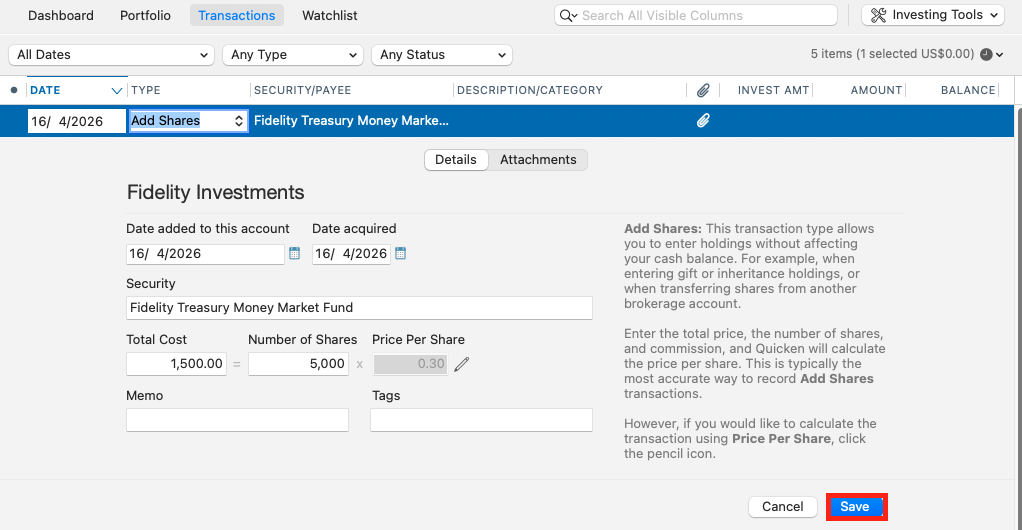
    • Choose the appropriate security or money market fund
    • Enter the difference required to match the total value
    • Click Save
      Screenshot 2026-04-16 at 9.19.40 AM.png

    After making these adjustments, return to the portfolio view to confirm everything matches correctly.

    I hope this helps. Let me know how it goes!

    Quicken Carlos

    Make sure to sign up for the email digest to see a round up of your top posts.