Why am I getting a notification that Quicken will no longer work on Intel Macs (on my M1 MBP)?
I just received a notification warning me that Quicken will no longer be compatible with Intel Macs after the next version (or something to that effect). I'm running Quicken Classic v. 8.5.2 on an M1 Pro Apple MacBook Pro. It's running the latest version of macOS Tahoe, 26.4.1. What's up with this?
Answers
-
Mac OS is starting to display warnings for Intel apps running on Apple Silicon Macs since they'll quit working when macOS 28 comes out in the fall of next year. But you shouldn't be seeing that for Quicken since it's been a Universal app since version 6.0 came out in 2020..
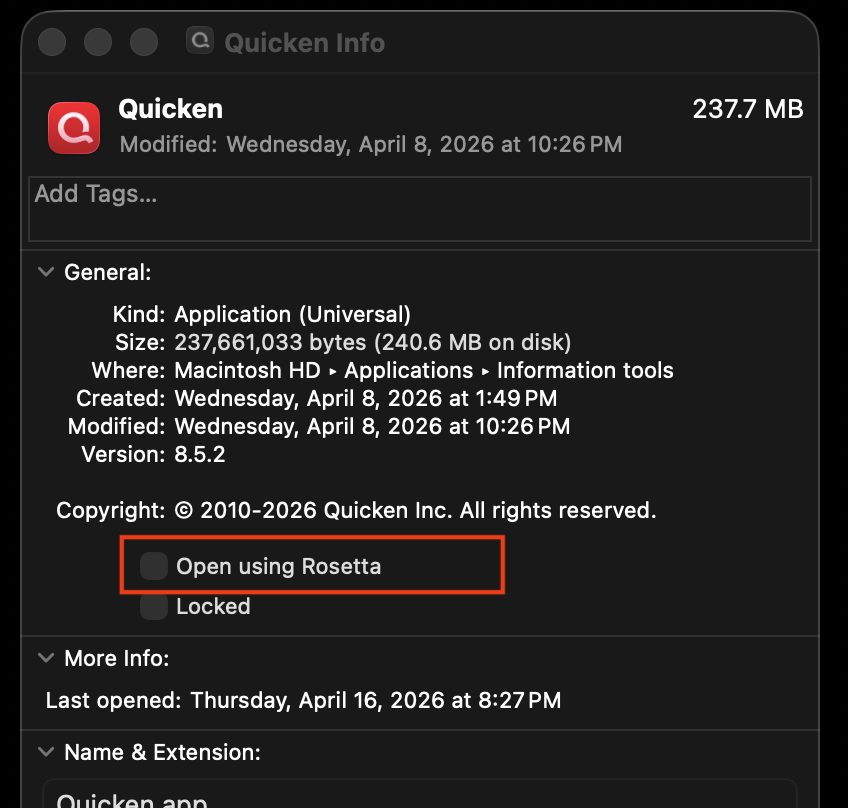
The only thing I can think of is that somehow you got Quicken set to run in Intel mode using Rosetta. Right-click on the Quicken app and select Get Info, then look to see if the Open using Rosetta box is checked.
If it is checked, uncheck it (I can't think of a reason you would need to have it checked).
If that's not checked, I don't know what else could have caused that warning to appear for you.
1 -
The only other warning I can think of that you might have seen is something telling you that the next release of Quicken won't work on macOS 12 (Monterey) but will require at least macOS 13 (Ventura). But that's not related to Intel CPUs; I haven't heard any hint of Quicken dropping support for Intel. Anyway, Monterey support isn't something you need to worry about since you're on Tahoe.
0