One Step Update

Barb V
Barb V Quicken Windows Subscription Member

Not working for some time. Call Quicken and have had many discussions about this. Ticket # after ticket #, they have escalated to a higher support team, and still no resolution. Just spent another hour on the phone to be told they are still working on it. Not happy. [Removed-Third Party Software]. Help.


Comments

  • Quicken Carlos
    Quicken Carlos Quicken Mac Subscription Moderator mod

    Hi @Barb V,

    Thank you for reaching out to the Quicken Community!

    Sometimes, a specific connected account can cause issues and slow down or freeze others during a One Step Update. Before proceeding, I recommend creating a backup of your data file.

    If you haven’t tried this yet, please follow these steps to identify the issue:

    • Open the Account List
    • Select the first connected account
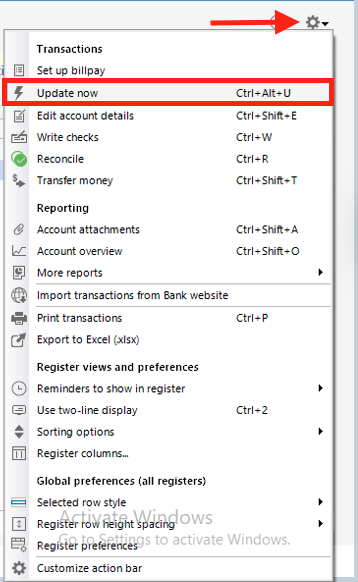
    • Click the Actions (gear) icon in the upper-right corner of the transaction window
    • Choose Update Now
    • Repeat this process for each connected account until you identify which one freezes during the update
    Screenshot 2026-04-20 at 2.31.20 PM.png

    Once identified:

    • Deactivate and then reactivate the affected account
    • Run One Step Update again

    If the issue persists

    Disable Mobile & Web Sync

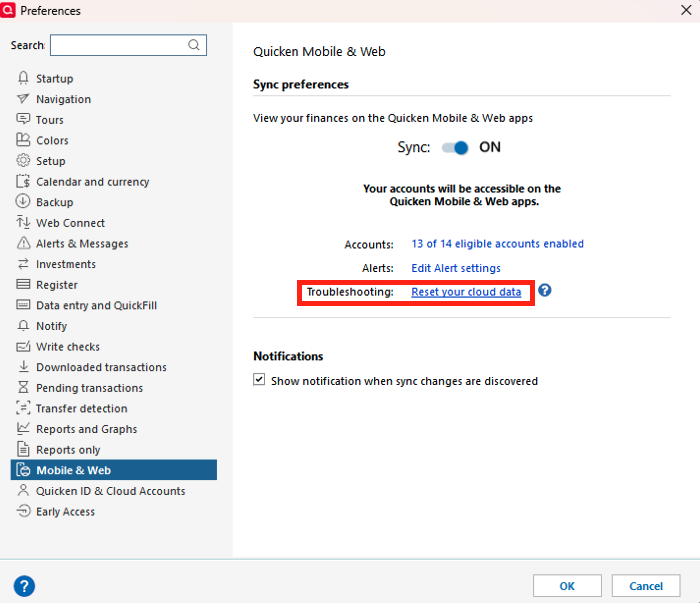
    • Go to Edit > Preferences
    • Select Mobile & Web
    • Click Reset your cloud data and follow the on-screen instructions
    • Sync your desktop file to the cloud
    Screenshot 2026-04-20 at 2.24.15 PM.png

    If you do not use Mobile & Web Sync:

    • Go to Edit > Preferences
    • Select Mobile & Web
    • Turn the Sync toggle to OFF
    • Attempt One Step Update again.

    I hope this helps! Please let me know how it goes!

    Quicken Carlos

    Make sure to sign up for the email digest to see a round up of your top posts.