Mismatched Online Balance vs Ending Balance

jpitt
jpitt Quicken Windows 2017 Member

Using Quicken Classic for Windows. It's the latest version. This has been happening to me for years, and I can't figure it out.

When I set up the account, the balances match. But within a week or two, they mismatch.

What I used to do is open the software, download my account transactions and manually match all the bills (at least the ones that aren't automatically matched. But before too long I have the mismatch again.

These days I don't even match bills to the register. I just verified that it happened and skipped the bill I'm reviewing. I even unmatch any "new match" entries in the registry. But still, the mismatch happens. And it's not an amount that is easy to figure out, as if it's multiple transactions that are bad.

I don't know the cause of this. The only fix is to go through every bill and income and change it to a different account, delete the account with the issue, add it back in, and move all the bills back to the account. But it's just a temporary fix.

I will say my primary and favorite tool is Projected Balances. That single feature is why I stay with Quicken. But I'd like to get to the bottom of this weird behavior.

Thanks!!!

[Edited Readability]

Comments

  • Quicken Laura
    Quicken Laura Quicken Windows Subscription Moderator mod

    Hi @jpitt,

    Thank you for reaching out and for outlining the steps you’ve taken so far to troubleshoot the issue.

    To help me better understand what’s happening, I’d appreciate it if you could provide a bit more information:

    • Where is your Quicken file located?
    • When you mention “multiple transactions that are bad,” do you mean that Quicken is creating duplicate transactions, modifying your opening balance, creating adjustments, or something else?
    • Is there anything in particular that seems to trigger the mismatch, such as updating, closing, or reopening Quicken?
    • Is this happening to a specific account, all of your existing accounts, or only some of them?

    To check the file location:

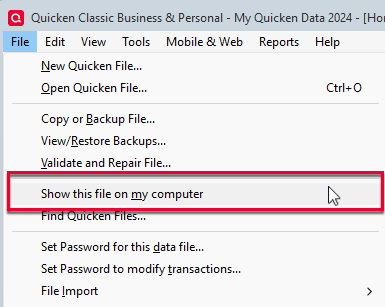
    1. Go to File > Show this file on my computer. image.png
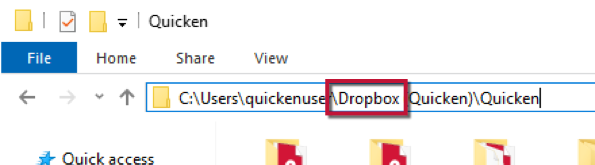
    2. Review the file location path in the bar above the list of files. image.png

    I look forward to your response!

    Quicken Laura

    Make sure to sign up for the email digest to see a round up of your top posts.