Issue with Merrill Edge (Lynch)

gulf83
gulf83 Quicken Windows Subscription Member ✭✭

2 days ago, I did my normal d/l. I have 4 accounts.

When the d/l finished, there was a large discrepancy on one of my accounts, namely my IRA Managed Acct.

I tried d/l over the next day or two but it never corrected itself. Today I first reset the account without success. I then deactivated and reactivated the accounts, again with no success. The one account still shows the discrepancy.

Update: I just discovered that the holding in question split 6:1. I manually adjusted that holding and now it's ok.

But:

Now, when I run an update, my updated summary does not show the Merrill Lynch accounts at all. When I look at the individual accounts, there is no date or time for the last update indicated in the top left corner of the account.

Now that I have tried all the normal "fixes", what can I do to remedy this?

Thank you

Comments

  • Quicken Laura
    Quicken Laura Quicken Windows Subscription Moderator mod

    Hi @gulf83,

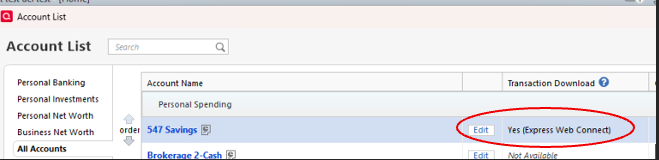
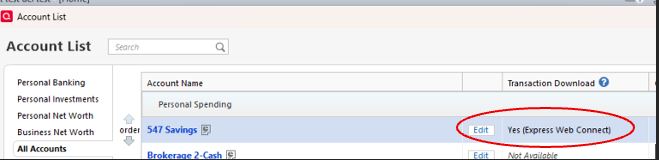
    Thank you for sharing what you are experiencing. I checked your accounts on our end, and only three of them appear to be connected. I'd appreciate it if you could check if the accounts are connected via Express Web Connect + in the account list.

    1. Go to tools.
    2. Select the Account list. Screenshot 2026-04-22 at 12.09.23 PM.png
    3. Enable Show transaction download status under Options at the bottom left of the account list.
    4. Confirm whether or not the accounts are connected. Screenshot 2026-04-22 at 12.09.23 PM.png

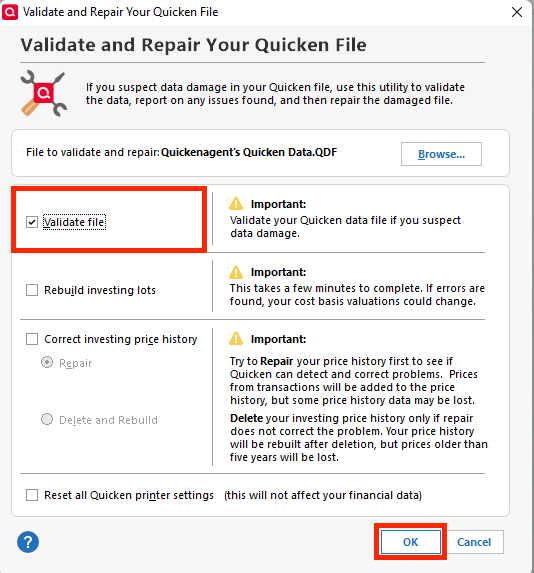
    If they are connected, please back up your file and validate it.

    1. Go to File
    2. Select Validate and Repair File
    3. Choose Validate File
    4. Click OK validate file.png

    Lastly, run an update and check if they work as usual.

    Please let me know how it goes!

    Quicken Laura

    Make sure to sign up for the email digest to see a round up of your top posts.

  • gulf83
    gulf83 Quicken Windows Subscription Member ✭✭

    Laura:

    Thank you for your reply.

    I tried what you suggested, and everything is OK based on your recommendations.

    When I update Merrill, this is what is get after completion:

    For example, this is what I used to receive:

    I would also see this when I opened an account:

    image.png

    Now, with the Merrill accts. all I see is a blank:

    image.png

    I don't know if in fact the accounts are updating or not. I recently closed one of the accts.

  • gulf83
    gulf83 Quicken Windows Subscription Member ✭✭

    I would like to add that I am updating 7 accts. daily, but only 4 of those accts. are appearing in the Update Summary.

  • Quicken Laura
    Quicken Laura Quicken Windows Subscription Moderator mod
    edited April 23

    Hi @gulf83,

    Thank you for providing the additional information; it’s very helpful. I’ve sent you a direct message with some additional steps to try. Please check your messages in the upper-right corner.

    image.png

    Let me know how it goes or if you have any questions!

    Quicken Laura

    Make sure to sign up for the email digest to see a round up of your top posts.

  • gulf83
    gulf83 Quicken Windows Subscription Member ✭✭

    Laura:

    Thank you VERY much. That one change fixed my problem!

    I was just curious. I had a stock split in a mutual fund from Merrill. The fund split 6:1. Merrill/Quicken reported the lower stock price which substantially lowered the value of my fund, instead of reporting the split. It has been three days now and it never did update. I did a manual entry for the stock split which worked. Is this usually the responsibility of the Merrill to report the correct split, or is Quicken unable to make an automatic entry for the split?

    Again, thank you for helping me with my earlier issue. You are very knowledgeable and professional

  • Quicken Laura
    Quicken Laura Quicken Windows Subscription Moderator mod
    edited April 26

    Hi @gulf83,

    That's great news! I'm glad to hear the issue has been resolved.

    What you’re seeing can happen depending on how Merrill Lynch reports the transaction. In many cases, financial institutions don’t send a true “stock split” transaction. Instead, they transmit it as two separate entries—Removed Shares (for the old shares) and Added Shares (for the new shares). When this occurs, Quicken won’t automatically recognize it as a split and won’t create a split transaction.

    Because of this, it’s generally up to the financial institution to provide clear and complete transaction data. If they don’t send it as a split, Quicken can only record the information it receives.

    You handled it correctly by entering the stock split manually. This is often the recommended approach in situations like this. If you’ve seen splits download correctly from Merrill in the past, it may simply depend on how that specific fund or event was reported.

    Quicken Laura

    Make sure to sign up for the email digest to see a round up of your top posts.

  • jdparker225
    jdparker225 Member ✭✭✭✭

    @Quicken Laura @gulf83

    Not sure what to make of the title of this "…Merrill Edge (Lynch)". Is it a Merrill Lynch account or not?

    Assumming it is a Merrrill Lynch account…

    This is a partial screen shot from the ML website of the last stock split I had in my Merrill Lynch account:

    image.png

    I, too, had to manually enter the StkSplit transaction.

    This is a problem and a fix is possible. Perhaps the problem is that Quicken does not know how to handle what ML does send or ML is not sending what Quicken expects. Quicken needs to get with ML and work it out. There is no crying in baseball and there is no "depending on how…" in Quicken😉

    Jim