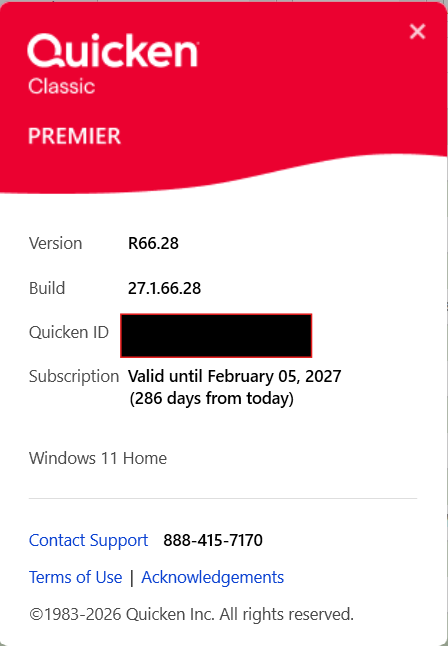
When I check for Updates it is showing my current release which is R66.28. However, when I go to the Quicken Mondo Patch website it is showing the latest being R67.7.
Shouldn't check for Updates show the latest release and not my current release?
Normally yes, but updates go through a staged release process where only a certain number of users are offered the update in order to be certain there are no major issues caused by the update. Manual updates are made available a few days in advance of the update being available for all users. At that time, you would see the latest release when you click "check for updates."
Ok. Thank you for the information on the process.
It did appear this morning when I checked for updates. Updated it and all worked well.
I honestly don't know anything about the above discussion concerning R66.28 or R67.7 nor do I have any idea where this magical Quicken Mondo Patch website might be, because I've never been able to find it.
I'm pretty sure that my problem really does need a Mondo patch, but, but no one seemed to be having constant 'unexpected error' issues that I have and no one can seem to tell me where to find it the patch.
I'm running Quicken 2014 Deluxe because I wanted to keep my financial data locally (not on the cloud) and I don't like subscription based products. I have transactions dating back to 1995, but around May of 2020, I started getting a pop-up screen that said 'unexpected error' with an error code. It asks if you want to send a report, but it won't let me do so. I also am unable to exit the program. Exiting often required using Task Manager. When I could finally open up the program, I found that I didn't just lose the last few transactions, I lost a LOT of data. I made backups often and ran validate and repair often as well.
So back then, in desperation, I asked if anyone else was having this problem and someone on the Quicken users forum asked me if I had installed the Mondo patch. I'd never even heard of the Mondo patch, but the man was nice enough to provide me with a direct link to the patch. Once I found it and installed it, the problem was solved and it's worked perfectly since then - until now.
Then, (stupid me) bought a newer small platform Dell running Win10 and just loaded my few programs back on to the computer (using physical discs) with no issues. Quicken 2014 Deluxe ran fine for on the new computer running Win10 - for a short while - and then I started getting the same 'unexpected error' screen over and over and over again just like I did in 2020. Now it locks up the program and I can't exit it unless I go to the bottom of the screen and close 2 windows - 1 blank and 1 with the error message. I could sometimes close it by opening the Task Manager. However, if I try to re-open it, all I got was another 'unexpected error' screen. The only way to get back into the program was to literally re-load the Quicken software from my disc.
I belatedly realized that with the new computer, and loading Quicken directly from my disc, I no longer had the Mondo patch and was hoping someone could provide me a link to it since the error messages I was getting looked identical to the ones I was getting back in 2020 and since the Mondo patch solved all my error messages back in 2020. I asked everywhere if someone could provide me with a link to the Mondo patch that I could install again and have it still work on Quicken 2014 deluxe. The previous link I got back in 2020 no longer exists and all of the other places that claimed to be links to the Mondo patch just come up with a 404 error.
We found a woman on eBay who was selling Quicken 2014 Home and Office, not Deluxe, but I figured H&O version wasn't that different and would still work with my software. She very specifically told me that the USB she was sending would include not only the Mondo patch, but other tweeks to make it work better on Win 10 or 11.
When I got it, I wiped the Quicken Deluxe from my computer and installed the Quicken version from the USB she had provided. It seemed to work fine after I took my last backup file and restored it. That also seemed to work fine, even thought I think I lost a bit of data, but nothing that wasn't easily re-entered. Then within a couple of days - back came the deadly 'unexpected error' messages that locked the program up again, and I had to do the same thing to just get out of (and subsequently also closed Quicken). The same thing kept happening again over and over and over again. If I tried to re-open Quicken, another error screen came up and once more and (again) the only way to get back into the program was to re-install it and restore the last back.
I've had multiple conversations with the seller, and she swears that the Mondo patch was included, but I don't think it's there because I'm getting the same error screen (with various different error codes), and I was getting back in 2020, and now have to go through an even worse process to close it and keep reloading the software just to open the program again.
I contacted the seller again and told her that the error messages were still locking everything up and told her that I kept finding different things that made it go into error death, like trying to use Bill Reminders (which is one of the things I use constantly) or almost anything that was a split transaction triggered the error message.She told me that for the time being, I should stop using Billing Reminders and just enter everything manually. (I already enter most things manually, but I also use Bill Reminder for ongoing bills and apparently I shouldn't use 'split transactions' either. I sent her screen shots of several error messages and she thought that the various Error codes would help her track down the problem. She hasn't come up with anything so far, but told me I needed to stop reloading the program over and over again. I told her (again) that re-loading the Quicken software was literally the only way to open the program up again.
I finally asked the seller if she would just PLEASE sent me a link to the Mondo patch she said was included in the program, just to see if installing that again will solve the same problems I'd had back in 2020 that got solved instantly with the Mondo patch. Instead, she had me go through a number of gyrations like holding down CTRL and SHIFT keys on the blank page until the file tab appeared at the top of the screen. After I got to that point, she had me go to 'file operations' and bring up 'validate and repair' again. I'd done this many times before so thought she was having me do something totally different, but it was the same thing I'd been doing all along. I told her never had anything that needed to be repaired in all the times I ran validate and repair, and every time I made a backup, the screen always came up and said my data had backed up successfully (and I have a LOT of backups).
The seller kept telling me that it wasn't the program, it had to be some corrupt data. But that still didn't make any sense to me. I think with all the gyrations and all the things she had me do - all of which didn't seem to show any errors or problems - proved that I don't have a problem with corrupted data or I would have seen it during all the validations and backups.
She hasn't responded yet to my question asking her to please just send me a link to whatever Mondo patch is supposed to work on Quicken 2014. The program seems to be getting worse and worse. I honestly can't get more than a few entries on quicken before it throws up an error screen. Even entering everything manually and not using bill reminder or splits.
So here I am, begging to find someone who understands this (much better than me) and can send me a link to the Mondo patch that fixed everything back in 2020. I'm frantic about this because I have so much data - back to 1995 - and I'm at my wit's end about what I can do to get back where I was before I bought the new Dell. If anyone has any answers to this - and most importantly could provide me with a way to get to the Mondo patch, I would be eternally grateful.
It's also been super fun spending hours (and now days) re-entering the same data over and over and over again, only to lose it. Credit card entries with a bunch of splits are especially time-consuming and just when I think I've made some progress I get the screen of death.