In the Lifetime Planner (LTP) and looking at the Event List just below the graph, I realized that a list without values does not convey much, so I asked myself two questions (leading to two new ideas):
- Question-1: "How much did I allocate for those items?" I had to click on each item on the list one by one to view the numbers. So I thought "wish the amounts were displayed right there"💡
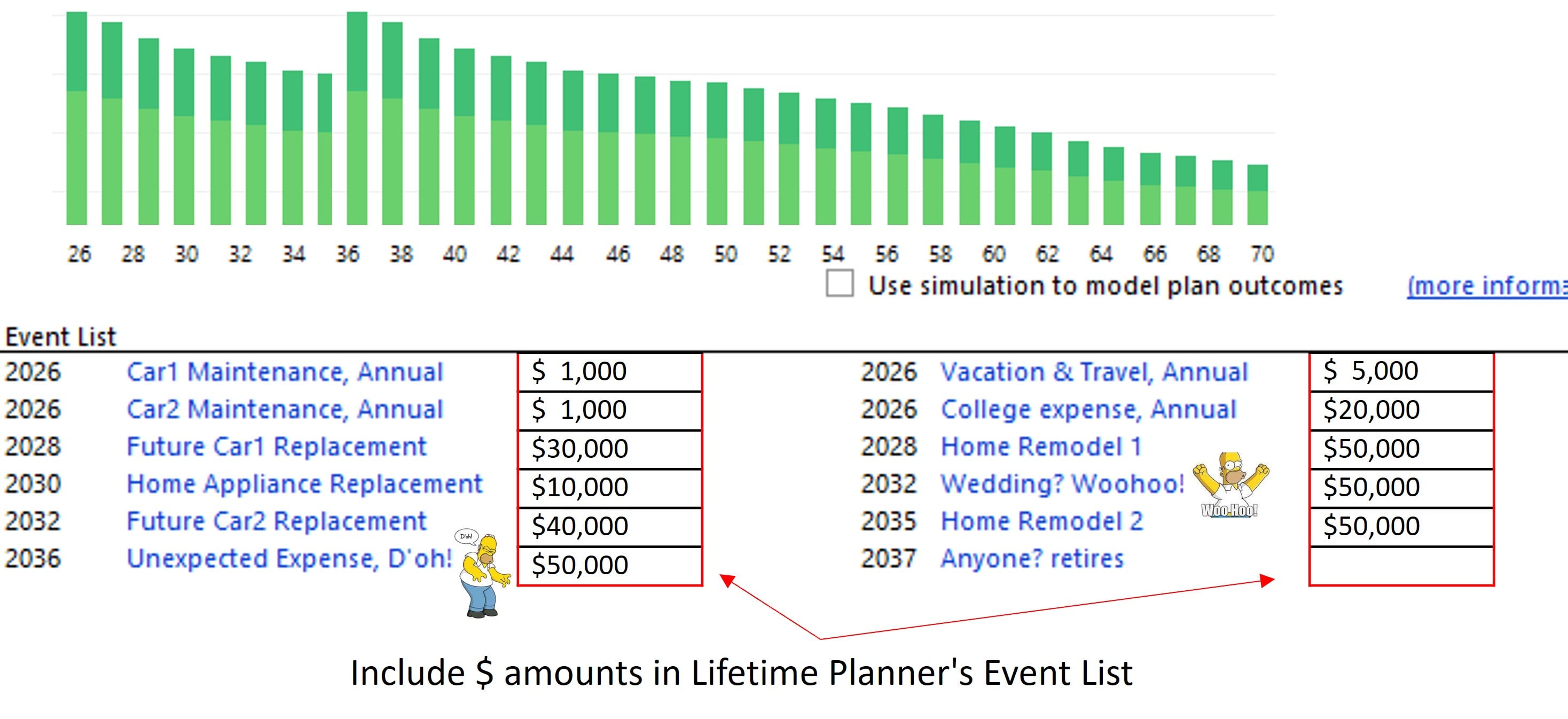
Idea 1 - show Amounts on the main LTP screen: Include $ amounts for each 'Event List' item that is displayed just below the Lifetime Planner graph. Benefit: In one glance users can see the associated amounts, to determine if the amounts are still valid or need revisions. Here's a mock-up:
- Question-2: "How did I arrive at those values?" Because some numbers didn't quite make sense, I must have made some assumptions I cannot remember! "wish there was a way to capture my thoughts back then" 💡
Idea 2 - add a Memo field: Add a comment/memo text field within each event/item to allow users write an explanation about the item, inclusions, exclusions, assumptions, whatever, etc. Benefit: A memo provides additional details and data about the items leading to better valuations.
************************************************
Vote & comment: Quicken requires ~50 votes to take an idea under consideration. If you like this idea bookmark it and, (a) Vote by clicking on the yellow/gray voting box
 located just below this post and observe the count increment. (b) Add comments now and also in the future as they will bring visibility and new life to the post, but note that comments alone will not count as a vote. Thank you.

