Reminder to sync to cloud no longer working
Wsamuel3
Quicken Windows Subscription Member ✭✭
I have Windows 11 and Quicken Classic, and have the most recent version of Quicken. Under mobile & web, I have the “remind me to sync to quicken cloud on exit” checked off, but recently when I close, the reminder does not come up. How can I get it back?
Tagged:
0
Comments
-
Hi @Waste25,
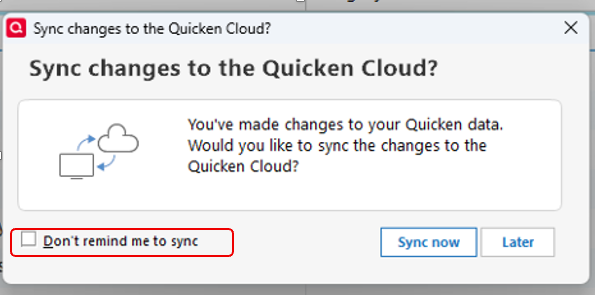
Thank you for reaching out! It’s possible that the “Don’t remind me to sync” option was selected at some point. Resetting the Quicken warnings should restore the reminder.
Please follow these steps:
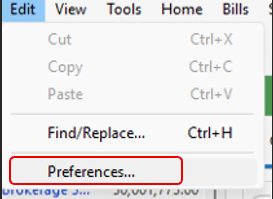
- Go to Edit
- Click on Preferences
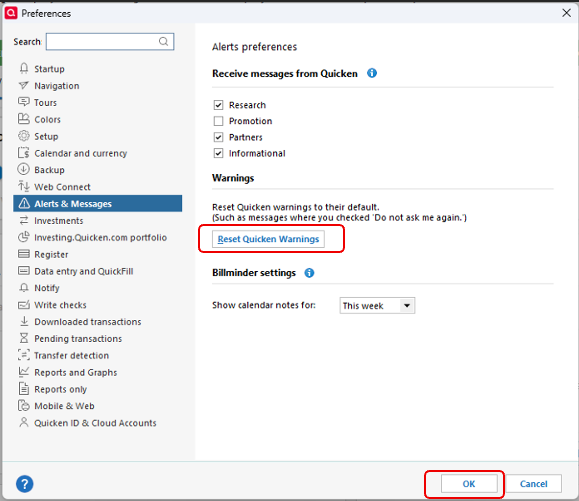
- Select Alerts & Messages from the left panel
- Click Reset Quicken Warnings
- Click OK
- Make sure Sync to cloud on closing Quicken is checked
After completing these steps, close Quicken and verify whether the reminder appears as expected.
Please let me know how it goes!
Quicken Laura
Make sure to sign up for the email digest to see a round up of your top posts.
0