For the past few days I have been required to reauthorize my Chase accounts after EVERY update. What's going on here?
Hi @dmhump1,
Thanks for taking the time to reach out to the Quicken Community!
I understand how frustrating this situation can be. After some internal research, I did find an error that may be causing the issue (PAUTH_INVALID_TOKEN). Before proceeding with any troubleshooting, I strongly recommend creating a backup of your file.
Please follow the steps below:
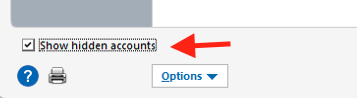
To deactivate account(s):
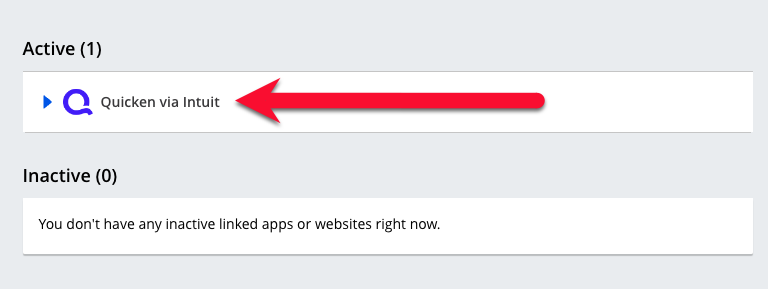
To stop sharing access (Chase website):
Once access has been revoked, reopen Quicken and try reconnecting your accounts.
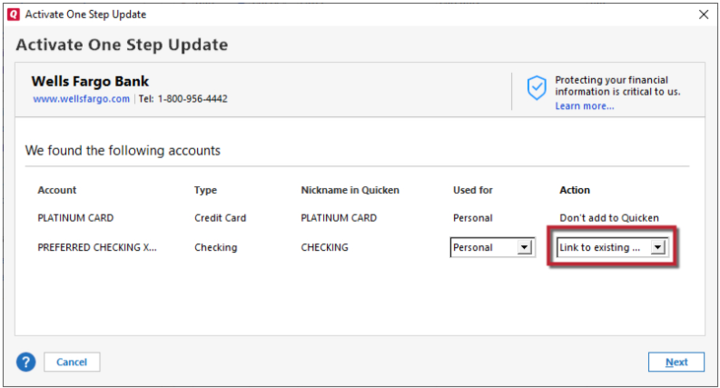
To reactivate account(s):
Note: If the accounts are joint and appear in the secondary set of credentials during the authorization process, only select those that belong to the main set of credentials.
I hope this helps! Please let us know how it goes.
Thank you. I had to reauthorize again today (4th day in a row). One of the accounts had been deactivated. I'm currently traveling and will try your solution when I return and will let you know the results.
Thanks for following up!
I recommend deactivating all Chase accounts in Quicken by following the steps above for each account before reconnecting them. This helps ensure a clean reconnection process and can prevent potential issues.
If you run into any problems, please let us know.
I look forward to your reply!
I did what you suggested yesterday and this morning there were no error messages. Fingers crossed. For anyone else who might need this, I will add that when you go through this process of un-sharing access, Chase displays a warning about processing payments, etc. I use Quicken only to keep track of things, not to pay bills or execute transactions directly, so that warning didn't apply to me. But it may to others.
Thanks for following up and for sharing that helpful information, it will benefit other users who may encounter the same issue.
I checked my internal tools, and the status for Chase accounts looks good. I recommend continuing to monitor things, and if you encounter any errors or issues, please don’t hesitate to reach out again.
We’re happy to help!