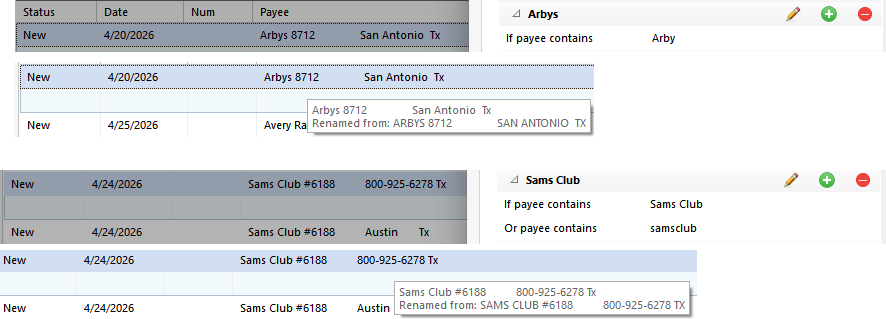
Here are two new downloads that should clearly match renaming rules but are not getting renamed. Any ideas? I'm about to give up on Quicken.
@Mike Harris … Your Sams Club renaming looks good to me. I'm wondering about that Arby's one, though.
It's my understanding that the "contains" operation looks for the text Arby as a delimited token. The delimited tokens in the download would be "Arbys" and "8712". I would think changing your rule to be payee contains Arbys it would work.
I know that the token matching has to be in order, too. I don't see that as a problem with your Sams Club rule. According to the docs, your Sams Club #6188 download would have 3 tokens: "SAMS" "CLUB" "6188". I'd expect a match on payee contains Sams Club (not case sensitive, 2 of 3 tokens matching in order).
Be sure that you have renaming enabled (Edit, Preferences, Downloaded transactions, [X] Use my renaming rules). If that's already enabled, consider running a File, Validate and Repair, Validate file step because there may be some underlying index within the Quicken file that needs to be repaired.
I have probably 50+ renaming rules, and they're all working. I turned off auto memorize payees and auto create new rules when I rename payees).
"It's my understanding that the "contains" operation looks for the text Arby as a delimited token. The delimited tokens in the download would be "Arbys" and "8712". I would think changing your rule to be payee contains Arbys it would work." Can anybody confirm or deny this? The problem is that some transactions come through as "arby" and others as "arbys", so I'm trying to catch them with one rule. If this is really how it works, there needs to be wildcards. I've already validated and super validated, because I'm trying to figure out why Quicken is SO SO SO SO SLOW accepting downloaded transactions, like many other people report. Other renaming rules are working fine. Quicken deleted 80% of my rules last year, I thing in response to a file validate. It's really gone downhill.
Looking at the very first picture in this discussion …
Have you tried defining a Renaming Rule for "Arby" / "Arbys" similar to the one showing variations of "Sams club" Or "Samsclub"?
I'll try that. Sometimes when I try strings that are subsets of another one, Quicken just ignores it when you try to add the new rule. However, this time it did work. That still doesn't explain why Arbys didn't match Arbys.