How do you delete multiple transactions at once in an investment account?
Hello @rbridges01,
Thank you for posing this question.
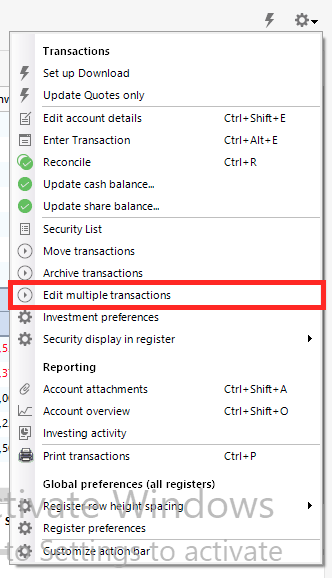
To delete multiple transactions in an investment account in Quicken for Windows, select the gear icon in the top-right corner of the register. From there, select Edit multiple transactions.
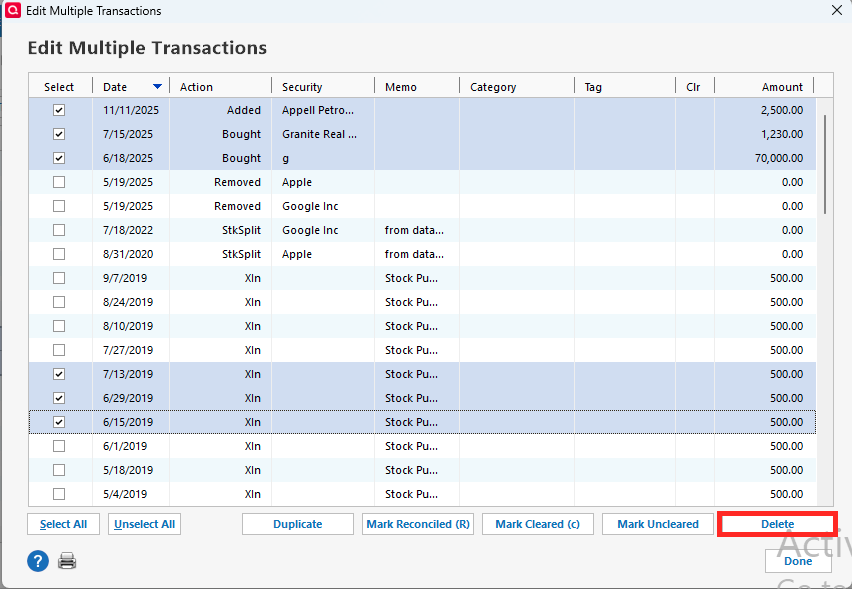
A window will open, and you can select multiple transactions and then click Delete.
Hope this helps!
@rbridges01,
Just checking in, we haven't heard back from you in a while.
Do you still need assistance?
Thank you!
Hello again,
Checking in once more before this thread is closed.
Let us know if you still need assistance.
Due to the lack of response, I went ahead and closed this post.
If you still require assistance, please feel free to start a new post.