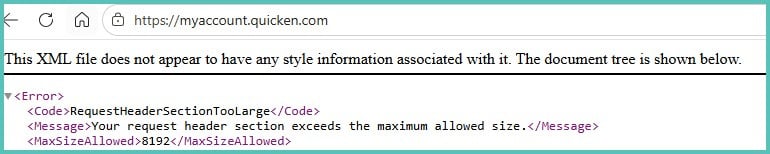
I can't log into Quicken, I'm getting some error message. 😣 Otherwise, Quicken Classic Deluxe / Windows is working fine.
What to do?
Thanks.
I just logged into mine with no issue.
Did you try again?
Hello @Chench53,
Thank you for reporting the issue you are running into.
I have some follow-up questions for you:
Looking forward to your response!
Hadn't tried in a while but signed up for online backup yesterday w/o problems. Used same browser today, didn't work. Just tried with different browser and got in, so it's browser related I guess.
Thank you nmestanas and Quicken Alyssa for your replies.
Windows 11, desktop PC. The problem browser is Edge. Chrome has no problems. Cookies/cache cleared. And I rebooted. Will give it a day and see what shakes out. Thanks again.
@Chench53,
Thank you for following up and letting us know you were able to resolve this by using a different web browser.
If you need more help, don't hesitate to reach back out!
Thanks again!
I does appear to be an issue with your Edge. I successfully logged into my Quicken account using Edge.
Make sure your Edge is updated. Double check for any extensions (like ad blockers, etc.)
Edge updated. no ad blockers. Don't find any extensions.
I did notice when I type quicken.com into browser (either edge or chrome), then it changes to this
https://www.quicken.com/?mrasn=1623114.2026166.TBensB4f
which if I make that an active link, I see this and I can get to other quicken pages on quicken.com but still get that weird message if I try to sign in. 😔
Time to get husband who's IT on the case I suppose.
Thank you for providing us with some more insight.
Interesting issue for sure. Maybe the browser needs to be updated. Just another thing you could check.
Browser is updated.
Thanks for checking that and following up.
If your husband gets to the bottom of it, let us know what his findings were!
In the meantime, you can access Quicken.com with one of your other browsers.