NY's 529 College Savings Program Account Error
Hi everyone,
I’ve been unable to connect my NY 529 account to Quicken Classic for Mac for most of this year. I’ve seen previous community posts marked as resolved, but I’m still experiencing the issue.
The current error message says:
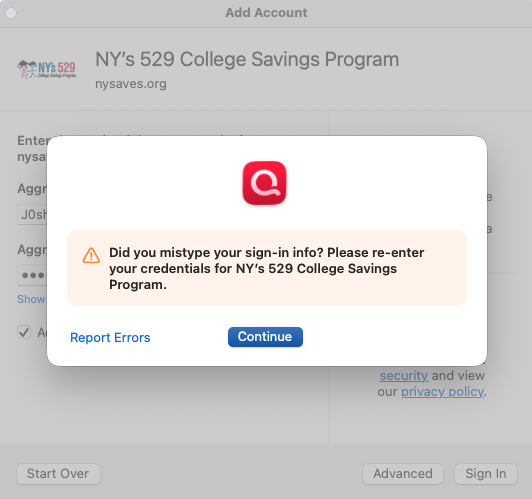
“Did you mistype your sign-in info? Please re-enter your credentials for NY’s 529 College Savings Program.”
I can successfully log in directly on the NY 529 website, so I’m confident my credentials are correct. I’ve also tried deleting saved credentials from Keychain Access and resetting my password multiple times, but the issue persists.
Is anyone else still experiencing this, or does anyone have a fix?
Thanks in advance for any help.
Comments
-
Hi @JoshyG,
Thank you for taking the time to reach out to the Quicken Community and for sharing the steps you have already taken.
I recommend reviewing our support article for this error and following the outlined steps. This includes checking any accounts connected with this financial institution and ensuring they are properly deactivated if still active.
Please follow these steps:
- Go to the Accounts menu and select Hide and Show Accounts.
- Uncheck any accounts for this financial institution (FI) that are currently hidden in the list.
- Once completed, click on the account name for your account(s) in the Accounts toolbar in Quicken.
- Select the Settings icon in the bottom-right corner.
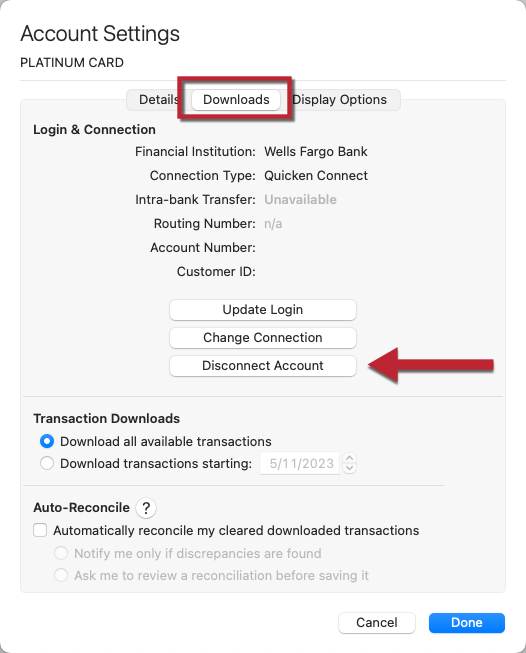
- Go to the Downloads tab.
- Click Disconnect Account.
- Select Done and repeat this for each account associated with this FI.
- Quit Quicken.
Next, please confirm once more, that the old password has been removed from Keychain.
After that, try adding the account again:
- Go to Accounts > Add Account.
- Type the name of the financial institution and select the appropriate option.
- Enter your login credentials and click Continue.
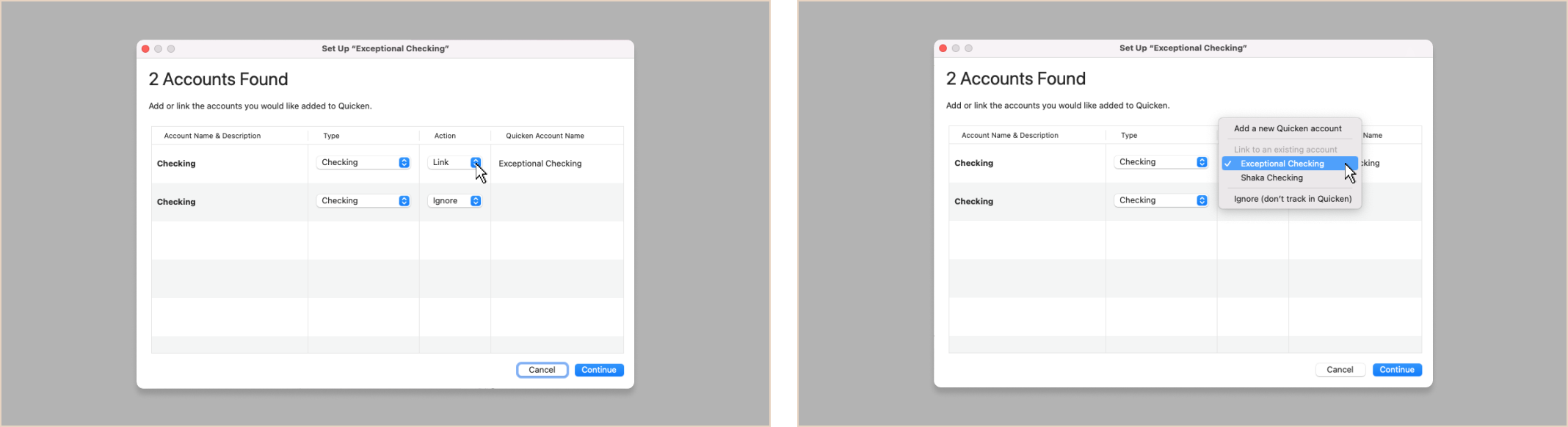
- When Quicken finds your accounts, carefully link each detected account to the correct existing account in Quicken.
If the steps above do not resolve the issue, I recommend contacting Quicken Support for further assistance. They can guide you through additional troubleshooting steps in real time or escalate the case if necessary.
Phone support is available Monday through Friday, from 5:00 AM PT to 5:00 PM PT.
I hope this helps!
Quicken Carlos
Make sure to sign up for the email digest to see a round up of your top posts.
0