I am getting a CC-502 error this morning when downloading updates for my Navient Loans account. It says that Quicken is aware and looking into it, but I am not seeing any post about it.
Is Quicken currently looking into this issue? Thanks.
Hi @Tammy Borgnis,
Thanks for reaching out to the Quicken Community and for sharing the screenshot with us. It is very helpful.
This error CC-502 is typically caused by maintenance on the bank’s servers that Quicken uses to download transactions. We recommend that you do not deactivate and reactivate your account(s) for this specific issue.
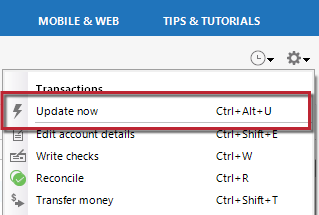
Instead, I suggest refreshing your account information:
If refreshing your accounts does not resolve the issue, I recommend waiting one business day, as this error is often related to temporary maintenance on your bank’s website. You can try updating again after a few hours or on the next business day.
If the issue still persists after one business day, I recommend contacting Quicken Support for further assistance. They can guide you through additional troubleshooting steps in real time or escalate the case if necessary.
Phone support is available Monday through Friday, from 5:00 AM PT to 5:00 PM PT.
I hope this helps!
@Quicken Carlos Good morning Carlos. It has been 24 hours and I am still getting a CC-502 error for Navient.
Can you please tell me if Quicken is aware and looking into this issue? It says that you are. I don't want to call support and wait on hold for an issue that Quicken is already looking into.
I also tried creating a brand new Quicken file and just adding the Navient Loans account. I can't even add the account. Same error.
@Tammy Borgnis,
Thank you for following up!
This is not considered a known or widespread issue at this time. If you followed the steps posted by @Quicken Carlos above, and it has been more than 24 hours, the next step is contacting Quicken Support for further assistance. They can guide you through additional troubleshooting steps in real time or escalate the case if necessary.
Let us know how it goes!
@Quicken Alyssa So why does Quicken tell me that you are looking into it when you are not?
Also, I just spoke with Quicken support and was told that there is nothing they can do. That I just have to wait for Navient to finish the maintenance.
So, what do I do now?
Thank you for posing this question.
If you look at the first screenshot you sent, the message is in a section labeled "Instructions from Financial Institution".
I am not sure why it looks different in your second screenshot; maybe you updated your software since yesterday. I am just speculating, and I agree, the way it looks in the second screenshot does seem like Quicken is the one looking into it. I have passed along this feedback internally. At any rate, it is a message from the bank and indicates that they are looking into it.
We can get this escalated from our end as well, if needed. In order to do this, you will need to reach out to Quicken Support. I know you said you have done that already, and I did check to see what could have happened with that interaction. Unfortunately, I do not see any documented interaction. Please try reaching out once more. Ask for a ticket number in case we need to reference it.
@Quicken Alyssa It has been multiple days now and I am still getting CC-502 errors for Navient.
Has Quicken acknowledged the issue yet?
Thanks for following up. Unfortunately, the issue is not reproducible, which limits the troubleshooting steps we can complete from our side. This type of error requires an agent to review the logs directly and escalate the case when necessary.
As @Quicken Alyssa as mentioned previously, our team has confirmed that the message is generated by the financial institution and does not originate from Quicken. Based on the information available, the connection itself is responding with an institution-Side message rather than a Quicken system error.
Since we are unable to reproduce the behavior on our end, the next best step is to contact Quicken Support directly so they can investigate the logs further and determine whether additional escalation is needed. They will also be able to gather account-specific details that are not available through this channel.
We understand this situation can be frustrating, but at this point, contacting Quicken Support is the appropriate path forward for additional troubleshooting and escalation.
Figured I would update this.
The issue is that Navient (now called MOHELA) updated their website to ask you when you login if you want to setup two-step authentication for your account. If you click "Not Now", it will keep popping up and Quicken downloads will NOT work (i.e. you will get CC-502 forever).
You need to "Opt Out" or setup 2FA in order for the downloads to work again. The second I clicked "Opt Out", the downloads started working again.
Thank you for coming back to report your findings!
I'm sure this information will be helpful to others who run into this. If you need more help, let us know.
Thanks again for sharing!