I logged in, went to my Profile page, but do not see how to access the Subscription / Billing page. Can you help?
Hi @DaveManz,
Thank you for reaching out. You can manage your Quicken membership in the My Account section of Quicken.com. When you log in with your Quicken ID (email address), you can see your product version, your date of activation, and your subscription expiration date under Plan Details.
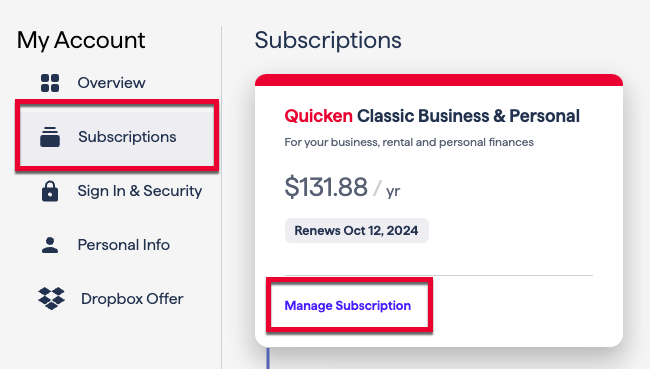
If you need to update your payment information, go to the Subscriptions section and select Manage Subscription.
I hope this helps!
Just checking in, we haven't heard back from you in a while. Do you still need assistance?
Thank you!
Thanks for the tips. I, incorrectly, was trying to get to the My Subscriptions page via my Quicken community login. It worked when I logged into my Quicken account.
I'm glad to hear that everything is working now!
If you have any additional questions or need further assistance, please don't hesitate to reach out.
To avoid all this confusion, aren't these IDs supposed to be the same?