Yes, I had to delete about 30 out of 186 transactions I downloaded today because they were duplicated.
Hi @Annoyed3, If you haven't done so already, I suggest following the steps outlined in our support article about missing transactions.
There are a few possible causes of duplicate transactions. I suggest trying the steps outlined in our support article below to help resolve the issue. Alternatively, you can restore a backup from before the issue started.
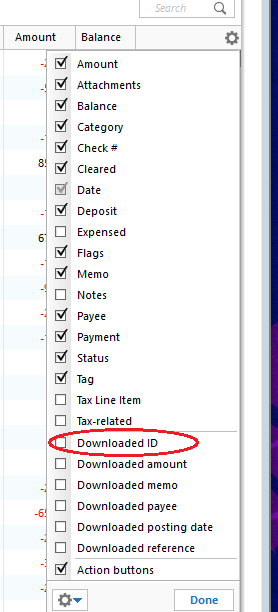
To determine what may be causing the duplicates, we'll first need to review the Downloaded ID for the affected transactions:
Based on the Downloaded ID, determine which of the following scenarios applies:
Duplicate and manual transactions do not have a Downloaded ID
This means the downloaded transaction was not properly matched to the existing manual transaction.
Solution:
Downloaded transactions appear twice with the same Downloaded ID
Transfers are appearing twice
This can occur when a transfer is downloaded for one account and then downloaded again for the other account, but the two transfer transactions are not properly matched.
Deactivating and reactivating the account to change the connection method caused downloaded transactions to appear again
This is typically a one-time occurrence. If you have not deactivated and reactivated the account in Quicken, this scenario does not apply to you.
Downloaded transactions appear twice with different Downloaded IDs
If your bank and/or its service provider is making changes to how they present data to Quicken, they may transmit the same transaction with two different IDs.
Please let me know if any of these scenarios relate to the issue you're experiencing.
I look forward to your reply!
Hi @Annoyed3,
I just wanted to follow up since I haven’t heard back from you. I’m checking in to see if you still need assistance.
Hello again, @Annoyed3. I am checking in once more before this thread gets closed. If you need assistance, let us know.
Due to the lack of response, I went ahead and closed this post. If you still require assistance, please feel free to start a new post.
Thank you!