Using Quicken Cloud on Windows.
Also, the LPL account balances are much different than actual LPL balances. Anyone experience the same?
Hi @Qknmep, Thanks for taking the time to post in the Quicken Community. After reviewing our internal tools, I can confirm that the CC-502 error started occurring today. The balance can appear incorrect because Quicken is temporarily unable to successfully connect to the financial institution to download the latest account information.
For this type of error, we do not recommend disconnecting and reconnecting the affected accounts. If you haven’t already done so, I suggest refreshing the account information, as recommended in our Support Article:
If the issue persists, I suggest waiting one business day. This error is typically caused by temporary maintenance or an issue with the financial institution’s website.
I hope this helps!
Thanks Carlos. This morning I'm receiving a "CC-587" error when updating my 6 LPL accounts. Unfortunately, there are more than 10 error log file attachments that exceed the # of attachments allowed to be sent to Quicken. I'll need to make a call or wait until this is corrected.
Also, the LPL account balances in Quicken do not closely match the actual LPL account balances as stated in LPL. Any idea as to why?
It's the weekend so will wait as you suggested 1 business day.
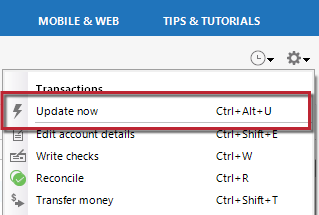
I don't see the same menu as you shared in your screenshot above. Rather, some of my LPL accounts in Quicken have a menu (when clicking the gear) with "Update Quotes" and some other LPL accounts in Quicken have "Update Transactions" vs. "Update Now".
Hi @Qknmep, Thanks for the additional details. Since you’re working with investment accounts, the option you’re seeing may be Update Transactions rather than Update Now. I suggest clicking Update Transactions to refresh the account information. This update should also refresh the information shown for the banking accounts.
If you continue receiving the CC-587 or CC-502 error after trying this, please let me know. I’ll be happy to help with the next steps.
I look forward to your reply!
Hi Carlos,
I don't receive errors when selectively updating 3 of my 6 accounts.
Some of my LPL accounts updated in Quicken are lower $ than the actual values reported on the LPL website.
I see that I can export a Quicken .qdf file from LPL and import to Quicken. I never did this before so not sure I want to run the risk of messing up my LPL accounts in Quicken. I backed up Quicken just in case I decide to do it.
Thanks again!
Hi @Qknmep, I’m glad to hear that you’re no longer seeing an error code or message. I understand the concern with the values still showing incorrectly in Quicken.
Based on your description, it sounds like some transactions may be missing. To help determine whether that is the case, I recommend following the troubleshooting steps outlined in our support article, How to Resolve Balance Discrepancies for Investment Accounts.
Review and Resolve Placeholders
Quicken enters a placeholder entry when you’re missing part of your investment transaction history. For any security, if the total number of shares bought or added in your transaction list doesn’t match the number of shares in your account, Quicken adds a placeholder entry to make up the difference. If placeholders do not show in the account, I suggest reviewing your securities and Quantity of shares.
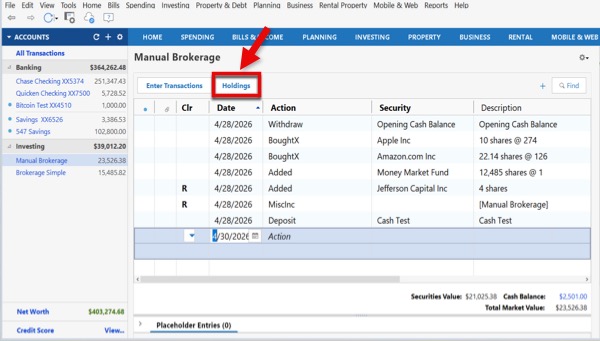
To review your holdings:
Note: If you don’t see the Holdings button, your account may be using the Simple Tracking Method (Positions Only). You can access your holdings by:
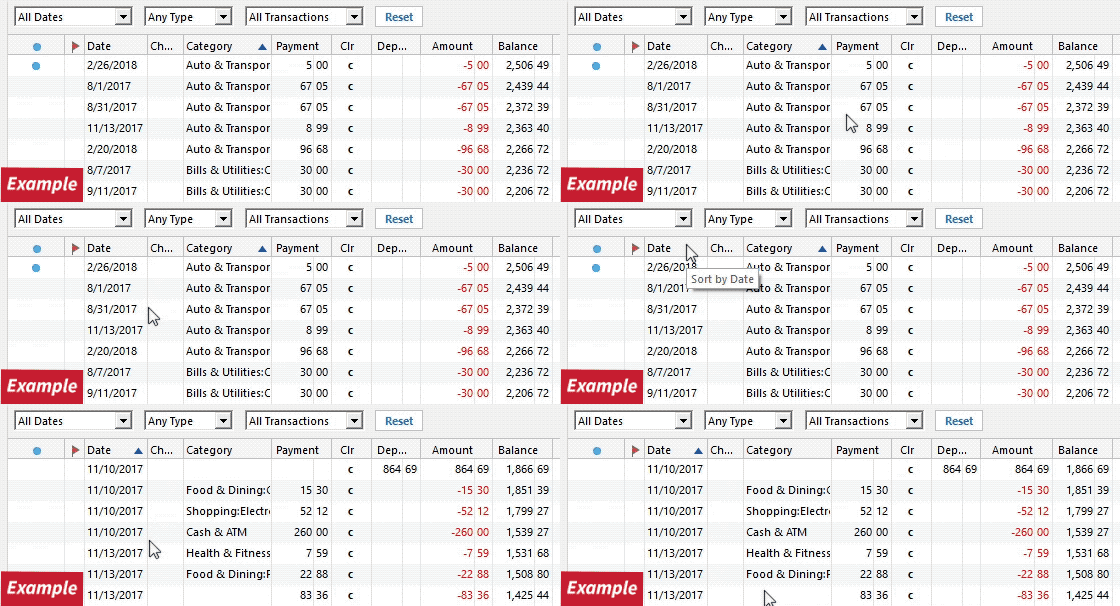
If the account updates successfully but no new transactions download, I also recommend following the steps in our support article for missing transactions. Confirm that the Sort Order in your account register is by Date; just click the top of the Date column in your account register. If applicable, click the Reset button at the top of the register.
Try refreshing your login session: Go to Help > Refresh Sign in. After you complete the login process, try running a One Step Update again. The QFX file will let you enter the missing transactions, but this is a manual workaround. If you would like to continue downloading the transactions automatically, I suggest contacting Quicken Support so they can review the issue and escalate it if necessary.
I hope this helps! Let me know how it goes!
Unfortunately I'm still getting the error message. Is there anything I should be doing?
Hi @Rick Guilander,
Thank you for chiming in and sharing your experience.
At the moment, we don't have any additional troubleshooting steps to recommend for the error you’re encountering. Our team is aware of the issue and is actively working toward a resolution.
To stay informed about any updates, you can bookmark the community alert. This will help you keep track of new information as it becomes available.
Thank you for your patience and understanding!
I have always manually downloaded a .qfx file from LPL and it has worked fine.
Hi @MarkTwain,
Thank you for sharing your workaround. It may help other users experiencing the CC-502/FDP-102 errors as well.
Thank you!
I did export a ..qfx file from LPL for one of my accounts to test it out. Appears to work, the balances are closer but not exact match. Some of the LPL accounts don't offer a .qfx export option though.
Thanks all!
My LPL accounts have not updated since September 13. I got errors 9/20 and again today 9/26 in trying to update quotes.
Hi @Qknmep and @JCLarson, Thanks for joining the discussion. I can see the CC-502 error associated with your accounts. Since not all accounts offer the option to download a QFX file, we’ll need to continue monitoring the Community Alert. We currently have a Community Alert for this issue with LPL Financial. Our teams are investigating the connection issue, and we’ll continue to provide updates through the alert as more information becomes available. Thanks for your patience while this issue is being investigated.