All of my Capital One banking accounts have not been downloading for over a week. I continue to get the error CC-501. Is anyone else having this issue?
[Edited-Readability]
I got it about a week ago. Deactivating the account cleared it up for me.
@chblanton,
Thank you for reporting the error you are seeing when trying to update your Capital One accounts.
After reviewing your connections internally, it looks like you're seeing a different error. On our end, this shows as an FDP-350, which translates to a CC-901 for Quicken Windows. Most likely, your security token has expired, and you need to re-enter your account credentials.
If you have multiple accounts with one financial institution updating its connection method, you'll need to authorize each account individually.
For example, if you have a checking account with Capital One 360, and a credit card account with Capital One - Credit Cards, you would need to go through the process twice, one for each instance of that financial institution. Don't worry–Quicken will prompt you if you need to go through the process more than once.
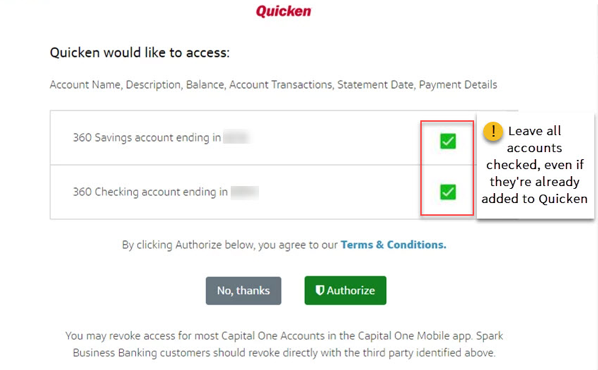
If you do need to go through the migration process more than once, it's important that you don't uncheck any accounts listed on the authorization screen, unless you don't want to see the account at all in Quicken.
If you uncheck accounts during the process, this will revoke your authorization and prevent the accounts from updating. If you've unchecked accounts, follow this FAQ for Windows or this FAQ for Mac to authorize them again for download into Quicken.
NOTE: If you have multiple accounts with just one instance of the financial institution, you'll only need to do this once.
Please open the CC-901 article I have linked above and follow the steps to resolve this.
Let us know how it goes!