10/15/26 11:05 AM Phoenix Time, during repeated attempts to Update Transactions CC505 returned.
Hi @CaveCreek,
Thank you for sharing the details of what you're experiencing. I've checked your account and confirmed that the CC-505 error first appeared today.
As explained in our CC-505 support article, this error may be related to temporary connectivity limitations during market hours. I recommend trying to update your account again later. If the issue persists, please wait one business day and then follow these steps to refresh your online account information:
Try refreshing your online account information:
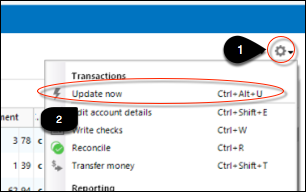
1. From your account register, select the Actions gear icon at the very top right of your register (Ctrl + Shift + N). 2. Select Update Now.
3. Follow the on-screen instructions to complete the update. 4. Repeat these steps for each financial institution experiencing this error.
If the issue continues for more than 48 hours, please contact Quicken Support for further assistance.
You can find the Quicken Support phone number here: Support Home | Quicken. Phone support is available Monday through Friday, from 5:00 AM PT to 5:00 PM PT.
Please let me know if you have any additional questions.