For a few days in a row now, I need to reauthorize my PenFed connection. The process works fine, but the next day is required again. Is there a way to make it stick?
Hi @langejos,
Thanks for sharing the details about the issue you’re experiencing with Pentagon Federal Credit Union.
As it is outlined in our support article, there are two potential causes for this behavior:
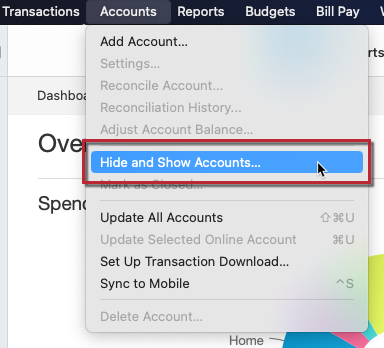
If you’re not using multiple data files, I suggest checking whether any hidden or closed accounts are still connected for downloads by following these steps:
Once the affected accounts have been disconnected, the repeated authorization prompts may stop.
If the issue persists, could you please clarify a few things?
Your answers will help us better understand what may be causing the repeated authorization prompts.
I look forward to your reply!
I am having the same problem with Penfed, which started a few days ago. None of the possible causes you mention are applicable in my case. In the past I had to re-authorize every month or two (I think) but now it appears to be requiring it every day. I have not changed the status of my accounts in many months, in fact, Penfed downloads have been more reliable than they have ever been. I am on macOS Quicken, if that makes any difference.
My gut feeling is that PenFed has changed something on their end, but it is notoriously difficult to get them to understand these things.
Hi @Harry D,
Thanks for your reply and for confirming that the causes mentioned above do not apply to your situation.
After checking our internal tools, I found that all your accounts are showing an OK status. This makes it difficult to determine what is causing Quicken to repeatedly prompt you to reauthorize your accounts.
Given the nature of this issue, I recommend contacting Quicken Support for further assistance. They can walk you through additional troubleshooting steps in real time and escalate the case if necessary.
Phone support is available Monday through Friday, from 5:00 AM to 5:00 PM PT.
Thank you for the quick and comprehensive reply! Just as for "Harry D", none of the possible causes you outlined apply. I have just tried to connect again and get a "Login failure when using partner auth credential" PAUTH_INVALID_TOKEN (FDP-350) error.
They're showing OK because I went through the re-authorization procedure. So if I get the "need to re-authorize" message, I should contact Quicken Support right then? I will try to do that.
Hi @langejos and @Harry D, Thanks for providing the additional details.
If you were able to complete the authorization process successfully, that would explain why your accounts are now showing an OK status in our internal tools. However, the previous FDP-350 error may indicate that the security token has expired. In this case, revoking Quicken's existing authorization through your financial institution's website and reconnecting the accounts may help resolve the issue.
If you haven't already done so, I suggest following the steps outlined in our support article for the FDP-350 error. Before proceeding, please create a backup of your Quicken data file. Then follow the steps below:
To deactivate all accounts
Once you deactivate the accounts related to Pentagon Federal Credit Union
I hope this helps! Please let us know how it goes.
I will try this later today. Meanwhile, is it the case that I must disconnect EVERY one of my Penfed accounts before re-authorizing?
Thanks for updating us!
Yes, you should disconnect all PenFed accounts before reauthorizing. That way, you can reauthorize all of them at the same time, instead of having to do them one by one.
Let us know how it goes!
This problem seems to have cleared up for me. I didn't do anything out of the ordinary. Thanks for the help!
Thanks for following up and letting us know you are no longer experiencing this issue.
If that changes, or you need more help, don't hesitate to reach back out.
Thanks again!
Well the problem seems to have returned. Right now it's asking me to re-authorize. I will leave it in this state for a few hours if someone is willing to check on it and perhaps glean more information.
The only factor mentioned before is that I do have two different Quicken files, but no accounts overlap between them.
I needed to update accounts, so I went ahead and re-authorized. Assuming the problem isn't really fixed, is there anything I can do to help you diagnose it? Leaving my accounts un-authorized and not updated is not a solution for very long.
Hello @Harry D,
Thank you for coming back to the Community with your issue. I am happy to assist!
I looked into our internal tools and noticed that the reason you were having to reconnect the accounts was due to getting the FDP-350 error. That error is a PAUTH_INVALID_TOKEN error.
Since the issue continues to recur, we’ll need to try revoking Quicken’s authorization through your bank’s website.
Please refer to the FDP-350 Support Article. Start with the section titled “If the issue persists.” The first steps are outlined below:
Please continue with the remaining steps in the article and reconnect your accounts.
Once you’ve completed these steps, let us know if they resolve the recurring reconnection issue.
I look forward to your response!
Thanks again.