I realized today, when trying to update all accounts in Quicken, that it was not downloading transactions from several institutions including Fidelity. Hence me adding onto this discussion. Seems like it's happening to multiple people! But it had also stopped downloading from Wells Fargo, Chase, Amex and Charles Schwab. All institutions showed up on the 'One Step Update Progress' window (and each account in the account list has the little blue circular arrow showing it's updating) however 'The One Step Update Summary' was missing each of these institutions and there were no error messages. To try and resolve this for each institution I went into one account for each institution, selected settings, edit account details, online services, and 'Reset Account.' That reauthorized each institution and it downloaded transactions for the one account that I'd selected to reset. I also deselected every institution on the 'One Step Update Settings' page and then reselected them. None of this helped. When I do the full one step update none of the institutions I mentioned downloaded any transactions and they were still missing from the one step update summary. I also went through the file validation process. Nothing has resolved the situation and since this applies to multiple institutions I have to believe that issues lies on the Quicken side. Any suggestions to help resolve this would be appreciated.
A few more thoughts / comments. Everything was downloading perfectly before I went on vacation in Oct for a couple of weeks. Since I've been back that is when I noticed the issue. Nothing has changed with my accounts, computer or quicken during that timeframe. Now when I try and update Fidelity from one of the accounts I get the One Step Update Progress windows showing Fidelity Investments and 'Waiting..' After several minutes it looks like it times out and shows me the One Step Update Summary window that says the update was completed but no institutions as listed, no errors either, just a blank window. My quicken files are stored on my laptop in the default directory. If I look at the account list several credit cards show they updated today the Fidelity accounts are all Yes (Express Web Connect+) but the last download says 'Not Available' although it did download earlier this month. And the correct name is listed under the Financial Institution. There is also a last reconcile date for each account.
@DerekG Thanks for the additional details in both your comments. What stands out to me is that this appears to be affecting multiple financial institutions, not just Fidelity. Also, the fact that the institutions appear in the One Step Update Progress window but are missing from the One Step Update Summary window, along with Fidelity remaining at "Waiting..." and Last Download showing "Not Available," suggests the issue may be with the One Step Update process itself rather than with a specific financial institution.
Since you've already validated the file and reset accounts, I would next suggest:
Given that multiple financial institutions are involved, your issue may ultimately prove to be separate from the Fidelity-specific issue being discussed here.
Thank you for sharing your experience. I am happy to help.
I reviewed your accounts in our internal tools and noticed that you are getting an FDP-350 error for Fidelity and American Express. To help resolve those errors, we will need to revoke Qickens access on the financial institution's site and then reconnect the accounts. Please do the following steps:
When looking for Wells Fargo, I do not see any login attempts. This can happen when using the Direct Connect connection method. As the connection and security are managed by the bank. Please confirm the connection method you are using for Wells Fargo.
I hope this helps.
I look forward to your response.
@Sceptic / @Quicken James
A quick update. I tried cancelling the Fidelity authorizations and setting it up again. Same issue. I did the super validate - no issues found.
So then I tried going to 'Mobile & Web' and I did a 'Reset your cloud data.' Having done that I tried a One Step Update again and all the fidelity transactions across all accounts downloaded as did the other instituations that I seemed to be having issues with as well. So it looks like it worked and everything is now downloading correctly. So that is good.
But I did notice that not all institutions were listed in the One Step Update Summary window. So that still seems wrong. And when I look at the account list it's saying the last download is 'Not Available.' But it it continues to work I can live with those. I try again in a few days and post an update if it stops downloading again. Thanks for your help and suggestions.
Hi @DerekG,
Thank you for the information.
I am glad you were able to get the accounts to download and are now current.
You stated that not all accounts were listed in the One Step Update Summary. Did the accounts update even though they were not listed?
Thanks again for the update.
Sorry for the delay in replying. We were on vacation (out of the country) for a couple of weeks. I just did another One Step Update, and it looks like everything is working, but yes, on the summary after the downloads complete, the summary is missing several of the accounts that actually downloaded. Minor, but still looks like a bug. Let me know if there is anything I can do to help with resolving this or if you need more info. Fidelity is one of the companies that did not show as having anything downloaded, but 3 accounts there had new transactions. [Edited-Readabiltiy]
Hello @DerekG,
Thank you for checking back. I am glad that the accounts are downloading and working as expected.
Regarding the One Step Update Summary not showing all accounts, I have a couple of questions to look into this further.
Once I hear back from you with your responses, it will help me determine the best path forward.
Thanks again.
@Quicken James,
Thanks for your response .
My Quicken file is on my C: drive. I'm aware of the potential issues with having it on a drive that is being automatically backed up, like OneDrive. Nothing there has changed. I'm on Quicken Classic Premier version R69.53 Build 27.1.69.53 if that helps. And it's set to check for updates when it launches, so updates are always installed as soon as they are available, and it looks like the last update was on 9/25.
I download transactions 2-3 times a month, and most transactions are dividends at month-end. So I think at the end of Sept everything downloaded. It was really at the end of Oct that I noticed this issue. So it started sometime in Oct. So I'm thinking it wasn't the last update.
On my computer, it's just had the regular Windows updates, but nothing that I think would impact Quicken (esp. when Quicken is now downloading everything but missing accounts on the OSU Summary page.
One more thing I noticed is that on the OSU Progress page it only shows Wells Fargo downloading and then complete. Every other institution and the 'online services' section just show 'Waiting….' The update also takes many minutes (10+) to complete (I'm pretty sure it used to take that long), and then the OSU Summary page shows up with just 2 of the 10 institutions listed. See the attached screenshots. The in-progress screenshot was taken 11 minutes after it started and never changed once Wells Fargo was Complete. On the USO Summary screenshot, you can see the two institutions it updated, but transactions were downloaded from several of the institutions. And from the times show the services updated at 1:01 pm but didn't show as 'Complete' on the other screenshot, and it completed at 1:14 pm. 13 mins later.
So while the downloads are working, the progress and summary pages seem to have issues. [Edited-Readability]
I’ve sent you a direct message with a few steps to try. Please check your messages in the upper-right corner.
Let me know how it goes or if you have any questions!
Hi @Quicken James,
Thanks for the steps to try. I completed them and yeah, all institutions now show up in the OSU Summary. I did have to re-authorize my Citi card, not sure if that was releated or not. But the Summary looks good now! And I did it several times before and after restarting Quicken. All good. But the Progress windows did not change. It updated Wells Fargo and everything else was still 'Waiting..' and it still took over 10 mins, but that's really not a big deal. So I think we're good for now. Really appreciate your support and help!!
Derek
@Quicken James I got a CC-505 error with Chase & Fidelity around November 20, which cleared up later in the day. Since then nothing has downloaded for Fidelity, and I seem to be missing transactions.
I'm also missing institutions in my summary. How do I get them back?
Hi @EvDob,
Thank you for letting me know you are experiencing the same issue.
Thank you for letting me know that the steps fixed the problem. If you need any further assistance, please do not hesitate to reach out.
@Quicken James what about the missing Fidelity transactions?
Sorry for missing that part of your first comment. I'm happy to help.
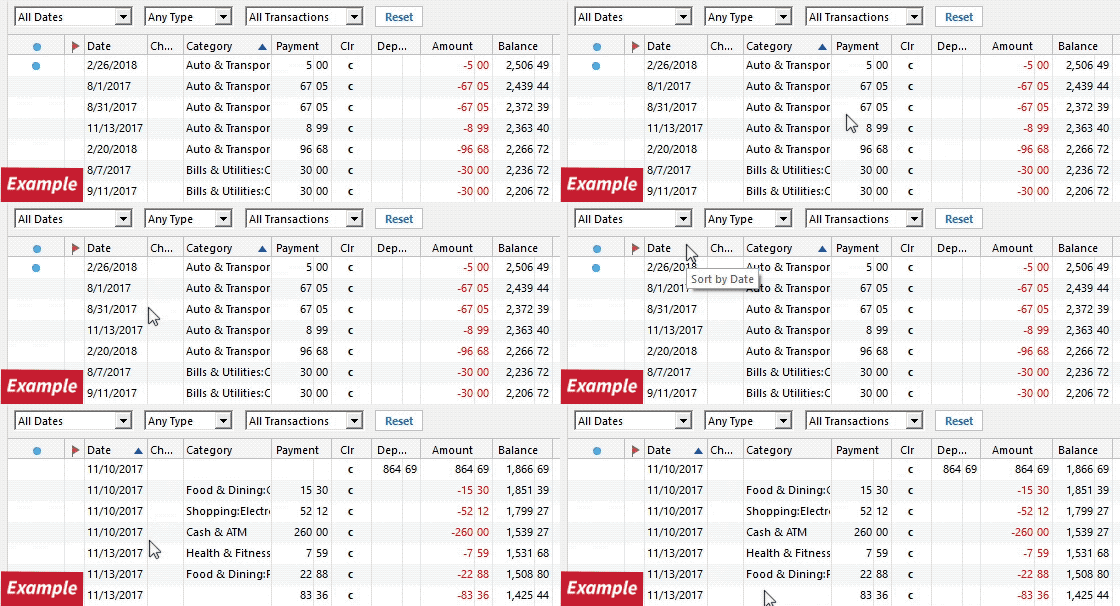
I checked our internal tool for your accounts, and they seem connected and working. If transactions are missing, I recommend following the steps in this Support Article for missing transactions. The first couple of steps are as follows:
Review this list of reasons; if the issue has only happened once, one of the scenarios below is the likely cause:
1. Has the sort order been changed in the register? Confirm that the Sort Order in your account register is by Date; just click the top of the Date column in your account register. It's likely the transactions are in your register, just not where you thought they'd be.
2. Click Reset at the top of the register to remove any filters currently applied.
Note: The Reset button appears only when filters are applied.
Continue with the remaining steps in the article.
Please keep me updated on your progress and the outcome.
The article didn't help resolve the issue.
Anyone else missing Fidelity transactions over the past couple days?