To repro using Quicken version R69.53 build 27.1.69.53 on Windows 11 Pro:
Edition Windows 11 Pro
Version 26H2
Installed on 10/18/2024
OS build 26300.10075
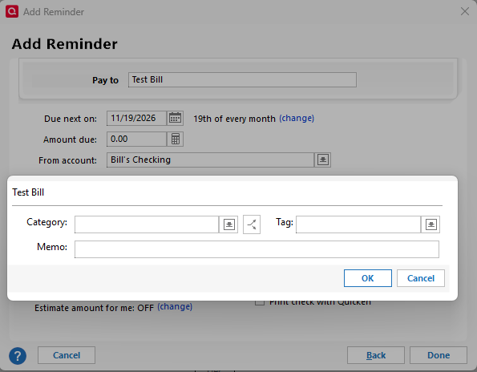
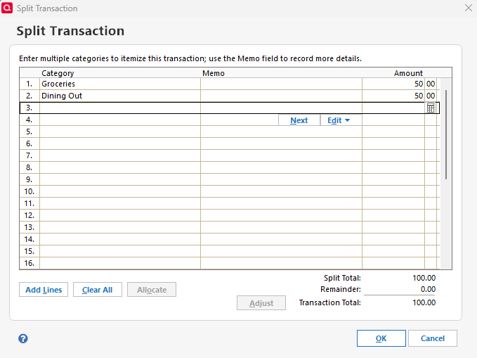
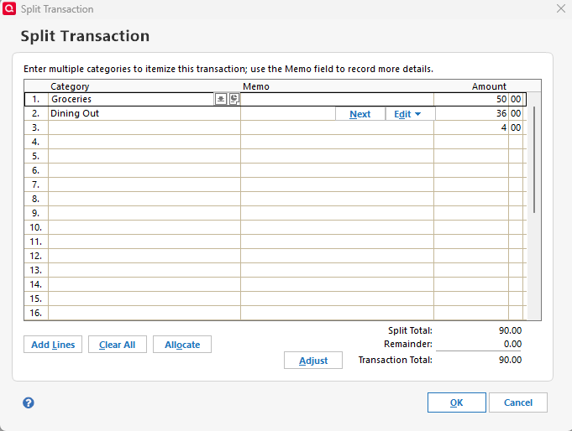
Create a manual bill (image 1) with a split category with two splits for $50 each. ($100 total). (Image 2) Save the split transaction screen back to the main category screen. Immediately, go back into the split transaction dialog and modify the second category from $50 to $40, press the adjust button to change the total to $90. (Image 3) Save the split transaction screen. Finally, re-enter the split transaction screen again.
RESULT: There are three amount lines on the split transaction screen reading "$50", "$36", and "$4", with the "$4" uncategorized. (Image 4)
EXPECT: There should be two amount lines reading "$50" and "$40".