Cannot download data to truist account

mikejm46
Quicken Windows Subscription Member
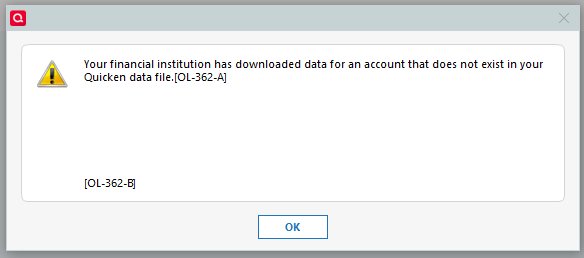
I get this error when trying to manually download data to my truist mortgage account:
0
Comments
-
There are some things you can try to fix the OL-362-A error:
- Deactivate & Reactivate the Account
- Open Quicken and go to Tools > Account List.
- Click Edit next to the affected account.
- Go to the Online Services tab and click Deactivate.
- Close and reopen Quicken.
- Go back to Tools > Account List, click Edit, and select Set up now to reconnect.
- Ensure All Transactions Are Accepted
- If Quicken prompts you to accept downloaded transactions before deactivating, make sure all transactions are reviewed and accepted.
- Restart Your Computer
- Sometimes, a simple restart can resolve syncing issues.
Here is some documentation from Quicken Support
0 - Deactivate & Reactivate the Account
This discussion has been closed.
Categories
- All Categories
- 3 Product Ideas
- 34 Announcements
- 249 Alerts, Online Banking & Known Product Issues
- 19 Product Alerts
- 266 Welcome to the Community!
- 42 Before you Buy
- 1.4K Product Ideas
- 55.8K Quicken Classic for Windows
- 16.9K Quicken Classic for Mac
- 1K Quicken Mobile
- 834 Quicken on the Web
- 84 Quicken LifeHub