Please! How do you get rid of these?

cgoneal
Quicken Mac Subscription Member ✭✭
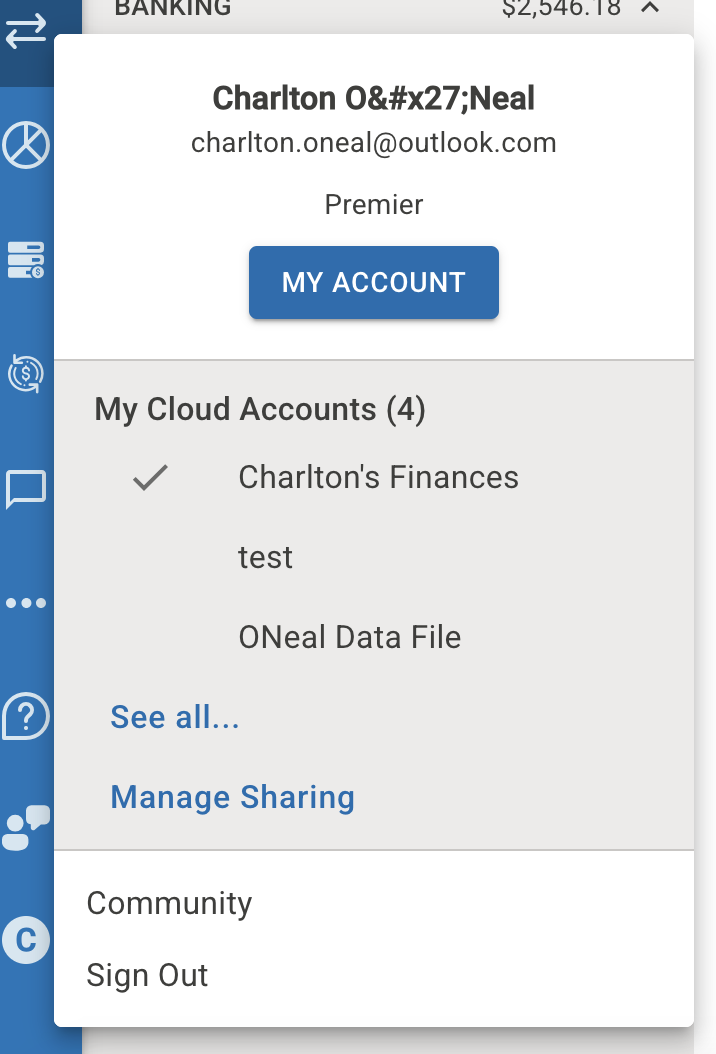
I have asked this before and never got an answer that would work. Can't you just delete them from your data so they don't appear anymore?
See the two that aren't checked.
0
Answers
-
@cgoneal there are several ways to do this but one is to go to your "Mobile & Web" tab. If SYNC is OFF, turn it ON. Scroll down to the Troubleshooting tile and click on "Cloud accounts associated with this Quicken ID". You should see a list of cloud accounts. Delete the ones that are not in use ("test" and "ONeal Data File" and any others). You cannot delete out the one the asterisk ("Charlton's Finances"). Turn SYNC back to OFF if needed. Go back into your Web account and the two files should be no longer there.
0
This discussion has been closed.
Categories
- All Categories
- 16 Product Ideas
- 34 Announcements
- 248 Alerts, Online Banking & Known Product Issues
- 20 Product Alerts
- 516 Welcome to the Community!
- 680 Before you Buy
- 1.5K Product Ideas
- 55.6K Quicken Classic for Windows
- 16.8K Quicken Classic for Mac
- 1K Quicken Mobile
- 834 Quicken on the Web
- 126 Quicken LifeHub