Last Download Date doesn't appear for Direct Connect Accounts.

Not sure when this started but I noticed it a couple of weeks ago…
All other accounts are fine.
Quicken Classic - R65.29, Windows 11 PRO current on updates
My data file is NOT being synced nor backed up.
Comments
-
I am not experiencing that issue. I'm sure you probably started troubleshooting your data file, and I might consider creating a new test data file, create a direct connect account, and see how that performs.
0 -
Thanks, do you have any Direct Connect Accounts? I have Wells Fargo and Merrill Lynch. Neither of them show Last Download Date…
Quicken Classic - R65.29, Windows 11 PRO current on updates
My data file is NOT being synced nor backed up.
0 -
@Greg Brown are transactions downloading for all your accounts and it's only the last update date and time that is not showing?
0 -
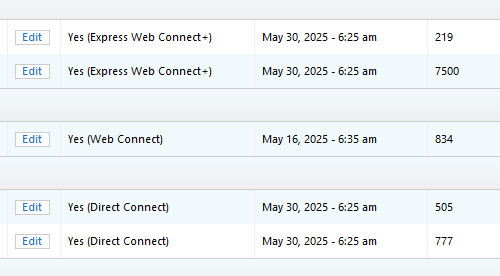
Where are you not seeing the dates but expect to? Mine show up in the OSU Summary and in the Account List in the Last Download Column (you can add it if it's not there).
Here's a snap of my account list after running OSU this morning. Note the EWC+ and the DC have the same date/time from the OSU. The one in the middle is a WC (download from website) so it shows the date I last "imported" the download file.
 0
0 -
I look at the top of each account register as well as in the account list. Here is what I am seeing. Greg's Checking is express web connect and Wells Checking is Diresct Connect.
Quicken Classic - R65.29, Windows 11 PRO current on updates
My data file is NOT being synced nor backed up.
0 -
Odd, I just checked mine again and I do see the same date/time at the top of the register for each account. They match the values in my account list.
Do the proper dates appear in your OSU Summary? Mine do.
0 -
Wells Fargo Bank is one of my 11 Direct Connect accounts. All of them show the last connection date, both in the register and in the Accounts list.
0 -
I have the same problem. I use two quicken files, since I manage funds for me/wife and also for my son's family. I have last-download data for all accounts in my file, and have NO last-download data for any account in his file.
0 -
Well, it's definitely not a systemic Quicken issue as I'm not experiencing any issues and I don't see any other complaints on the forum. I wonder if it's a Windows display issue. Have you altered the default setting(s) for your Windows display driver, such as the Windows font size or Windows screen resolution?
0 -
Thanks for the commenst. I once again deleted the runtime.dat file and let it create a new one. All's well, problem solved. BTW I have done this many times in the past…
Quicken Classic - R65.29, Windows 11 PRO current on updates
My data file is NOT being synced nor backed up.
1


Categories
- All Categories
- 49 Product Ideas
- 35 Announcements
- 229 Alerts, Online Banking & Known Product Issues
- 21 Product Alerts
- 499 Welcome to the Community!
- 677 Before you Buy
- 1.3K Product Ideas
- 54.5K Quicken Classic for Windows
- 16.5K Quicken Classic for Mac
- 1K Quicken Mobile
- 817 Quicken on the Web
- 116 Quicken LifeHub