Schwab and constant CC-506 errors

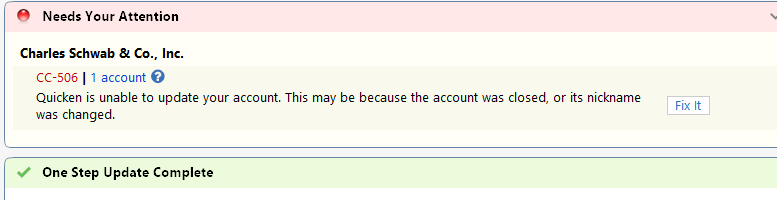
The last couple of weeks, I have continued to get CC-506 errors for Schwab. No other accounts currently have this issue. I updated to R63.20 HF1 today and face the same issue.
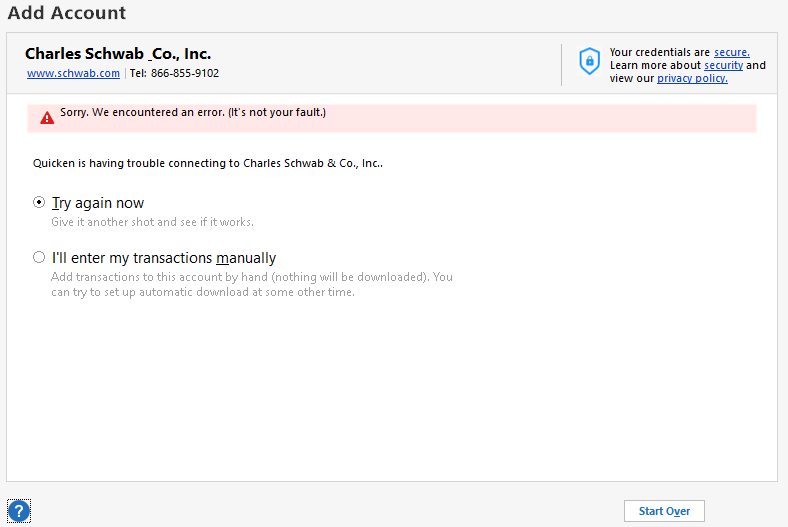
I constantly have to deactivate the Schwab online setup, clear the financial institution and account number fields, close Quicken, reopen Quicken. Once Quicken is opened back up, I then have to open the Account List, Add Account, select Schwab, go through the Account link process for Schwab. Schwab displays the right accounts, and they are successfully authorized. I then get a message "Sorry we encountered an error. (it's not your fault)" every single time (screenshot below).
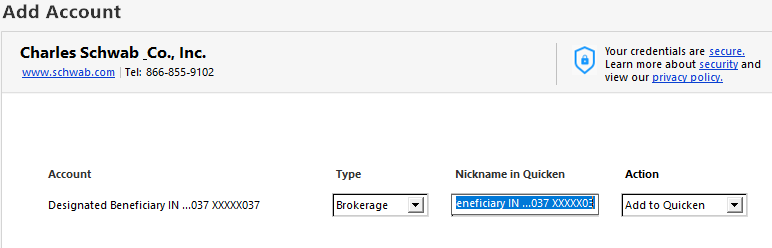
I then go through the "Try again now" and click "Start Over" and the process basically goes through the "Add Account" process again, except this time it locates the account and wants to add them. So it works this one time (last screenshot below). However, when attempting to Update Transactions, I get the same CC-506 error and have to go through the same process every time I want to update Schwab.
Please help.
Comments
-
@John McCurdy if you haven't seen this, here is some information from Quicken Support that might help -
0 -
I have had this going on for years with multiple Schwab accounts in two different Quicken files I use. Discussed with Quicken support multiple times a few years ago without resolution. Followed the tedious process to totally rebuild both Quicken files (multiple bank and credit cards beyond Schwab) which was supposed to be the cure, but it was not. Followed latest instructions in the latest link without success. None of the assumptions about nickname changing or account closed apply. One time it says Schwab doesn't know the account but after the reset, it finds it and downloads, while it the alternates to the other account it says it can't find. One of these days when I have hours to kill, I may give Quicken support a try. What amazes me is how Quicken and Schwab IT can't put their heads together to fix this.
0 -
@CaliQknThat was the article I basically followed when this first started, and does not help my situation.
@William Toperzer Sounds like I may be in the same boat at this point, though I have not tried a rebuild. Not sure I want to go that route if you did not have success though.
0 -
@John McCurdy sorry the Quicken Support article didn't provide any additional insight. Have you tried creating a test file and adding the Schwab account to see if you can make a successful connection? At least this will narrow down where or what the issue might be.
0 -
@CaliQkn I created a test file and added Schwab, and the updates worked fine. I tried multiple "One Step Updates", "Update Transactions", along with closing Quicken and reopening, and then updating the transactions again. This worked every time with the test file. I also did the Reset Account a couple of times, and the update worked as well.
0 -
@John McCurdy have you tried uninstalling Quicken, making sure that the Quicken folder in C:\Program Files (x86)\, has been deleted, and then reinstalling Quicken?
If the connection works fine in a test file, that would point to the issue being either your data file or the Quicken installation.
0 -
@John McCurdy if reinstalling Quicken doesn't help with the issue, the other thing you can try is to make a copy of your data file using Quicken's "Copy File" process.
- Make a backup of your data file.
- Do a "Copy File" to create a copy of your data file. This line by line copy process forces a rewrite of code and fixes some file corruption issues. It will also clear out online connection "remnants" for all accounts. Click on File→Copy or Backup File, and select "Create a copy or template", and then click Next.
- On the next screen, leave the defaults as is. You can change the new file name and location, if you wish. Click on "Save Copy".
- During the copy process, you will be asked to provide a password for the new file. If you don't want a password, hit ESC.
- When the process completes, switch over to the new file. For each account, in Account Details, blank out the Financial Institution Name and Account Number.
- Reactivate online services for all accounts in the new data file, by using “Add Account” and carefully linking to existing accounts in Quicken. Do not use “Set up now” on the Online Services tab of Account Details.
This may seem like overkill, but the "Copy File" process can remove file corruption that might be causing your issue.
0 -
@CaliQkn - I tried the complete uninstall and removal of the Quicken folder, then installed Quicken fresh, but the same issue is there. When I have more time in the next few days, I will try the next method you described.
0 -
@CaliQkn I did the "copy file" process last weekend, and the "One Step Update" has worked each day so far. Hopefully, it will continue. Thanks for the assistance.
0