Is there a way to copy or export transactions in investing accounts completely?

All I could figure out was a transaction report by account, but it neglects half the fields. For instance the category is just "Investments: Realized gain or loss." In the register is tells you if it was a buy or a sale (or dividend, etc.), how many shares, new share balance for that equity, and the amount spent or recieved, etc.
These reports show none of that. They do add realized gain in the report, which isn't even a field in the register, but no clue what the total amount of the transaction was. You can't even infer buy or sale from that, nor how many shares or at what price, nor the position balance (for that you have to go to the portfolio view). How do it capture the actual register data info into a report / spreadsheet? Right now I'd like something I can analyze and manipulate - so was hoping I could export it to a CSV. Not to mention the weird column headings like "Payee" being the equity in question. This is really maddening.
And here's my goal for that info, because I'm guessing this is a head scratcher for most people casually reading this. If someone has a better idea, I'm all ears: Basically, half my portfolio is self directed and half of it is managed. For anyone with managed accounts, you know there are many small positions resulting in many transactions, and at a relatively high frequency. For one day this week I had 36 transactions in one account that was either a buy or a sale. What I'm trying to see is if I can infer a strategy when they buy and sell dozens of positions in waves. I'm trying to see if I can determine the logic for which equities are chosen, and what each equity represents in the overall account position. So, culling the transaction data as given to me would be really useful. I may not be able to learn anything from it, and that's OK, but I have the data staring right at me and I can't even use it.
Quicken Premier Mac Classic (since 2022), Quicken Premiere Windows (1995 - current, but not actively using since Mac conversion)
Answers
-
Yes.
Make sure you are in the desired Investment account and make sure the columns displayed in that register are what you want to show in what gets exported. (What you see is what you get, basically.)
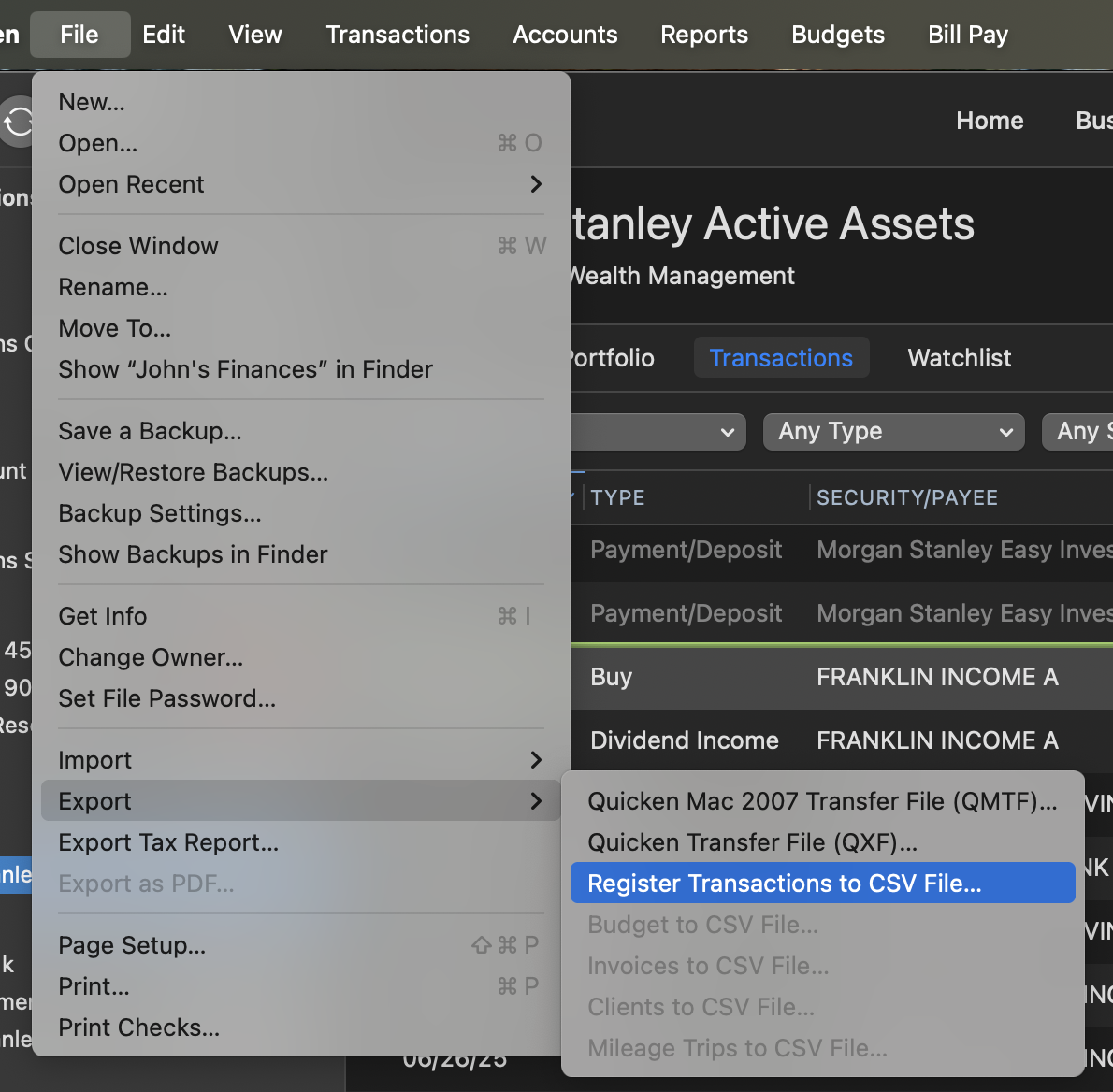
Then, navigate to File:Export:Register Transactions to CSV file. Follow the dialog if you want all, visible, scheduled transactions, etc. included. Save that file, and open in something like Excel. You can peruse your data there.
 2
2 -
This is awesome! I think I tripped over this once when I was just exploring all the menus, but didn't have an application for it at the time. Much appreciated. I guess what I also need to do is if I want only to see certain dates, or a date range, adjust that first before I do the export.
Quicken Premier Mac Classic (since 2022), Quicken Premiere Windows (1995 - current, but not actively using since Mac conversion)
0 -
Or instead of changing date ranges, you can simply select those transactions and choose the option to export those selected transactions.
You can also filter (search) (say by a security), and again export only selected transx.)
I answer far more questions by filtering/selecting than I ever do with reports.
Note: you can also command+p (Print) to prepare a more actual report of doing what you are above. That's nice for EZ formatting, but not as good if you want to massage the data in Excel. Try it just to see your options, and open and Preview to see results without wasting paper/ink.
One last register tip: the sum of the transactions you select will display in the upper right of the window. So, if you want a quick calc, select them and you will see the math done there.
0 -
This is great. I can easily see doing the "By Payee" report via the register and not getting stuck with the splits breakouts. After 27 years or so of relying on reports in Windows I still haven't got used to the idea that "anything but Reports" is more productive on Mac
Quicken Premier Mac Classic (since 2022), Quicken Premiere Windows (1995 - current, but not actively using since Mac conversion)
0
