Changing multiple transactions Investment category - no choice offered for Investment

I know I did it before
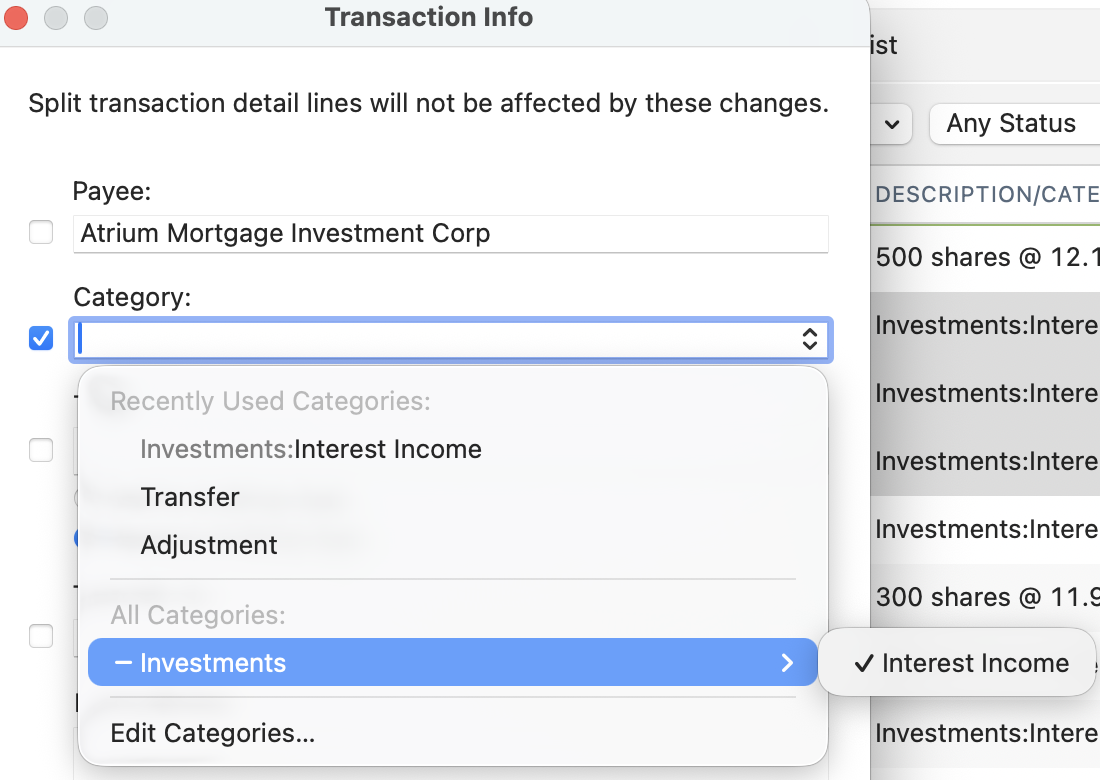
But this time I have no other option under -Investment…. ( see image )
I selected a few transactions for the same security, and wanted to change the category from Investment:interest income to Investment: Dividend income, by choosing Edit Transactions
as you can see in the image below, the only choice I get for Investment is the actual one that I need to change ( I cannot edit categories under Investment as these are Required by Quicken for Mac )
A bug or I am missing something
Comments
-
The category for investing account transactions is generally derived from the transaction type. If you want to change the category from Interest Income to Dividend Income, you need to do that by changing the transaction type from Interest to Dividend. Unfortunately, the Type field is not available in the Transaction Info window so you can't change it on multiple transactions at once, you have to modify each transaction individually.
There's a Product Idea that includes a suggestion to add the Type field to the group edit window for investment transactions:
https://community.quicken.com/discussion/7961374/group-edit-in-investment-register
0 -
OK, so I would have done it for each transactions , one at the time
I am surprised, but it could be as it is a long time ago I needed to do this
Thank you
0