Update Quicken Canada to Manage and Identify TFSAs Correctly

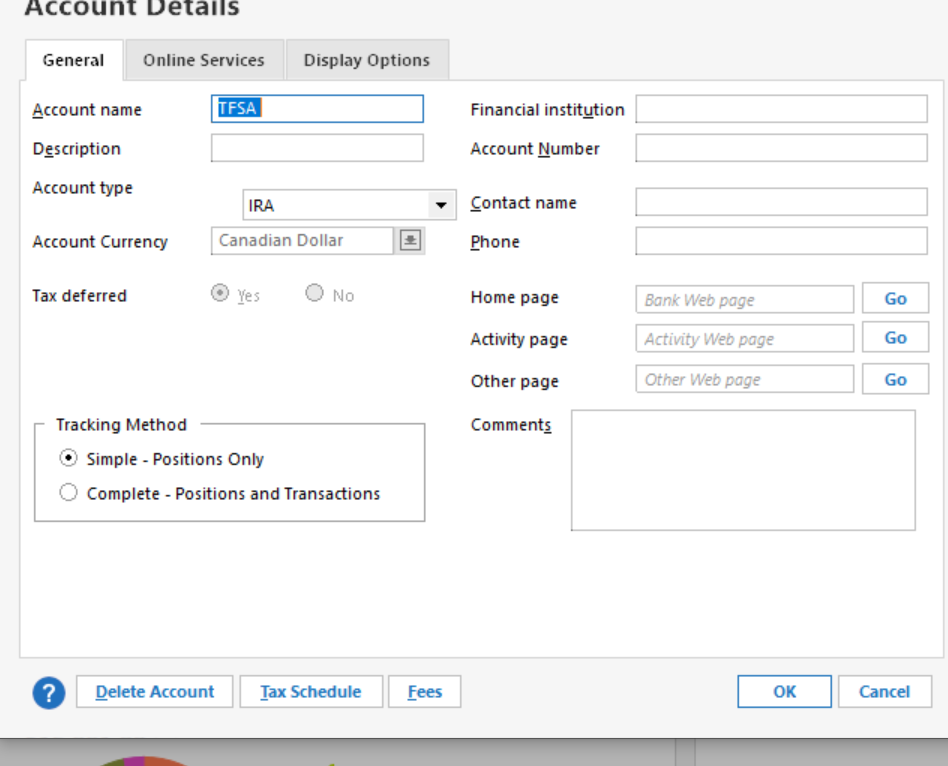
I've been in contact with Quicken today regarding the TFSA set of issues that continue to exist with Quicken Canada version. Yes, you can identify a new Investment Account (TFSA - Type) but that's where it ends. As soon as you try and edit it, you get USA and not Canada. IRAs and CDs are not investment types or security types in Canada. Why create a Canadian version when it clearly isn't?
I was able to do a minimal workaround but it's not great.
Quicken needs to improve its software for Canada. We are not the 51 State!
Answers
-
I recommend ignoring the TFSA and RRSP account types. As you have noted, they are poorly implemented. They use USA account types with a lipstick approach to changing labels. The good news is, you can get all the functionality necessary by simply using a Brokerage account. I have taken this approach and used Brokerage accounts for all my TFSA and RRSP accounts. I've done this for a long time running and I see no downside. The existing of the TFSA and RRSP account types is pure marketing glitz with no exra functionality… in fact, as you have pointed out, it impairs functionality at times.
1 -
Thanks for the reply. Tracking/Updating my RRSPs is done manually. Yesterday, I received my July statement from the financial institution and had to manually input the dividends earned. While the securities within the list are updated, dividends earned or management fees are not.
When you created the Brokerage account did you use the Express Web Connect or the simple Web Connect? For some unknown reason, while my financial institution (one of the largest in Canada) seamlessly works with my regular banking, it’s “Wealth Management” isn’t available as a Brokerage. I’ll let the readers of this post guess which of the Canadian institutions do not have an option to do this investment tracking set of tasks.For example, I tried it for BMO Financial Group (the correct website comes up) but when I clicked Next and Continue, the screen shows Chequing. Is this what you got as well? Not a Brokerage arm of BMO but it’s regular banking side.
I tried TD Waterhouse and that worked and identified it as a Brokerage. So, it’s a crapshoot! Some are available but the majority are not.
Trying to use the built-in help, virtually everything is USA. Very disappointing.
0 -
There are no financial institutions in Canada that support Express Web Connect for investment accounts. Period.
There are a small number of financial institutions in Canada that support a partial implementation of Web Connect for investment accounts. The two (large) brokerages that I use do not support it. I use RBC Direct Investing and CI Financial Self Trading.
The security price updates don't come from the financial institutions where your investments are held; the price data is a feed from a third party provider not linked or related to where you hold your investment accounts.
Using Canadian Quicken for investments is a manual process except for security prices and - in a very few cases - limited download via Web Connect.
As an aside, I recommend NOT using Express Web Connect as there are serious security weaknesses in that process. I have completed reverted back to Web Connect because of those security vulnerbilities.
There is a move towards implementing EWC+ in Canada, which will solve the security vulnerbilities of normal EWC, but the timeline for that implementation is entirely unknown at this point.
1 -
Thanks for the informative and helpful information. It was much appreciated. I was not surprised that there was a third-party relationship between and another company providing the securities’ updates.
0
