Saving Backup to Desktop

Don STEWART
Member ✭✭✭
Using Quicken Classic on Windows 10 and saving backups to the desktop then uploading to Google Drive. Suddenly It's no longer saving to my desktop, no recent updates, the only recent change was activating Windows One Drive This may be a very elemental question but what do I type in the location for the backup to be saved on the desktop?
0
Answers
-
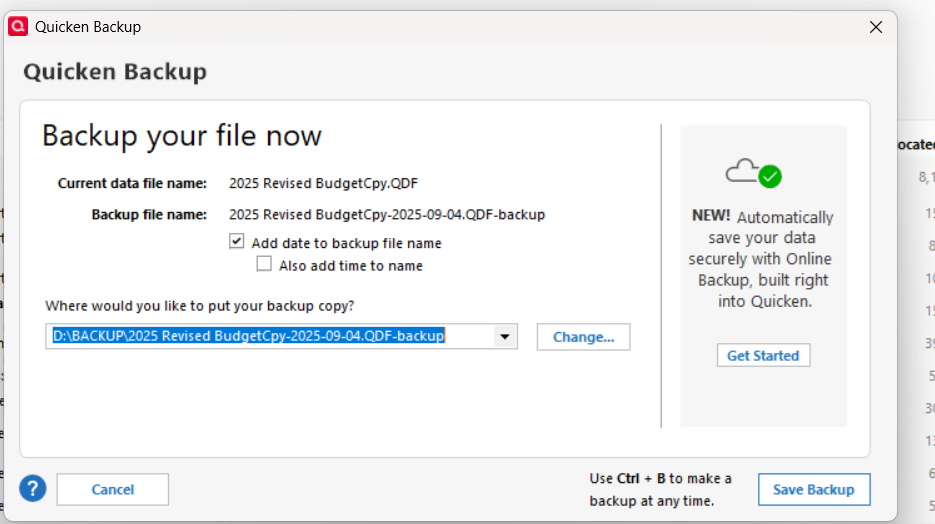
When you created your one drive it should have already created a file folder titled desktop. Just click on the change button and it will display your various file folders, select the desktop folder and you are good to go
0 -
I would set my target folder as the Google Drive sync folder, bypassing the extra step of saving to the desktop.
0

This discussion has been closed.
Categories
- All Categories
- 6 Product Ideas
- 34 Announcements
- 249 Alerts, Online Banking & Known Product Issues
- 19 Product Alerts
- 266 Welcome to the Community!
- 301 Before you Buy
- 1.5K Product Ideas
- 55.8K Quicken Classic for Windows
- 16.9K Quicken Classic for Mac
- 1K Quicken Mobile
- 834 Quicken on the Web
- 129 Quicken LifeHub