When window size changes, adjust location of the Add Bills icon on the "Bills & Income" tab [Edited]

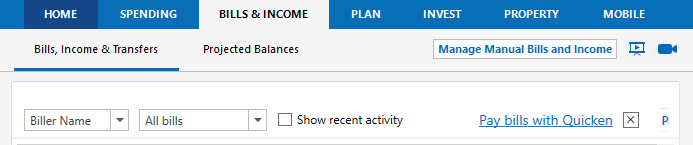
In "Bills & Income" on a 21" screen with resolution of 1920x1080, scaled at 100% I have to stretch the window to consume 3/4 of the screen before the Add Bills + sign on the far right is finally visible.

Lots of white space to shift to the left.

Why not simply shift them over to the left next to (show recent activity) as in this example.

Or move them up in the same panel as the sub tabs, just to the left of "Projected Balances" as in this example.

Or just fix it so they shift just like the panel "manage manual bills & income" button as in this example.
Comments
-
In addition to "resolution of 1920x1080, scaled at 100%" have you also enabled View / Use large fonts?
Unless unavoidable, I recommend not using large fonts or any scaling greater than 125%To make more space available within your Quicken window, please try this:
- use the "F11" function key to temporarily toggle off the Account side bar
or - click the "▼" icon in the title of the Accounts side bar, to temporarily toggle off the side bar
- to turn the Account side bar on again press or click the function you used to turn it off
P.S.: On my 17" laptop screen with 1600*900 resolution at 100% scaling, my Quicken window works best when set to 12" wide and as high as the screen allows, from the top of screen to the top of the Taskbar.
0 - use the "F11" function key to temporarily toggle off the Account side bar
-
Thanks for the reply. Unless I'm misunderstanding you, you have about the same issue as me. Sounds like you're having to use Quicken almost full screen to see the options.
Using F11 does allow for the width of the window to be smaller. That's really just a band-aid since I like that pane exposed because I hop around a lot sometimes, and my screen shot examples provide a clear path to fix the issue.
0
