Paypal transaction with stored credit card

I use Paypal with stored credit card to make payments for an online purchase when it's supported. When I download my credit card transactions into Quicken, the Payee section only contains Paypal. I would like to see the actual name of the merchant. When I log into the credit card account directly, I see the merchant's name for the Paypal transactions. So, why doesn't Quicken download only shows Paypal as payee. Is there a fix for this?
Best Answer
-
Yes, there is
Go to Edit > Preferences > Downloaded Transactions, and uncheck the box for "Automatically apply Quicken's suggested name to payee"
Doing so will impact all other future downloaded transactions for all payees, not just PaylPal. But you may not want to do that unless your daily PayPal transactions are far more than others. I have maybe couple of paypal transactions per month, so manually renaming them is zero effort and my preference. Give it a try for a few days and see how you like it.
There is yet another option by using the renaming rules: For example if many of your paypal transactions are ebay and newegg, you can setup two separate renaming rules to recognize those two types of payees and rename them based on your liking. And so on.
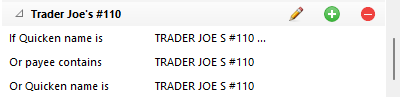
Here my example of how I do that: All of my Trader Joe's transactions are renamed to "Trader Joe's" and categorized as Grocery. However, I have setup another renaming rule to recognize "TRADER JOE S #110" as the specific store that my daughter-in-college shops that. It renames her transactions as "Trader Joe's #110" and further categorizes them as "College Grocery". All is automatic and allows me the differentiate expenses accordingly.
Hope this helps.
(corrected a typo. the correction is now in bold)
- Q Win Deluxe user since 2010, US Subscription
- I don't use Cloud Sync, Mobile & Web, Bill Pay0

Answers
-
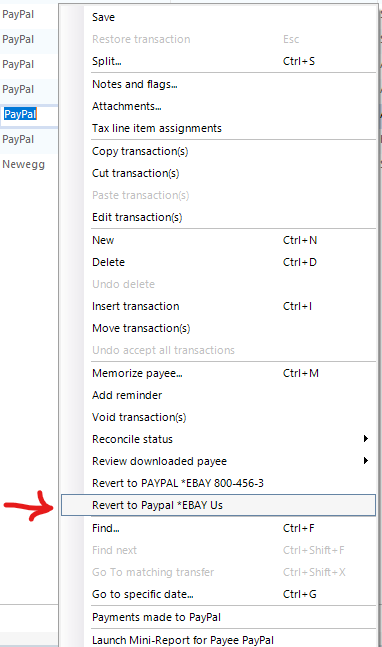
If you right-click on the Payee, near the bottom of the drop down list it should provide more info where you can optionally make a selection such as this:
Revert to Paypal *EBAY US, or Paypal *NEWEGG
- Q Win Deluxe user since 2010, US Subscription
- I don't use Cloud Sync, Mobile & Web, Bill Pay0 -
OK, thank you. Is there an automated way to do this?
0 -
Yes, there is
Go to Edit > Preferences > Downloaded Transactions, and uncheck the box for "Automatically apply Quicken's suggested name to payee"
Doing so will impact all other future downloaded transactions for all payees, not just PaylPal. But you may not want to do that unless your daily PayPal transactions are far more than others. I have maybe couple of paypal transactions per month, so manually renaming them is zero effort and my preference. Give it a try for a few days and see how you like it.
There is yet another option by using the renaming rules: For example if many of your paypal transactions are ebay and newegg, you can setup two separate renaming rules to recognize those two types of payees and rename them based on your liking. And so on.
Here my example of how I do that: All of my Trader Joe's transactions are renamed to "Trader Joe's" and categorized as Grocery. However, I have setup another renaming rule to recognize "TRADER JOE S #110" as the specific store that my daughter-in-college shops that. It renames her transactions as "Trader Joe's #110" and further categorizes them as "College Grocery". All is automatic and allows me the differentiate expenses accordingly.
Hope this helps.
(corrected a typo. the correction is now in bold)
- Q Win Deluxe user since 2010, US Subscription
- I don't use Cloud Sync, Mobile & Web, Bill Pay0 -
Thank you for your suggestions. My Preferences option was under the Edit tab. I did have the "Automatically apply Quicken's suggest name to payee" unchecked. I will look into the renaming rule options. Thank you for your help.
0 -
You are welcome. My apologies for the mistake and thank you for pointing it out. I corrected it.
- Q Win Deluxe user since 2010, US Subscription
- I don't use Cloud Sync, Mobile & Web, Bill Pay0
Categories
- All Categories
- 6 Product Ideas
- 34 Announcements
- 249 Alerts, Online Banking & Known Product Issues
- 19 Product Alerts
- 266 Welcome to the Community!
- 301 Before you Buy
- 1.5K Product Ideas
- 55.8K Quicken Classic for Windows
- 16.9K Quicken Classic for Mac
- 1K Quicken Mobile
- 834 Quicken on the Web
- 129 Quicken LifeHub