"Backup Date" incorrect in 'Local Backups' in 'View/Restore Backup Files'

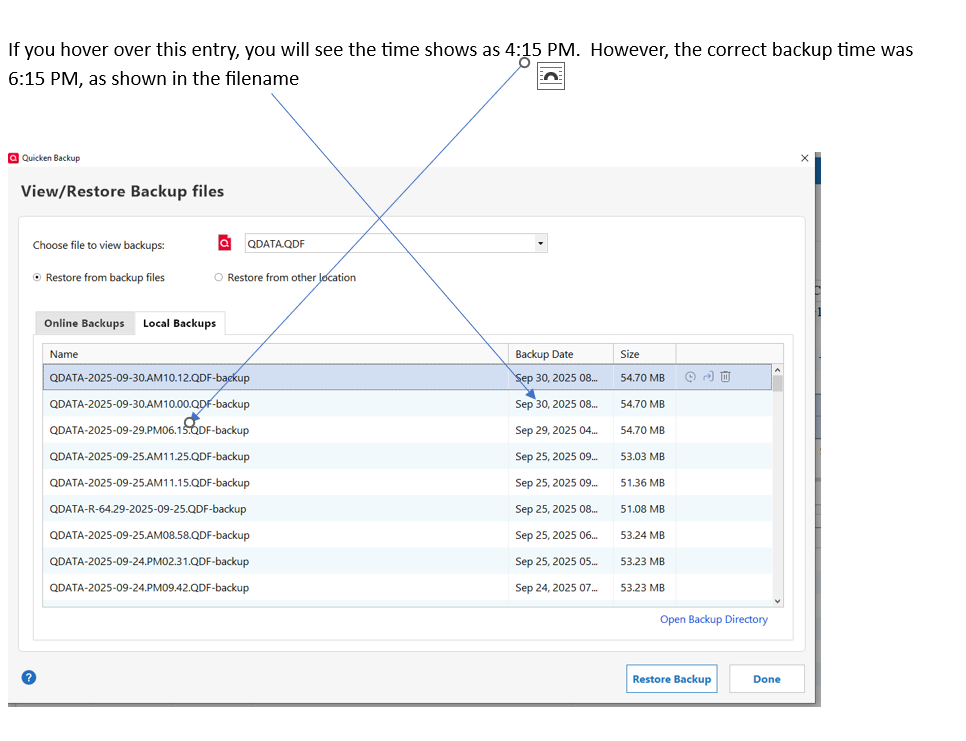
Using Quicken for Windows, R64.30, Build 27.1.64.30, there is a backup date inconsistency when clicking the online backup icon at the top (right hand corner). See ATTACHMENT. If one selects 'View/Restore Backups…' in the drop-down menu, selects 'Local Backups', the backup date shown in the left column doesn't match the date when one hovers over the same line in the 'Size' column. The 'Backup Date' column represents 'real time' in my time zone, but the time under the 'Size' column is off by two hours (probably a Savings Time offset). However, this is VERY confusing to the local user (especially new users). Quicken: please correct this so they show the same local time.
Comments
-
There usually is a 1-hour offset between Standard Time and Daylight Savings Time, so I'm puzzled where your 2-hour difference comes in.
What time zone have you set on your computer?
Are you allowing Windows to sync your clock to a time server on the Internet? This should keep your time correct and adjust DST/Standard Time automatically every spring and fall.BTW, my timestamps show exactly the same time in each backup file.
0

Categories
- All Categories
- 21 Product Ideas
- 34 Announcements
- 247 Alerts, Online Banking & Known Product Issues
- 19 Product Alerts
- 518 Welcome to the Community!
- 682 Before you Buy
- 1.5K Product Ideas
- 55.7K Quicken Classic for Windows
- 16.8K Quicken Classic for Mac
- 1K Quicken Mobile
- 834 Quicken on the Web
- 128 Quicken LifeHub